

X Progress is made and published by 鹏 张. AppBrain is an independent app data site and isn't affiliated with 鹏 张. The app name, icon, screenshots and description belong to 鹏 张 and are shown as published on the App Store.
AppBrain's verdict
Established- Rating on App Store
- 4.73
- 86 ratings
- Last updated
- August 28, 2026
It doesn't have enough ratings yet to judge what users think.
Rankings
App Store top chartsApp Store Rankings for X Progress
Competitors
Similar apps and more from 鹏 张Alternatives to X Progress




Releases
Updates seen on the App Store- Version
- 7.0
- Launched
- March 2018
No changelog data
User feedback
Ratings and reviews on the App StoreComments on X Progress for iOS
We don't have enough comments to show example comments. Please check back later.
Technology
Found in the app by AppBrain- Price
- Free
- App size
- 154.1 MB
- Content rating
- Everyone
Technologies used by X Progress
About the app and developer
About X Progress
X Progress is an utilities app developed by 鹏 张.
User Ratings
X Progress is rated 4.73 out of 5 stars. The rating is based on 86 ratings.
App Information
X Progress is freely available from the App Store. The app size is 154.05 MB. The latest version available is 7.0. The last update was on August 28, 2026.
Technical Requirements
The app has a content rating of Everyone. The app has been available on the App Store since March 2018.
Developer information for 鹏 张
Address:
Store listing
By 鹏 张, from the App Store


Description by 鹏 张 Written by the developer, not by AppBrain. Click to read.
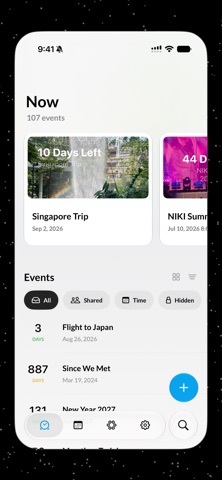
Count down to a trip. Count up from a memory. Watch a semester, a project, a year, or any chapter of life - fill in.
X Progress turns the moments that matter into beautiful, living progress you can understand at a glance.
SEE TIME YOUR WAY
• Track one-day moments, longer periods, repeating events, and the built-in progress of the year, month, week, and day.
• Show days passed, days left, or a percentage. Count up, count down, or let Auto change direction as time moves.
• Add all-day or timed dates, alerts, notes, and photos.
• Organize with tags, search, pinned events, Archive, and a Hidden tab protected by Face ID, Touch ID, or your passcode.
MAKE EVERY EVENT YOURS
• Choose from 40+ designer themes, from quiet gradients and pixel art to animated worlds.
• Use Photo Theme Studio to turn a photo or Live Photo into your own theme.
• Customize backgrounds, subject cutouts, colors, gradients, fonts, text layouts, and motion.
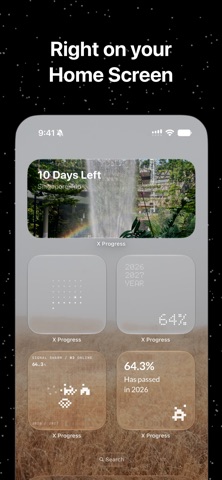
• Keep important events visible with Home Screen and Lock Screen widgets or Apple Watch complications.
COUNT DOWN TOGETHER
• Invite friends and family to view or edit an event. Changes stay synchronized through iCloud, with shared activity collected in one place.
• Share any event as a photo, Live Photo, video, Instagram Story, or sticker.
• Use ZEN with SharePlay to focus on a moment together over FaceTime.
CREATE IN LESS TIME
• With Smart Create, describe an event in a sentence, or share a photo to X Progress, and review the completed event before saving.
• Ask Siri to create an event or check its progress.
ON EVERY SCREEN
X Progress works on iPhone, iPad, Mac, and Apple Watch. iCloud keeps your events, photo themes, and notes in sync across devices.
You’ll also find Date Gap for measuring the exact time between two dates, a calendar, public holiday events, reminders, search, and accessibility support for VoiceOver.
Start free. X Progress Unlimited unlocks the complete designer theme gallery.
Smart Create requires a compatible device with Apple Intelligence. Availability may vary by language and region.
Terms of Use:
https://www.roczhang.com/x-progress/terms_and_conditions.html
Privacy Policy:
https://www.roczhang.com/x-progress/privacy_policy.html