


AppBrain's verdict
- Last updated
- July 9, 2026
- Size
- 8.87 MB
User feedback
Ratings and reviews on the App StoreComments on xFast: Share & Transfer Files for iOS
We don't have enough comments to show example comments. Please check back later.
Store listing
By Duc Nguyen Ba Trung, from the App StoreDescription by Duc Nguyen Ba Trung Written by the developer, not by AppBrain. Click to read.
SEND IN SECONDS
• Pick photos & videos from your library, or any file from the Files app
• Send several files at once — they're zipped into one archive automatically
• Get an instant download link + QR code
• Copy the link, share it anywhere, or save the QR code to Photos
• Links are temporary and expire automatically, so your file doesn't stay online
RECEIVE ANYWHERE
• Paste a download link, scan a QR code with the camera, or read a QR from a saved image
• Downloads are saved straight into the app
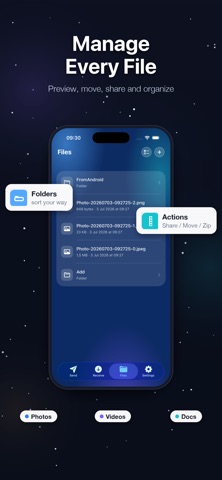
BUILT-IN FILE MANAGER
• Keep received and imported files organized in folders
• Preview documents, photos, and videos
• Compress files to .zip and extract archives in one tap
• Move, share, and manage everything on-device
WORKS IN ANY BROWSER
The receiving side only needs a web browser — nothing to install. Share a file and open it on any phone, tablet, or computer. It just works.
PRIVATE BY DESIGN
• No account, no sign-up, no login
• No ads and no third-party analytics
• Files are transferred over HTTPS through a temporary hosting service and expire automatically
• Everything you receive stays on your device
Subscription Pricing & Terms:
Account Charge: Your Apple Account will be charged once you confirm your purchase.
Account Settings: You can manage your subscriptions and disable auto-renewal in your Account Settings after the purchase.
Auto-Renewal: Subscriptions will automatically renew unless auto-renewal is turned off at least 24 hours before the end of the current period.
Renewal Cost: The renewal cost will be charged to your account 24 hours before the end of the current period.
Free Trial: The yearly plan includes a 3-day free trial. Any unused portion of the free trial period will be forfeited when you purchase a subscription. Cancel at least 24 hours before the trial ends to avoid being charged.
Cancellation Policy: If you choose to cancel a subscription, it will remain active until the end of the period. Auto-renewal will be disabled, but no refunds will be provided for the current subscription.
Lifetime: The Lifetime option is a one-time purchase that unlocks Premium forever — no subscription, no renewal.
Terms (EULA): https://www.apple.com/legal/internet-services/itunes/dev/stdeula/
Privacy Policy: https://docs.google.com/document/d/e/2PACX-1vRBoPRdt804Zl65f6ehxNdFCeHi-R_O6H1_ehyPX1cYZbIj3VQ_WAnD9QLMpw1zynh5UYQXnh0sl71L/pub
Safety and technology
Found in the app by AppBrain- Price
- Free
- App size
- 8.87 MB
- Content rating
- Everyone
Technologies used by xFast: Share & Transfer Files
Releases
Updates seen on the App Store- Version
- 1.0
- Launched
- July 2026
No changelog data
Alternatives
Similar apps and more from Duc Nguyen Ba TrungAlternatives to xFast: Share & Transfer Files


More from Duc Nguyen Ba Trung


Rankings
App Store top chartsApp Store Rankings for xFast: Share & Transfer Files
About the app and developer
About xFast: Share & Transfer Files
xFast: Share & Transfer Files is a productivity app developed by Duc Nguyen Ba Trung.
What is the rating of xFast: Share & Transfer Files?
xFast: Share & Transfer Files has no ratings yet.
Is xFast: Share & Transfer Files free?
xFast: Share & Transfer Files is free. The app size is 8.87 MB. The latest version available is 1.0. The last update was on July 9, 2026.
What are the requirements for xFast: Share & Transfer Files?
The app has a content rating of Everyone. The app has been available on the App Store since July 2026.
xFast: Share & Transfer Files is made and published by Duc Nguyen Ba Trung. AppBrain is an independent app data site and isn't affiliated with Duc Nguyen Ba Trung. The app name, icon, screenshots and description belong to Duc Nguyen Ba Trung and are shown as published on the App Store.
Developer information for Duc Nguyen Ba Trung
Address:
Frequently asked questions about xFast: Share & Transfer Files
Is xFast: Share & Transfer Files free?
Yes. xFast: Share & Transfer Files is free on the App Store.
Is xFast: Share & Transfer Files still available?
Yes. xFast: Share & Transfer Files is on the App Store, and the last update we saw was on July 9, 2026.
How large is xFast: Share & Transfer Files?
xFast: Share & Transfer Files is 8.87 MB.
Is xFast: Share & Transfer Files suitable for children?
App Store rates the content of xFast: Share & Transfer Files as suitable for everyone.
Who made xFast: Share & Transfer Files?
xFast: Share & Transfer Files was developed by Duc Nguyen Ba Trung. It is listed in the productivity category on the App Store.
What are the best alternatives to xFast: Share & Transfer Files?
People looking at xFast: Share & Transfer Files also look at these productivity apps: ChuteDrop, FastShared, Dropify: File Transfer, ShareMe: Fast File Sharing App, Phone Drive: File Manager.