



AppBrain's verdict
- Last updated
- April 16, 2025
- Size
- 60.7 MB
User feedback
Ratings and reviews on the App StoreComments on ZArchiver File Manager for iOS
We don't have enough comments to show example comments. Please check back later.
Store listing
By Parth Patel, from the App StoreDescription by Parth Patel Written by the developer, not by AppBrain. Click to read.
Unlock the full potential of your device with ZArchiver File Manager, the all-in-one file manager and archiving solution designed for power users and everyday explorers alike. Seamlessly manage, organize, and protect your files with a beautiful, intuitive interface and a robust set of features that make file handling effortless and secure.
Key Features:
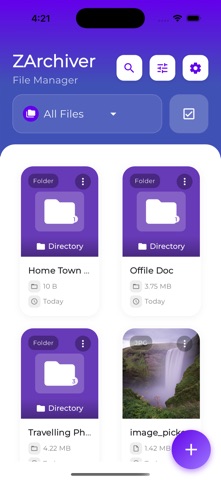
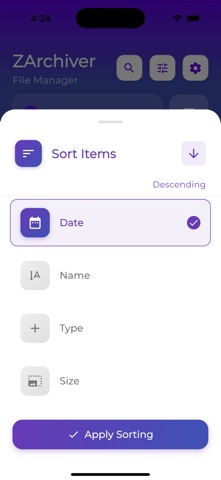
• Powerful File Management Navigate your device’s storage with ease. ZArchiver provides a modern, user-friendly interface for browsing, searching, and managing all your files and folders. Move, copy, rename, delete, and organize files with just a few taps. Enjoy advanced sorting and filtering options to quickly find what you need, whether it’s documents, images, videos, or archives.
• Advanced Archiving & Extraction Compress files and folders into popular archive formats, including ZIP, RAR, 7z, and more. Extract content from a wide range of archive types with lightning-fast performance. Whether you’re saving space or sharing multiple files, ZArchiver makes archiving simple and reliable.
• Storage Insights & Optimization Keep your device running smoothly with real-time storage usage insights. Visualize how much space your files and archives occupy, and free up valuable storage with the built-in cache cleaner. ZArchiver helps you identify large files and manage your storage efficiently, ensuring you always have room for what matters most.
• Secure & Private Your privacy is our priority. ZArchiver operates entirely on your device, ensuring your files remain secure and private. No data is uploaded or shared without your consent. Protect sensitive files with password-protected archives and enjoy peace of mind knowing your information is safe.
• Beautiful & Customizable Design Experience a clean, modern interface with customizable themes and layouts. ZArchiver is optimized for both iPhone and iPad, supporting dark mode and dynamic scaling for a seamless experience on any device.
Why Choose ZArchiver?
Fast, reliable, and easy to use
Supports all major archive formats
Regular updates and new features
Built with privacy and security in mind
Perfect For:
Students and professionals managing documents
Creatives organizing photos, videos, and projects
Anyone who needs to compress, extract, or share files on the go
Download ZArchiver today and take control of your files!
Safety and technology
Found in the app by AppBrain- Price
- Free
- App size
- 60.7 MB
- Content rating
- Everyone
Technologies used by ZArchiver File Manager
Releases
Updates seen on the App Store- Version
- 1.0
- Launched
- April 2025
No changelog data
Alternatives
Similar apps and more from Parth PatelAlternatives to ZArchiver File Manager





More from Parth Patel


Rankings
App Store top chartsApp Store Rankings for ZArchiver File Manager
About the app and developer
About ZArchiver File Manager
ZArchiver File Manager is an utilities app developed by Parth Patel.
What is the rating of ZArchiver File Manager?
ZArchiver File Manager has no ratings yet.
Is ZArchiver File Manager free?
ZArchiver File Manager is free. The app size is 60.71 MB. The latest version available is 1.0. The last update was on April 16, 2025.
What are the requirements for ZArchiver File Manager?
The app has a content rating of Everyone. The app has been available on the App Store since April 2025.
ZArchiver File Manager is made and published by Parth Patel. AppBrain is an independent app data site and isn't affiliated with Parth Patel. The app name, icon, screenshots and description belong to Parth Patel and are shown as published on the App Store.
Developer information for Parth Patel
Address:
Frequently asked questions about ZArchiver File Manager
Is ZArchiver File Manager free?
Yes. ZArchiver File Manager is free on the App Store.
Is ZArchiver File Manager still available?
Yes. ZArchiver File Manager is on the App Store, and the last update we saw was on April 16, 2025.
How large is ZArchiver File Manager?
ZArchiver File Manager is 60.71 MB.
Is ZArchiver File Manager suitable for children?
App Store rates the content of ZArchiver File Manager as suitable for everyone.
Who made ZArchiver File Manager?
ZArchiver File Manager was developed by Parth Patel. It is listed in the utilities category on the App Store.
What are the best alternatives to ZArchiver File Manager?
People looking at ZArchiver File Manager also look at these utilities apps: ZArchiver - Zip UnZip, 7zArchiver: Zip File Extractor, ZIP Archiver - UnZIP, Unzip - Zip RAR 7Z File Viewer, Unarchiver - ZIP, RAR.