

ZArchiver Pro+
ZArchiver Pro+ is made and published by Vijay Shiroya. AppBrain is an independent app data site and isn't affiliated with Vijay Shiroya. The app name, icon, screenshots and description belong to Vijay Shiroya and are shown as published on the App Store.
AppBrain's verdict
- Last updated
- May 22, 2026
Rankings
App Store top chartsApp Store Rankings for ZArchiver Pro+
Competitors
Similar apps and more from Vijay ShiroyaMore from Vijay Shiroya



Releases
Updates seen on the App Store- Version
- 1.1
- Launched
- August 2025
No changelog data
User feedback
Ratings and reviews on the App StoreComments on ZArchiver Pro+ for iOS
We don't have enough comments to show example comments. Please check back later.
Technology
Found in the app by AppBrain- Price
- Free
- App size
- 69.9 MB
- Content rating
- Everyone
Technologies used by ZArchiver Pro+
About the app and developer
About ZArchiver Pro+
ZArchiver Pro+ is an utilities app developed by Vijay Shiroya.
User Ratings
The app has no ratings yet.
App Information
ZArchiver Pro+ is freely available from the App Store. The app size is 69.87 MB. The latest version available is 1.1. The last update was on May 22, 2026.
Technical Requirements
The app has a content rating of Everyone. The app has been available on the App Store since August 2025.
Developer information for Vijay Shiroya
Address:
Frequently asked questions about ZArchiver Pro+
Is ZArchiver Pro+ free?
Yes. ZArchiver Pro+ is free on the App Store.
Is ZArchiver Pro+ still available?
Yes. ZArchiver Pro+ is on the App Store, and the last update we saw was on May 22, 2026.
How large is ZArchiver Pro+?
ZArchiver Pro+ is 69.87 MB.
Is ZArchiver Pro+ suitable for children?
App Store rates the content of ZArchiver Pro+ as suitable for everyone.
Who made ZArchiver Pro+?
ZArchiver Pro+ was developed by Vijay Shiroya. It is listed in the utilities category on the App Store.
Store listing
By Vijay Shiroya, from the App Store


Description by Vijay Shiroya Written by the developer, not by AppBrain. Click to read.
-> Archive & File Features:
• Extract any archive: Zip, Rar, 7z, Tar and more.
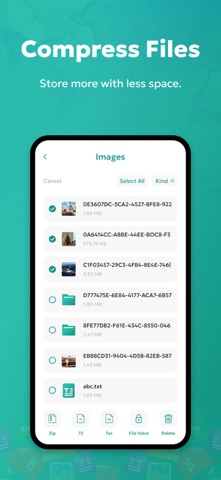
• Compress files: Create Zip archives to save space or share easily.
• File manager: Organize, move, rename, and delete files with ease.
• Preview documents & media: Instantly view images, videos, PDFs, and Office files.
• Face ID/Touch ID security: Protect private files & archives.
-> PDF Tools Included:
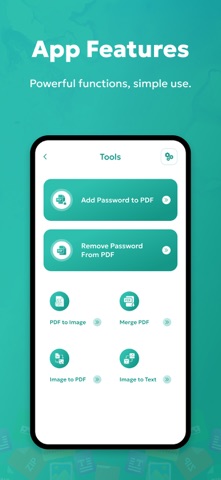
• Add Password to PDF → Secure your PDF with strong encryption.
• Remove Password from PDF → Unlock protected PDFs quickly.
• PDF to Image → Convert PDF pages into high-quality images.
• Merge PDF → Combine multiple PDFs into a single file.
• Image to PDF → Convert photos into a PDF document.
• Image to Text (OCR) → Extract editable text from scanned images or PDFs.
-> Why Choose dZip?
dZip is more than just a file extractor. It’s a complete productivity tool that saves you time and keeps your documents safe. Whether you’re a student, professional, or casual user, dZip gives you everything you need in one app.
-> Use Cases:
• Open downloaded RAR, 7z, or ZIP archives.
• Protect personal PDFs with passwords.
• Merge PDFs for school or office projects.
• Extract text from scanned documents instantly.
• Convert images into shareable PDFs.
Take full control of your files and documents—download dZip today and unlock all-in-one file management + PDF tools!
Privacy Policy: https://vijayshiroya.blogspot.com/#privacy
Terms of use: https://vijayshiroya.blogspot.com/#terms