AppBrain
AppBrain
  • Apps
  • Apps being viewed right now Trending apps today Most popular apps All-time most installed apps Top rated apps iPhone and iPad apps
  • Intelligence ▾
    Intelligence overview → Track any Android app or your whole market
    Track & analyze
    Keyword Tracker & OptimizerTrack & improve Play rankings App Performance ReportOne-off PDF for any app StatisticsFree Android & Play market stats
    Promote your app
    Featured Apps App Links
  • Intelligence
  • Pricing
  • Dashboard
  • Sign up
  • Log in
App Store Apps > Productivity > ZenNotes: Markdown Notes
App profile & analytics · Productivity · Data updated 2026-10-05
ZenNotes: Markdown Notes icon

ZenNotes: Markdown Notes

by Lumary Labs LLC · Free · Version 1.17.1
Availability On the App Store since July 2026 ↗
Rating on App Store
4.91/5
11 ratings
Rating
4.91
11 reviews
Best rank
–
not in the top lists
Last updated
October 3, 2026
1.17.1
AppBrain's verdict New

ZenNotes: Markdown Notes came out 82 days ago. It doesn't have enough ratings yet to judge what users think.

ZenNotes: Markdown Notes is made and published by Lumary Labs LLC. AppBrain is an independent app data site and isn't affiliated with Lumary Labs LLC. The app name, icon, screenshots and description belong to Lumary Labs LLC and are shown as published on the App Store.

About ZenNotes: Markdown Notes

ZenNotes: Markdown Notes is a productivity app developed by Lumary Labs LLC.

What is the rating of ZenNotes: Markdown Notes?

ZenNotes: Markdown Notes is rated 4.91 out of 5 stars, based on 11 ratings.

Is ZenNotes: Markdown Notes free?

ZenNotes: Markdown Notes is free. The app size is 80.30 MB. The latest version available is 1.17.1. The last update was on October 3, 2026.

What are the requirements for ZenNotes: Markdown Notes?

The app has a content rating of Everyone. The app has been available on the App Store since July 2026.

Description by Lumary Labs LLC (from the App Store)
ZenNotes is a local-first markdown notes app for writing, organizing, and connecting ideas without giving up ownership of your files.

YOUR NOTES, YOUR FILES

Every note is a plain .md file in a vault you control. Start with storage on your iPhone or iPad, use iCloud Drive, or open a folder through the system document picker. Local and iCloud vaults work without an account.

ZENNOTES CLOUD

Connect an optional ZenNotes Cloud plan to:
• Sync a vault across ZenNotes desktop and mobile
• Sync notes and attachments
• Create manual and automatic daily backups
• Restore a full vault or a single note from a backup
• Publish notes to the web and manage their public links

Cloud never replaces the free local-first workflow. Use it only when you want hosted sync, backup, or publishing.

WRITE IN MARKDOWN

Use a focused editor with headings, lists, tasks, tables, code, links, wikilinks, tags, callouts, footnotes, and frontmatter. A mobile formatting bar keeps common actions close to the keyboard, and a pinch resizes the text to your eyes.

RICH, OFFLINE PREVIEW

Render KaTeX math, Mermaid diagrams, JSXGraph, function plots, tables, callouts, and more directly on your device.

ORGANIZE YOUR WAY

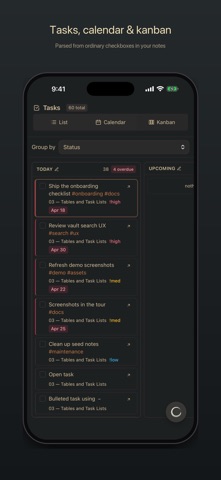
Pin your go-to notes and folders to the top, swipe rows to act on them, create and rename nested folders, browse tags, search the full vault, manage tasks, create periodic notes, and work with table databases stored as CSV.

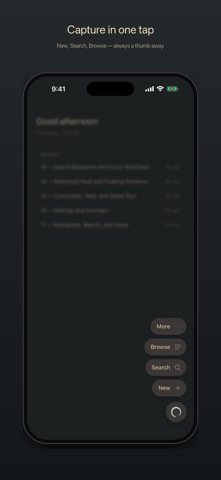
CAPTURE QUICKLY

Create a quick note from the app or send text and links to ZenNotes from the iOS share sheet.

HOME SCREEN WIDGETS

Start a note, open a recent one, or check today's tasks without opening the app. New Note also lives on the Lock Screen, and the widgets wear your theme.

PRIVACY BY DEFAULT

ZenNotes has no advertising or tracking. Local and iCloud notes stay in the storage you choose. When you enable ZenNotes Cloud, the account identity, connected-device information, and vault content needed for the Cloud features you use are sent to the ZenNotes service. Payment details are handled by Stripe.

ZenNotes is open source. Your vault remains useful outside the app because it is made of ordinary files.
Show more Show less

Screenshots

ZenNotes: Markdown Notes Screenshot 1 of 5
ZenNotes: Markdown Notes Screenshot 2 of 5
ZenNotes: Markdown Notes Screenshot 3 of 5
ZenNotes: Markdown Notes Screenshot 4 of 5
ZenNotes: Markdown Notes Screenshot 5 of 5
Screenshots by Lumary Labs LLC, from the the App Store listing
Official page on the App Store Also on Google Play

Also available on Google Play

ZenNotes: Markdown Notes icon ZenNotes: Markdown Notes
Lumary Labs LLC
0.0
Free
100+

Alternatives to ZenNotes: Markdown Notes

Glass Notes: Private Notepad icon Glass Notes: Private Notepad
Birkan Aksoy
5.0
Free
2 ratings
Vanta — Markdown Notes icon Vanta — Markdown Notes
Shane Vitarana
0.0
Free
SolidPass Offline Vault icon SolidPass Offline Vault
Air Microservices LLC
5.0
$4.99
1 ratings
Nestwell: All-in-One Organizer icon Nestwell: All-in-One Organizer
Md Monirul Islam
3.0
Free
2 ratings
Sebastian Assistant icon Sebastian Assistant
Michael Surratt
5.0
Free
1 ratings
Papyrus: Research Library icon Papyrus: Research Library
Zhenda Fu
5.0
Free
2 ratings
Libreta: A NoteBook App icon Libreta: A NoteBook App
Darian Iraola
5.0
Free
2 ratings
Note a Mess icon Note a Mess
ALPER OEDEN
0.0
Free

More from Lumary Labs LLC

Lumary Cam Mobile icon Lumary Cam Mobile
Lumary Labs LLC
0.0
Free

Changelog of ZenNotes: Markdown Notes

No changelog data

Developer information for Lumary Labs LLC

Lumary Labs LLC

Address:

Share ZenNotes: Markdown Notes

Comments on ZenNotes: Markdown Notes for iOS

We don't have enough comments to show example comments. Please check back later.

App Store Rankings for ZenNotes: Markdown Notes

This app is not ranked

Technologies used by ZenNotes: Markdown Notes

Popular Productivity Apps Top new apps Today's trending apps Price drops on Google Play Apps other people are watching
Glass Notes: Private Notepad icon Glass Notes: Private Notepad
Vanta — Markdown Notes icon Vanta — Markdown Notes
SolidPass Offline Vault icon SolidPass Offline Vault
Nestwell: All-in-One Organizer icon Nestwell: All-in-One Organizer
Sebastian Assistant icon Sebastian Assistant
Papyrus: Research Library icon Papyrus: Research Library
Libreta: A NoteBook App icon Libreta: A NoteBook App
Note a Mess icon Note a Mess
Overview Alternatives Reviews Rankings Technology
AppBrain Intelligence premium content

Subscribe now to get full and unlimited access to AppBrain Intelligence. You'll have access to:

  • App Intelligence dashboard (performance timeline, competitor comparison, country rankings, insight cards)
  • Detailed ranking data per app
  • Full timeline per developer
  • Device market shares data per country
  • Unlimited keyword tracking
1 Month

$75/mo
(billed every month)

SAVE 0%
Subscribe
3 Months

$65/mo
($195 billed every 3 months)

SAVE 13%
Subscribe
1 Year

$57.50/mo
($690 billed every year)

SAVE 23%
Subscribe
Each subscription will automatically renew 3 days before the expiration date for the same time period. Subscriptions can be cancelled at any time before the renewal.

AppBrain is an app data site, we track rankings, ratings, installs for all apps and games on Google Play and the App Store. AppBrain doesn't host app files or APKs, all install links go directly to the official store. All trademarks are owned by their respective owners.

More apps

  • Top Android apps being viewed
  • eCrew stats
  • Gold Detector
  • Private PDF Mini

App statistics

  • Android statistics
  • Google Play Developer stats
  • Trending Android Apps
  • Trending iOS apps
  • Top popular Apps
  • Buy the best Android phone
  • Buy & sell app businesses

About AppBrain

  • Contact
  • Privacy
  • Documentation
  • DMCA takedowns
  • Articles
  • Blog
  • Top Free Games Apps for your iPhone or iPad
© 2010-2026 - AppBrain