
Keyword Tracker & Optimizer: rank for more keywords on Google Play
 Uwe Maurer 5 min read
App Store Optimization is mostly a daily-discipline problem. You can’t improve what you can’t measure, and the keywords that matter for your app today are not the keywords that mattered a year ago.
The Keyword Tracker & Optimizer, free for your first 20 tracked keywords, is the tool we built to make that daily discipline cheap enough to actually do — no SDK to install, no CSVs to upload, and every keyword you rank for gets discovered and added automatically.
Two loops, one tool
The Tracker is built around two complementary loops:
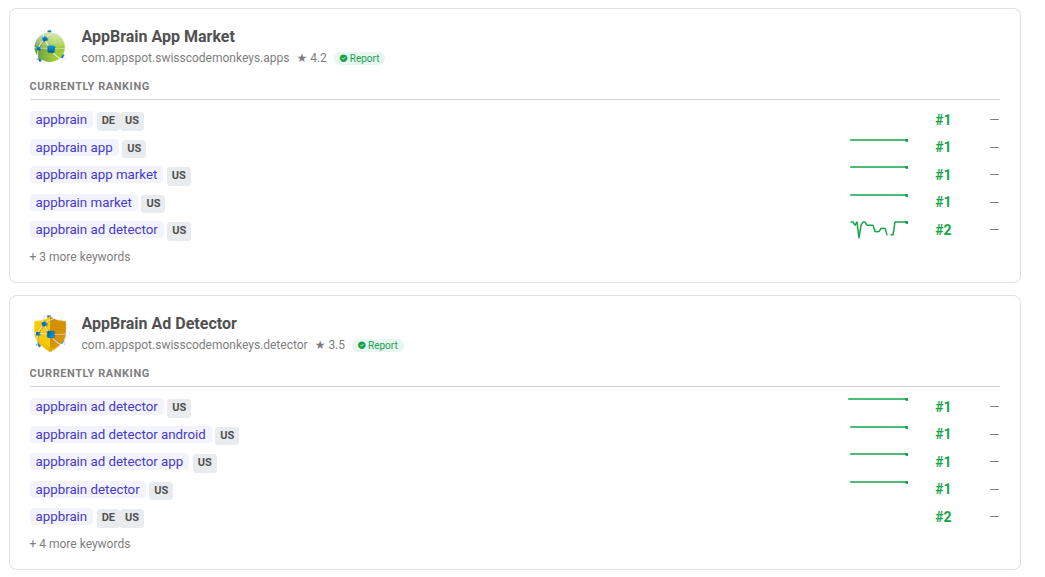
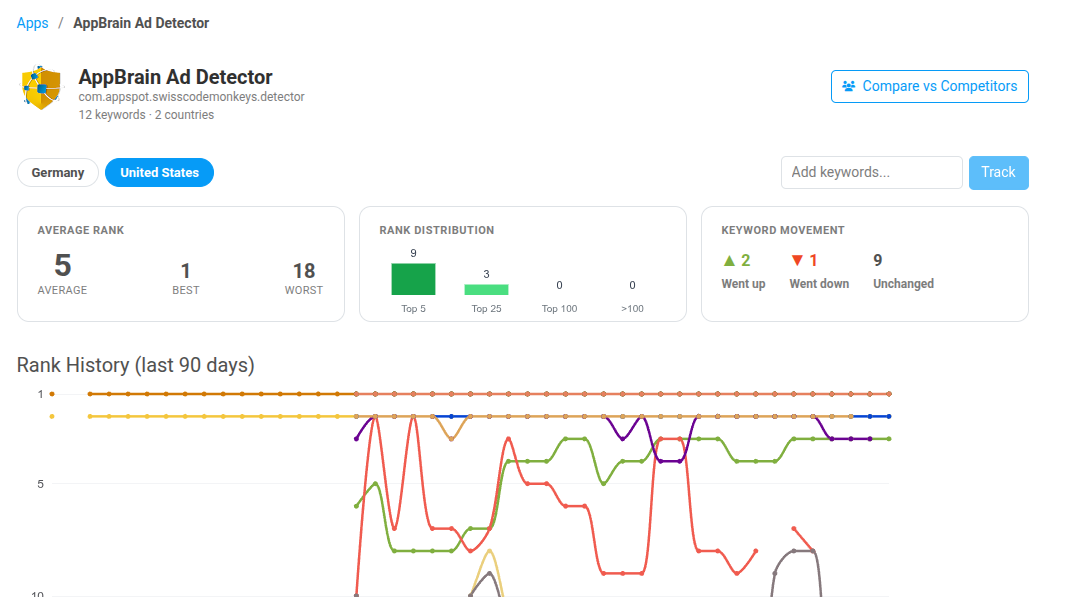
- Track — defend what you’ve already earned. Every tracked keyword is re-scraped on Google Play once a day. Current position, yesterday’s change, a 30-day sparkline, and the full 90-day rank history as a line chart, for every keyword, every country.
- Optimize — find what you could win. Generate a keyword report on any app and the optimizer surfaces dozens of candidates from five signal sources, marks the ones you already rank for, and queues the rest as your next targets.
You run the optimize loop occasionally — every few weeks, when you ship an update, or when a competitor moves. The track loop runs on its own, in the background, forever.
Five-source keyword discovery
The hard part of ASO isn’t watching ranks. It’s figuring out which keywords to watch in the first place. The optimizer pulls candidates from five distinct sources and scrapes Google Play for each:
- Title analysis — phrases extracted from your app title and developer name.
- Real user searches — actual Google Play search queries that led to your app or close peers.
- Search-term analysis — significant terms mined from AppBrain’s index of 2M+ apps.
- Competitor keywords — every keyword your auto-discovered competitors rank for.
- LLM suggestions — contextual keywords derived from your app’s description and category.
Each candidate is annotated with whether you already rank for it (and where), so you can prioritise the gap between “ranking on page 3” and “ranking in the top 10”.
Automatic competitor gap analysis
You don’t maintain a competitor list — competitors are auto-detected from shared keyword overlap. Once detected, every keyword they rank for is sorted into three buckets:
- Shared. You both rank. Compare positions side-by-side.
- Opportunity. They rank, you don’t. Start tracking, then target.
- Unique. You rank, they don’t. Keep your title and description tight to hold these positions.
The Opportunity bucket is usually the most actionable one — those are keywords competitors have already validated, and a working analogue for “what search terms are bringing them installs that you’re not seeing”.
Every country that matters
The same keyword can rank #4 for an app in Brazil and #80 for the same app in Germany on the same day. If you only watch the US, you’re missing where most of the growth opportunity actually lives.
Track any combination of 30+ countries per keyword. The sparklines, the deltas, and the full 90-day chart are all per-country.
From zero to a tracked app
No SDK to install. No CSVs to upload. The full loop is three steps:
- Add any app — search by name or package. Track your own apps, competitors, or any app in AppBrain’s index of 2M+.
- Run the optimizer — one click starts the five-source report. Keywords you already rank for are auto-added to tracking; the rest become your target list.
- Track, ship, repeat — rankings refresh daily. Update your listing, watch the sparklines respond, re-run the optimizer for the next round of candidates.
Free to start, bundled with Intelligence
Every capability above — daily ranks, the five-source optimizer, competitor gap analysis, all 30+ countries — works on a free AppBrain account. The only limit is how many keywords you track: 20 on the free plan.
The Tracker is not a separate product. Subscribing to AppBrain Intelligence lifts that limit to unlimited keywords, and gives you 10+ years of historical download and ranking data, competitor benchmarks, country heatmaps, and SDK detection at the same time — so a keyword move can be traced through to its effect on installs.
Where to find it: open your developer dashboard and click the Keywords tab. If there’s a keyword signal you wish we surfaced and don’t — write to contact@appbrain.com. The five sources above started as a list of three.
Find the keywords you're missing.
Add your app, run the optimizer, and you'll have a five-source report plus a daily tracking baseline by tomorrow.
Explore the Keyword Tracker