Download Android Apps and Games
AppBrain
  • Apps
  • Intelligence ▾
    Intelligence overview → Track any Android app or your whole market
    Track & analyze
    Keyword Tracker & OptimizerTrack & improve Play rankings App Performance ReportOne-off PDF for any app StatisticsFree Android & Play market stats
    Promote your app
    Featured Apps App Links
  • Intelligence
  • Pricing
  • Dashboard
  • Sign up
  • Log in

General

  • Introduction
  • Privacy policy
  • HTML widgets
  • Embeddable widgets
  • AppLinks ToS

Publishers

  • AppBrain SDK
    • Getting started
    • Ad unit preview
    • Banners
    • Interstitial
    • ListView ads
    • Extra features
    • Other SDKs
    • Integration policy
    • Mediation
  • Resources
  • Terms of service
  • FAQ

Advertisers

  • Resources
  • Terms of service
  • FAQ

Intelligence

  • Insights
  • Pricing
  • SDK downloads
  • Phone downloads
  • Terms of service

AppBrain API

  • Using the AppBrain API
  • API specification
  • API pricing
  • Promotion campaigns
  • Reporting

Banners

Adding a banner
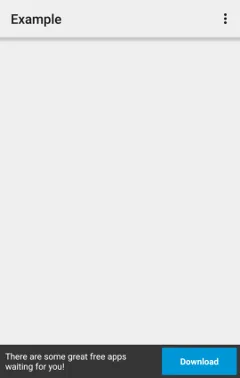
Banner screenshot

The AppBrain SDK allows you to put industry-standard banners into your app. In a layout XML file, you can add a banner to your app using the following code:

<com.appbrain.AppBrainBanner
    android:layout_width="match_parent"
    android:layout_height="wrap_content" />

Programmatically

If you would like to add a banner to your layout without using XML, you can instantiate the banner programmatically using the following code:

import com.appbrain.AppBrainBanner;

public void addBanner(ViewGroup parent) {
    AppBrainBanner banner = new AppBrainBanner(getContext());
    parent.addView(banner);
}

AppBrain banners are by default responsive, meaning that their size is increased on larger screens, which leads to better monetization. This behavior can be changed using AppBrainBanner.setSize().

To use AppBrain banners in mediation solutions like Admob or MoPub, see the section about integration with other SDKs.

AdId

If you use multiple banners in your app, you may like to get separate ad reports on the developer dashboard. To do this each banner needs its own AdId. To set an AdId in your XML, you need to define the AppBrain namespace in your view. Then you can set the adid attribute like so:

<LinearLayout
    xmlns:android="http://schemas.android.com/apk/res/android"
    xmlns:appbrain="http://schemas.android.com/apk/lib/com.appbrain"
    android:layout_width="match_parent"
    android:layout_height="match_parent"
    android:orientation="vertical">

    <!-- Other views -->

    <com.appbrain.AppBrainBanner
        android:layout_width="match_parent"
        android:layout_height="wrap_content"
        appbrain:adid="home_screen"/>
</LinearLayout>

The value of appbrain:adid can be any of the predefined AdId constants, or a custom AdId value you create on the developer dashboard.

AppBrain is a directory focused on discovering great apps and games. We give statistics, rankings and search options that Google Play and the App Store don't have. All trademarks are owned by their respective owners. AppBrain doesn't offer APKs or binaries, and always lets users install the official version from Google Play or the App Store.

More apps

  • Top Android apps being viewed
  • Hohem Joy
  • EASELOAN- Reliable Loan Online
  • Cooking Simulator Mobile: Kitc

Android Statistics

  • Android statistics
  • Google Play Developer stats
  • Trending Android Apps
  • Top popular Apps
  • Buy the best Android phone

About AppBrain

  • Contact
  • Privacy
  • Documentation
  • DMCA takedowns
  • Articles
  • Blog
  • Tips to improve your Android promotional campaign
© 2010-2026 - AppBrain