



AppBrain's verdict
- Last updated
- October 12, 2026
- Size
- 2.64 MB
User feedback
Ratings and reviews on the App StoreComments on 42 PDF Editor: Sign & Annotate for iOS
We don't have enough comments to show example comments. Please check back later.
Store listing
By Mohammed Shehada, from the App StoreDescription by Mohammed Shehada Written by the developer, not by AppBrain. Click to read.
Most of what people need to do to a PDF is small: sign a form, fill in a few fields, fix a typo, take out a page, add the scan of a receipt. 42 PDF Editor puts those jobs on the phone you already have with you, and shows every change on the page as you make it.
START WITH A TASK
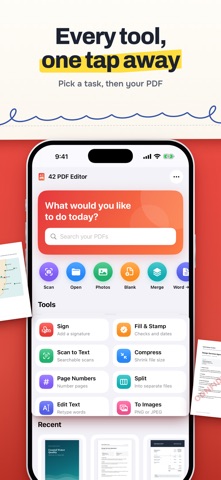
The Home screen lists the jobs: Sign, Fill & Stamp, Scan to Text, Compress, Page Numbers, Split, Edit Text and To Images. Pick one, then the PDF, and the editor opens straight into it.
MARK UP
Highlight, underline and strike through text. Draw with a pen or highlighter, by finger or Apple Pencil, with smooth strokes, and add shapes, arrows and text boxes. Tap any markup to move or resize it with its corner handles, change its colour, weight or opacity, duplicate or delete it, and undo or redo every change.
EDIT TEXT
Tap a line and retype it. The font, size and colours are matched to the original, and the page shows the result as you type. Change it or undo it later.
FILL, SIGN AND STAMP
Type into a PDF's form fields, or drop a check, cross, dot, today's date or saved text (your name, email, address) onto a flat form with one tap. Draw a signature once and keep it on your device, then place and resize it on any page; it stays sharp because it is written as vector ink. Add stamps such as Approved, Paid, Received or Draft, or make your own, with an optional date. Add logos and photos too.
SCAN TO TEXT
Scanned pages become searchable, selectable and editable with on-device text recognition. The page looks exactly the same; its words can now be found, highlighted, copied and retyped.
PAGES
Drag to reorder, rotate, duplicate or delete. Select several pages to extract them as a new PDF or export them as images. Split a document into files, add page numbers, and crop pages by hand or automatically to their content. Insert blank pages, pages from another PDF or Word file, scans or photos.
SCAN AND CREATE
Scan paper with the camera, make a PDF from photos, start a blank PDF, or merge several PDFs into one.
PDF AND WORD
Turn a Word (.docx) file into a PDF, keeping its styles, lists, tables, links, pictures and page size. Turn a PDF into a Word document with editable text, with scanned pages read by on-device text recognition, or with a picture of each page when the look matters most.
WATERMARKS, PASSWORDS AND FILE SIZE
Add a text or image watermark with your choice of opacity, angle and position. Open password-protected PDFs, and add, change or remove a password. Make a smaller version of a PDF: pictures are compressed, text and drawings stay sharp.
SAVE AND SHARE
Save in place, Save a Copy, Save a Flattened Copy with the markup drawn into the pages, Share, Print, or export pages as PNG or JPEG. Open in 42 PDF Editor from the Files app and the share sheet.
PRIVATE
No account, no ads, no analytics and no servers. Your documents, signatures and saved text never leave your device unless you share them.
Good to know: Edit Text and Whiteout cover the original content and place new content on top. The original text is still inside the file, so they are not a way to redact a document.
Safety and technology
Found in the app by AppBrain- Price
- Free
- App size
- 2.64 MB
- Content rating
- Everyone
Technologies used by 42 PDF Editor: Sign & Annotate
Releases
Updates seen on the App Store- Version
- 1.1
- Launched
- October 2026
No changelog data
Alternatives
Similar apps and more from Mohammed ShehadaAlternatives to 42 PDF Editor: Sign & Annotate


More from Mohammed Shehada


Rankings
App Store top chartsApp Store Rankings for 42 PDF Editor: Sign & Annotate
About the app and developer
About 42 PDF Editor: Sign & Annotate
42 PDF Editor: Sign & Annotate is a productivity app developed by Mohammed Shehada.
User Ratings
The app has no ratings yet.
App Information
42 PDF Editor: Sign & Annotate is freely available from the App Store. The app size is 2.64 MB. The latest version available is 1.1. The last update was on October 12, 2026.
Technical Requirements
The app has a content rating of Everyone. The app has been available on the App Store since October 2026.
42 PDF Editor: Sign & Annotate is made and published by Mohammed Shehada. AppBrain is an independent app data site and isn't affiliated with Mohammed Shehada. The app name, icon, screenshots and description belong to Mohammed Shehada and are shown as published on the App Store.
Developer information for Mohammed Shehada
Address:
Frequently asked questions about 42 PDF Editor: Sign & Annotate
Is 42 PDF Editor: Sign & Annotate free?
Yes. 42 PDF Editor: Sign & Annotate is free on the App Store.
Is 42 PDF Editor: Sign & Annotate still available?
Yes. 42 PDF Editor: Sign & Annotate is on the App Store, and the last update we saw was on October 12, 2026.
How large is 42 PDF Editor: Sign & Annotate?
42 PDF Editor: Sign & Annotate is 2.64 MB.
Is 42 PDF Editor: Sign & Annotate suitable for children?
App Store rates the content of 42 PDF Editor: Sign & Annotate as suitable for everyone.
Who made 42 PDF Editor: Sign & Annotate?
42 PDF Editor: Sign & Annotate was developed by Mohammed Shehada. It is listed in the productivity category on the App Store.
What are the best alternatives to 42 PDF Editor: Sign & Annotate?
People looking at 42 PDF Editor: Sign & Annotate also look at these productivity apps: DartPDF: Edit PDF Documents, PDFing: PDF Editor & OCR, PlainPDF: Scanner & PDF Editor, PDF Editor & Scanner: Folbrio, FolikPDF.