



AppBrain's verdict
- Rating on App Store
- 5.00
- 2 ratings
- Last updated
- November 17, 2026
- Size
- 55.2 MB
It doesn't have enough ratings yet to judge what users think.
User feedback
Ratings and reviews on the App StoreComments on DartPDF: Edit PDF Documents for iOS
We don't have enough comments to show example comments. Please check back later.
Store listing
By Railway Engineering Solutions Pty Ltd, from the App StoreDescription by Railway Engineering Solutions Pty Ltd Written by the developer, not by AppBrain. Click to read.
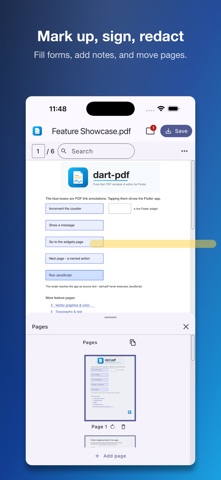
Open any PDF to mark it up, fill in forms, sign it, redact content, rearrange pages, or edit the text and images on the page. Changes save back to the original file.
Nothing is uploaded. There's no account, no sync, and no ads.
Features:
• Highlight, underline, strikethrough, and freehand ink
• Shapes, arrows, text boxes, notes, and stamps
• Edit existing text and add images
• Redaction that removes the covered text and images from the file, not just from view
• Fill form fields (text, checkboxes, radio buttons, dropdowns), or add your own
• Drawn signatures placed anywhere, plus certificate-backed PAdES digital signatures
• OCR scanned PDFs so text can be selected and searched
• Reorder, delete, and export pages to a new file
• Full-text search, text selection, and links
• Compare two versions side by side
• Open password-protected files
Runs on iPhone, iPad, and Mac. Opens PDFs from the Files app, share sheets, or drag-and-drop. Light and dark themes.
Safety and technology
Found in the app by AppBrain- Price
- Free
- App size
- 55.2 MB
- Content rating
- Everyone
Technologies used by DartPDF: Edit PDF Documents
Releases
Updates seen on the App Store- Version
- 16.1.1
- Launched
- June 2026
No changelog data
Alternatives
Similar apps and more from Railway Engineering Solutions Pty LtdAlternatives to DartPDF: Edit PDF Documents


More from Railway Engineering Solutions Pty Ltd

Also available on Google Play

Rankings
App Store top chartsApp Store Rankings for DartPDF: Edit PDF Documents
About the app and developer
About DartPDF: Edit PDF Documents
DartPDF: Edit PDF Documents is a productivity app developed by Railway Engineering Solutions Pty Ltd.
User Ratings
DartPDF: Edit PDF Documents is rated 5.00 out of 5 stars. The rating is based on 2 ratings.
App Information
DartPDF: Edit PDF Documents is freely available from the App Store. The app size is 55.16 MB. The latest version available is 16.1.1. The last update was on November 17, 2026.
Technical Requirements
The app has a content rating of Everyone. The app has been available on the App Store since June 2026.
DartPDF: Edit PDF Documents is made and published by Railway Engineering Solutions Pty Ltd. AppBrain is an independent app data site and isn't affiliated with Railway Engineering Solutions Pty Ltd. The app name, icon, screenshots and description belong to Railway Engineering Solutions Pty Ltd and are shown as published on the App Store.
Developer information for Railway Engineering Solutions Pty Ltd
Frequently asked questions about DartPDF: Edit PDF Documents
Is DartPDF: Edit PDF Documents free?
Yes. DartPDF: Edit PDF Documents is free on the App Store.
Is DartPDF: Edit PDF Documents still available?
Yes. DartPDF: Edit PDF Documents is on the App Store, and the last update we saw was on November 17, 2026.
How large is DartPDF: Edit PDF Documents?
DartPDF: Edit PDF Documents is 55.16 MB.
Is DartPDF: Edit PDF Documents suitable for children?
App Store rates the content of DartPDF: Edit PDF Documents as suitable for everyone.
How do people rate DartPDF: Edit PDF Documents?
DartPDF: Edit PDF Documents scores 5.00 out of 5 stars, from 2 ratings on the App Store.
Who made DartPDF: Edit PDF Documents?
DartPDF: Edit PDF Documents was developed by Railway Engineering Solutions Pty Ltd. It is listed in the productivity category on the App Store.
What are the best alternatives to DartPDF: Edit PDF Documents?
People looking at DartPDF: Edit PDF Documents also look at these productivity apps: PDF Text Editor ‑ Edit PDF, Docsmith: Edit PDF Text, KuttabPDF - PDF Editor, Notate, Magic PDF Pro: Offline Editor.