



AppBrain's verdict
- Rating on App Store
- 5.00
- 1 ratings
- Last updated
- October 24, 2026
- Size
- 10.5 MB
It doesn't have enough ratings yet to judge what users think.
User feedback
Ratings and reviews on the App StoreComments on PageForge - PDF document utils for iOS
We don't have enough comments to show example comments. Please check back later.
Store listing
By huang li, from the App StoreDescription by huang li Written by the developer, not by AppBrain. Click to read.
Create, scan, convert, and organize documents quickly. Most processing runs on your device, so your files stay private.
WHAT'S NEW IN THIS VERSION
- Wi-Fi Transfer: upload files from your computer to iPhone or iPad over the same Wi-Fi network, with upload progress on phone and browser
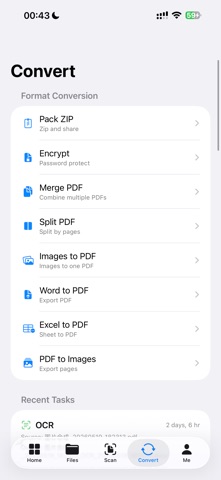
- Archive tools: pack files into ZIP (optional password); extract ZIP and RAR into your Files library, with overwrite or keep-both for duplicates
- Smarter file picking: choose from the system file picker or your in-app Files library when using tools from Home
- File preview: preview PDF, images, text, and Office files in the Files detail view
- PDF text editing: extract text from text-based PDFs, edit on device, save as a new PDF; complex layouts can export to Word via Layout Restore
- Layout Restore improvements: better table handling when exporting to Word
- Convert history: recent tasks show a fixed completion time
- PageForge Pro: Monthly and Yearly subscription plans
PDF TOOLS
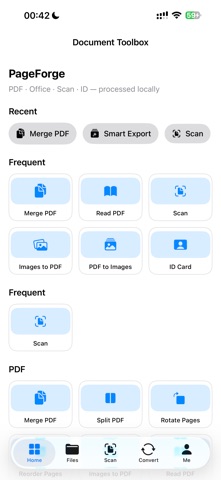
Merge, split, rotate, and reorder PDF pages. Read PDFs with search and highlights. Compress, sign, watermark, and fill forms (including batch fill). Export PDF pages to images. On-device OCR. Pro features include Layout Restore and Smart Export (searchable PDF and structured Word output).
SCAN AND CAPTURE
Scan paper documents with the camera. Convert images to PDF. ID card scan and passport photo tools.
OFFICE AND CONVERSION
Preview Word and Excel files. Convert Word and Excel to PDF. Pack and extract ZIP archives. Encrypt or decrypt supported document types.
FILES LIBRARY
Import, favorite, tag, and search documents. Optional iCloud sync (user-controlled). Share Extension to save files from other apps.
Designed for students, professionals, and small businesses who need efficient document workflows while keeping files private.
PRIVACY
Core document processing is performed on-device by default. Optional iCloud sync is user-controlled.
Privacy Policy:
https://api.qlcai.com/static/compress.html
SUBSCRIPTION PLANS (AUTO-RENEWABLE)
- PageForge Pro Monthly
- PageForge Pro Yearly
Pricing is shown in-app and on the App Store subscription sheet, and may vary by country or region. The exact amount is based on your local App Store pricing tier.
SUBSCRIPTION TERMS
- Payment is charged to your Apple ID account at confirmation of purchase.
- Subscription renews automatically unless auto-renew is turned off at least 24 hours before the end of the current period.
- Your account will be charged for renewal within 24 hours prior to the end of the current period.
- You can manage or cancel subscriptions anytime in your App Store account settings.
- Any unused portion of a free trial (if offered) will be forfeited when purchasing a subscription.
- Restore Purchases is available in the app.
Terms of Use (EULA):
https://www.apple.com/legal/internet-services/itunes/dev/stdeula/
Safety and technology
Found in the app by AppBrain- Price
- Free
- App size
- 10.5 MB
- Content rating
- Everyone
Technologies used by PageForge - PDF document utils
Releases
Updates seen on the App Store- Version
- 1.3.8
- Launched
- June 2026
No changelog data
Alternatives
Similar apps and more from huang liAlternatives to PageForge - PDF document utils


More from huang li




Rankings
App Store top chartsApp Store Rankings for PageForge - PDF document utils
About the app and developer
About PageForge - PDF document utils
PageForge - PDF document utils is a productivity app developed by huang li.
User Ratings
PageForge - PDF document utils is rated 5.00 out of 5 stars. The rating is based on one rating ratings.
App Information
PageForge - PDF document utils is freely available from the App Store. The app size is 10.50 MB. The latest version available is 1.3.8. The last update was on October 24, 2026.
Technical Requirements
The app has a content rating of Everyone. The app has been available on the App Store since June 2026.
PageForge - PDF document utils is made and published by huang li. AppBrain is an independent app data site and isn't affiliated with huang li. The app name, icon, screenshots and description belong to huang li and are shown as published on the App Store.
Developer information for huang li
Address:
Frequently asked questions about PageForge - PDF document utils
Is PageForge - PDF document utils free?
Yes. PageForge - PDF document utils is free on the App Store.
Is PageForge - PDF document utils still available?
Yes. PageForge - PDF document utils is on the App Store, and the last update we saw was on October 24, 2026.
How large is PageForge - PDF document utils?
PageForge - PDF document utils is 10.50 MB.
Is PageForge - PDF document utils suitable for children?
App Store rates the content of PageForge - PDF document utils as suitable for everyone.
How do people rate PageForge - PDF document utils?
PageForge - PDF document utils has one rating of 5.00 stars on the App Store.
Who made PageForge - PDF document utils?
PageForge - PDF document utils was developed by huang li. It is listed in the productivity category on the App Store.
What are the best alternatives to PageForge - PDF document utils?
People looking at PageForge - PDF document utils also look at these productivity apps: Callsgpt, DartPDF: Edit PDF Documents, QR Code Scanner Tool, PDF to Excel Converter - XLSX, QR Code Scanner & Reader ..