

Docsmith: Edit PDF Text
Docsmith: Edit PDF Text is made and published by Serhii Tykhonenko. AppBrain is an independent app data site and isn't affiliated with Serhii Tykhonenko. The app name, icon, screenshots and description belong to Serhii Tykhonenko and are shown as published on the App Store.
AppBrain's verdict
- Last updated
- September 11, 2026
Rankings
App Store top chartsApp Store Rankings for Docsmith: Edit PDF Text
Competitors
Similar apps and more from Serhii TykhonenkoAlternatives to Docsmith: Edit PDF Text


More from Serhii Tykhonenko


Releases
Updates seen on the App Store- Version
- 1.3
- Launched
- July 2026
No changelog data
User feedback
Ratings and reviews on the App StoreComments on Docsmith: Edit PDF Text for iOS
We don't have enough comments to show example comments. Please check back later.
Technology
Found in the app by AppBrain- Price
- Free
- App size
- 15.0 MB
- Content rating
- Everyone
Technologies used by Docsmith: Edit PDF Text
About the app and developer
About Docsmith: Edit PDF Text
Docsmith: Edit PDF Text is a productivity app developed by Serhii Tykhonenko.
User Ratings
The app has no ratings yet.
App Information
Docsmith: Edit PDF Text is freely available from the App Store. The app size is 14.96 MB. The latest version available is 1.3. The last update was on September 11, 2026.
Technical Requirements
The app has a content rating of Everyone. The app has been available on the App Store since July 2026.
Developer information for Serhii Tykhonenko
Address:
Frequently asked questions about Docsmith: Edit PDF Text
Is Docsmith: Edit PDF Text free?
Yes. Docsmith: Edit PDF Text is free on the App Store.
Is Docsmith: Edit PDF Text still available?
Yes. Docsmith: Edit PDF Text is on the App Store, and the last update we saw was on September 11, 2026.
How large is Docsmith: Edit PDF Text?
Docsmith: Edit PDF Text is 14.96 MB.
Is Docsmith: Edit PDF Text suitable for children?
App Store rates the content of Docsmith: Edit PDF Text as suitable for everyone.
Who made Docsmith: Edit PDF Text?
Docsmith: Edit PDF Text was developed by Serhii Tykhonenko. It is listed in the productivity category on the App Store.
What are the best alternatives to Docsmith: Edit PDF Text?
People looking at Docsmith: Edit PDF Text also look at these productivity apps: PDF أدوات, DartPDF: Edit PDF Documents, Pageva: Convert PDF to Word, PDF Maker and Editor, PDF Reader: Read, Merge, Sign.
Store listing
By Serhii Tykhonenko, from the App Store
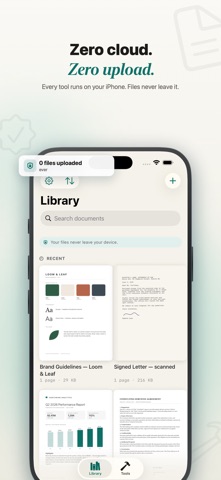


Description by Serhii Tykhonenko Written by the developer, not by AppBrain. Click to read.
Docsmith is a complete PDF workbench that runs 100% on your device. No account. No cloud. No ads. Your files never leave your iPhone. Reading and marking up are always free; editing, scanning and the core tools are free every day, and Pro removes all limits.
EDIT PDF TEXT — FOR REAL
• Tap a line, or a whole paragraph, and simply retype it
• Docsmith matches the original font, size and colour
• The text stays real and searchable — it is not a sticker placed on top
• Works in 40 languages, including right-to-left Arabic and Hebrew
SCAN & MAKE SEARCHABLE
• Scan paper with the camera into a clean, sharp PDF
• On-device OCR turns any scan into searchable, selectable text
• Nothing is uploaded — the recognition happens entirely on your iPhone
SIGN & FILL
• Draw, type or photograph your signature
• Your signature is stored only in your Keychain, never on a server
• Fill in forms and flatten them when you are done
20+ TOOLS IN ONE PLACE
• Merge several PDFs, or split one apart
• Compress to shrink file size
• Convert PDF to images, or pull out the text and images
• Add page numbers or Bates numbering
• Redact sensitive areas, then flatten to bake them in
• Add a watermark
• Set or remove a password
• Compare two PDFs side by side
• Run the same tool across many files at once
ANNOTATE & REVIEW
• Highlight, underline and strike through
• Draw with ink, add free text, sticky notes, shapes, images and stamps
PRIVATE BY DESIGN
• 100% on-device — no servers, no account, no tracking, no ads
• Docsmith collects nothing; your documents stay yours
• Lock the app behind Face ID
• Seal a finished PDF, then let anyone verify it has not been changed
FREE & PRO
Free every day:
• Read and annotate as much as you like
• Edit PDF text, sign documents and scan pages within a generous daily allowance
• One free run of each core tool (merge, split, compress, convert and more) per day
Docsmith Pro unlocks:
• Unlimited text editing — rewrite any line or paragraph, as often as you want
• Unlimited runs of every tool, with all daily limits removed
• OCR to make scans searchable
• Batch the same tool across many files
• Redaction, passwords, watermarks, Bates numbering and flattened copies
• The full annotation kit: shapes and stamps
• Unlimited signing and scanning
WORKS WITH THE SYSTEM
• Shortcuts and Siri: merge or compress from an automation
• Home-screen widgets for one-tap scan and import
• Open PDFs straight from Files, Mail or any share sheet
No account. No cloud. No ads. Just a fast, private PDF workbench.
—
Docsmith Pro is offered as a weekly, monthly or yearly subscription; the yearly plan begins with a 7-day free trial. Payment is charged to your Apple Account. Subscriptions renew automatically unless cancelled at least 24 hours before the current period ends; manage or cancel any time in Settings.
Terms of Use: https://sites.google.com/view/docsmith/terms
Privacy Policy: https://sites.google.com/view/docsmith/privacy