

AI Kitchen Designer & Budget
AI Kitchen Designer & Budget is made and published by Ling Hwe Ming. AppBrain is an independent app data site and isn't affiliated with Ling Hwe Ming. The app name, icon, screenshots and description belong to Ling Hwe Ming and are shown as published on the App Store.
AppBrain's verdict
- Last updated
- December 15, 2025
Rankings
App Store top chartsApp Store Rankings for AI Kitchen Designer & Budget
Competitors
Similar apps and more from Ling Hwe MingAlternatives to AI Kitchen Designer & Budget




More from Ling Hwe Ming



Releases
Updates seen on the App Store- Version
- 1.2
- Launched
- October 2025
No changelog data
User feedback
Ratings and reviews on the App StoreComments on AI Kitchen Designer & Budget for iOS
We don't have enough comments to show example comments. Please check back later.
Technology
Found in the app by AppBrain- Price
- Free
- App size
- 48.2 MB
- Content rating
- Everyone
Technologies used by AI Kitchen Designer & Budget
About the app and developer
About AI Kitchen Designer & Budget
AI Kitchen Designer & Budget is a graphics & design app developed by Ling Hwe Ming.
What is the rating of AI Kitchen Designer & Budget?
AI Kitchen Designer & Budget has no ratings yet.
Is AI Kitchen Designer & Budget free?
AI Kitchen Designer & Budget is free. The app size is 48.20 MB. The latest version available is 1.2. The last update was on December 15, 2025.
What are the requirements for AI Kitchen Designer & Budget?
The app has a content rating of Everyone. The app has been available on the App Store since October 2025.
Developer information for Ling Hwe Ming
Address:
Store listing
By Ling Hwe Ming, from the App Store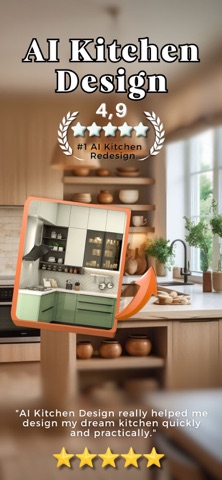


Description by Ling Hwe Ming Written by the developer, not by AppBrain. Click to read.
Design your dream kitchen in minutes—then plan the budget and materials like a pro. Upload a photo, pick a style, toggle appliances, and get an AI-powered redesign with a clear cost breakdown you can actually use.
Why you’ll love it
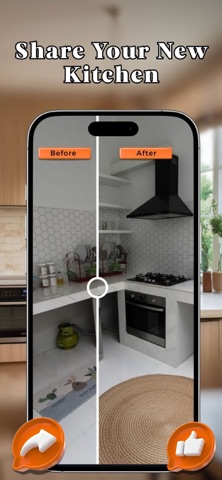
Instant before/after: See a realistic makeover of your kitchen, not a stock room.
Budget you can trust: Auto-builds a line-item budget as you add appliances and ideas.
Materials made simple: The app suggests hoses, cables, ducts, and fittings—auto-synced from your selections.
Style without guesswork: Choose curated looks (Scandinavian, Japandi, Industrial, etc.) or craft your own palette.
What it does
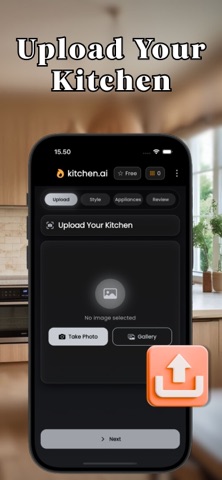
Upload & Compare
Import a kitchen photo, generate an AI redesign, and slide to compare before/after.
Style Picker
Try Scandinavian, Japandi, Industrial, Classic Chef’s, Minimal Chic—or write your Custom Style.
Use Use Photo Colors to auto-match a primary/accent from your image.
Layout & Finishes
Quickly set layout (Galley, L-shape, U-shape, Peninsula, Island), cabinet fronts, countertop, backsplash, handles, and lighting.
Appliances & Stations
Toggle essentials (Hob, Oven, Hood, Smart Fridge, Dishwasher, Coffee Station, Air Fryer, Wine Cooler). Add photos or notes for special requests.
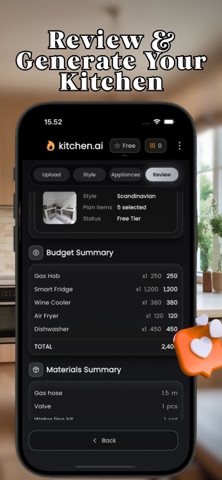
Budget Planner (auto)
Each appliance adds a unit cost × quantity line—edit any value. The total updates instantly.
Materials (auto)
Get suggested parts (e.g., ducting Ø150mm, thermal cable, inlet/drain hoses, MCB 16A) with units & quantities. Add your own items too.
Review & Generate
See a clean summary of Style, Budget, and Materials before rendering your AI result.
History
Every render saved—share, save to gallery, or revisit details anytime.
Who it’s for
Homeowners planning a remodel with clear scope & cost.
Renters wanting low-commitment glow-ups.
Designers & contractors who need quick concepts + materials lists.
Key features (at a glance)
Realistic AI redesigns of your actual space
Custom color picker + “Use Photo Colors”
Layout presets & detailed finish options
Appliance toggles with photos/notes
Auto Budget Planner with line items & totals
Auto Materials list (units & quantities)
Side-by-side compare slider
Project History, share & save
Gentle, premium UI with glass & motion
How it works
Upload your kitchen photo.
Style it—pick a vibe, colors, and details.
Add appliances (or notes/photos).
Review budget & materials.
Generate and compare before/after.
Pricing
Weekly: $5
Monthly: $15
Yearly: $35 (best value)
Free users can explore; generation requires Premium or tokens (if supported in your region).
Pro perks
Daily premium renders (fair-use cap)
Access to all styles & advanced options
Faster generation and priority queue
Ongoing updates & pro-only themes
Transparency
Estimates only: Costs and quantities are planning guides; always verify locally.
Privacy first: Photos are used to generate your designs—delete anytime.
No CAD/engineering output: Visual + planning tool, not construction documents.
Privacy Policy: https://ultrazoom.site/privacy.html
Terms of Use: https://ultrazoom.site/term.html