

AI Office: Docs XLS PPT PDF
AI Office: Docs XLS PPT PDF is made and published by Xi'an Yuzhilin Network Technology Co., Ltd. AppBrain is an independent app data site and isn't affiliated with Xi'an Yuzhilin Network Technology Co., Ltd. The app name, icon, screenshots and description belong to Xi'an Yuzhilin Network Technology Co., Ltd and are shown as published on the App Store.
AppBrain's verdict
New- Rating on App Store
- 5.00
- 1 ratings
- Last updated
- September 16, 2026
AI Office: Docs XLS PPT PDF came out 66 days ago. It doesn't have enough ratings yet to judge what users think.
Rankings
App Store top chartsApp Store Rankings for AI Office: Docs XLS PPT PDF
Competitors
Similar apps and more from Xi'an Yuzhilin Network Technology Co., LtdAlternatives to AI Office: Docs XLS PPT PDF


Releases
Updates seen on the App Store- Version
- 1.1
- Launched
- August 2026
No changelog data
User feedback
Ratings and reviews on the App StoreComments on AI Office: Docs XLS PPT PDF for iOS
We don't have enough comments to show example comments. Please check back later.
Technology
Found in the app by AppBrain- Price
- Free
- App size
- 53.6 MB
- Content rating
- Everyone
Technologies used by AI Office: Docs XLS PPT PDF
About the app and developer
About AI Office: Docs XLS PPT PDF
AI Office: Docs XLS PPT PDF is an utilities app developed by Xi'an Yuzhilin Network Technology Co., Ltd.
What is the rating of AI Office: Docs XLS PPT PDF?
AI Office: Docs XLS PPT PDF is rated 5.00 out of 5 stars, based on one rating ratings.
Is AI Office: Docs XLS PPT PDF free?
AI Office: Docs XLS PPT PDF is free. The app size is 53.58 MB. The latest version available is 1.1. The last update was on September 16, 2026.
What are the requirements for AI Office: Docs XLS PPT PDF?
The app has a content rating of Everyone. The app has been available on the App Store since August 2026.
Developer information for Xi'an Yuzhilin Network Technology Co., Ltd
Frequently asked questions about AI Office: Docs XLS PPT PDF
Is AI Office: Docs XLS PPT PDF free?
Yes. AI Office: Docs XLS PPT PDF is free on the App Store.
Is AI Office: Docs XLS PPT PDF still available?
Yes. AI Office: Docs XLS PPT PDF is on the App Store, and the last update we saw was on September 16, 2026.
How large is AI Office: Docs XLS PPT PDF?
AI Office: Docs XLS PPT PDF is 53.58 MB.
Is AI Office: Docs XLS PPT PDF suitable for children?
App Store rates the content of AI Office: Docs XLS PPT PDF as suitable for everyone.
How do people rate AI Office: Docs XLS PPT PDF?
AI Office: Docs XLS PPT PDF has one rating of 5.00 stars on the App Store.
Who made AI Office: Docs XLS PPT PDF?
AI Office: Docs XLS PPT PDF was developed by Xi'an Yuzhilin Network Technology Co., Ltd. It is listed in the utilities category on the App Store.
What are the best alternatives to AI Office: Docs XLS PPT PDF?
People looking at AI Office: Docs XLS PPT PDF also look at these utilities apps: ScanFlow PDF Scanner, Numiscope: Coin Ledger, Photo CleanUp: Smart Album, My Security Cam: Smart Link, GemTrail: Rock Identifier.
Store listing
By Xi'an Yuzhilin Network Technology Co., Ltd, from the App Store


Description by Xi'an Yuzhilin Network Technology Co., Ltd Written by the developer, not by AppBrain. Click to read.
Whether you are working with study materials, business documents, reports, proposals, or everyday files, you can handle more of your work in one place.
Create and Organize Files
Start with a blank document, spreadsheet, or presentation, or ask AI to help generate initial content based on your instructions.
If you already have an existing file, you can import supported formats to continue viewing, organizing, and editing your content.
You can also:
• View recently used files
• Search and organize files
• Mark important content as favorites
• Switch between documents, spreadsheets, and presentations
• Keep frequently used work in one place
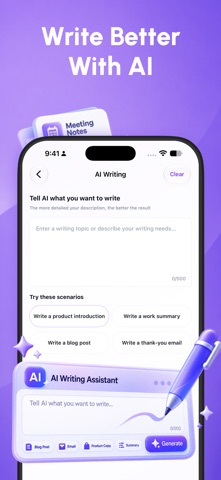
AI Writing Assistance
When you need help drafting, improving, or organizing text, AI can assist with:
• Generating content from your instructions
• Creating documents with AI
• Polishing and improving existing writing
• Continuing unfinished content
• Summarizing longer text
• Extracting key information
• Helping draft and refine emails
• Exploring and understanding content in supported files
AI-generated content can be used as a starting point or reference. Review, edit, and confirm the final content before using it for important purposes.
PDF and File Tools
In addition to document editing, AI Office includes practical tools for working with files:
• Convert supported file formats
• Merge PDF files
• Split PDF files
• Reduce PDF file size
• Add text watermarks to PDFs
• Add signatures to PDFs
• Protect PDFs with a password
• Turn images into PDF files
Text and Table Recognition
You can also work with text and tables found in images and scanned materials:
• Recognize text from supported images and content
• Extract tables and export them as Excel files (.xlsx)
Recognition results may vary depending on image quality, layout, language, lighting, and source clarity. Review recognized text and table data before relying on it.
A More Focused Office Workspace
AI Office brings writing, reading, organizing, editing, and file tools into one focused workspace, making common features easier to access and reducing the need to switch between multiple apps.
Use it to organize study materials, prepare reports, create proposals, work with PDFs, extract text and tables, or use AI to speed up drafting and content refinement.
Some features may require an internet connection. Available functions may vary depending on file type, file quality, device compatibility, system permissions, and service availability.
Review AI-generated, recognized, or converted content before using it for important purposes. Do not upload confidential, sensitive, or restricted information unless you have the right and authorization to process it.
Premium Features
For access to additional AI and file tools, you can choose to upgrade to a premium plan. Available plans, included features, and pricing are clearly shown before purchase, so you can choose the option that best fits your needs.
Subscription plans renew automatically based on the selected billing period unless canceled. You can manage or cancel your subscription at any time through your App Store account settings.
Privacy Policy:
https://yuzhilintech.com/pp/6796604488/
Terms of Use:
https://yuzhilintech.com/tou/6796604488/