

Alarm Stacks
Alarm Stacks is made and published by Conor Nolan. AppBrain is an independent app data site and isn't affiliated with Conor Nolan. The app name, icon, screenshots and description belong to Conor Nolan and are shown as published on the App Store.
AppBrain's verdict
- Last updated
- August 23, 2026
Rankings
App Store top chartsApp Store Rankings for Alarm Stacks
Competitors
Similar apps and more from Conor NolanAlternatives to Alarm Stacks




More from Conor Nolan


Releases
Updates seen on the App Store- Version
- 1.3
- Launched
- September 2025
No changelog data
User feedback
Ratings and reviews on the App StoreComments on Alarm Stacks for iOS
We don't have enough comments to show example comments. Please check back later.
Technology
Found in the app by AppBrain- Price
- Free
- App size
- 8.79 MB
- Content rating
- Everyone
Technologies used by Alarm Stacks
About the app and developer
About Alarm Stacks
Alarm Stacks is a productivity app developed by Conor Nolan.
User Ratings
The app has no ratings yet.
App Information
Alarm Stacks is freely available from the App Store. The app size is 8.79 MB. The latest version available is 1.3. The last update was on August 23, 2026.
Technical Requirements
The app has a content rating of Everyone. The app has been available on the App Store since September 2025.
Developer information for Conor Nolan
Address:
Frequently asked questions about Alarm Stacks
Is Alarm Stacks free?
Yes. Alarm Stacks is free on the App Store.
Is Alarm Stacks still available?
Yes. Alarm Stacks is on the App Store, and the last update we saw was on August 23, 2026.
How large is Alarm Stacks?
Alarm Stacks is 8.79 MB.
Is Alarm Stacks suitable for children?
App Store rates the content of Alarm Stacks as suitable for everyone.
Who made Alarm Stacks?
Alarm Stacks was developed by Conor Nolan. It is listed in the productivity category on the App Store.
What are the best alternatives to Alarm Stacks?
People looking at Alarm Stacks also look at these productivity apps: Unmissable: Calendar Alarm, Best Habit Tracker App, Time Zone Alarm: UTC & World, Alarm Clock: Wake Up Timer., Time Wallet: Unrot Your Brain.
Store listing
By Conor Nolan, from the App Store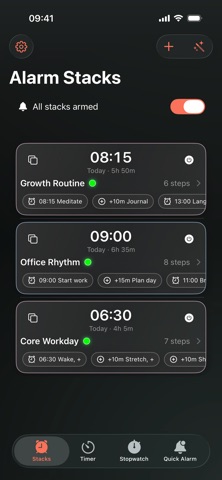



Description by Conor Nolan Written by the developer, not by AppBrain. Click to read.
Alarm Stacks lets you create stacks like Wake → Hydrate → Stretch → Shower → Leave. The first step can be Start in (a countdown) or Fixed time; later steps can be Fixed time or After previous. Alarms use the system’s full-screen interface and ring even with Silent or Focus enabled. Follow along on the Lock Screen with a Live Activity, skip or snooze a step, or control stacks with Siri and Shortcuts.
Highlights
• Real alarms — System-grade ringing that works even with Silent/Focus on.
• Stacks = routines — First step: Start in or Fixed time. Following steps: Fixed time or After previous.
• Live Activities (Lock Screen) — See countdowns and quick controls at a glance.
• Quick Alarm — Set an alarm for “in X minutes” or “at a time” in two taps.
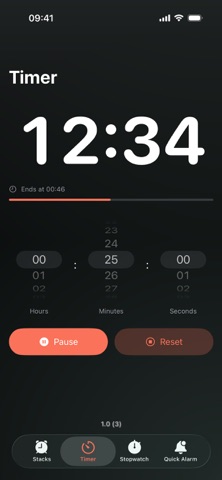
• Stopwatch & Timer — Simple, precise, each with a Lock Screen Live Activity.
• On-device routine generator (supported devices) — Type “6:30 gym then shower and coffee” and get a proposed stack you can edit before saving.
• Shortcuts & Siri — Arm, disarm, start, stop, or snooze via voice or automations.
• Themes — Pick a colour that suits you.
• No account, no ads, no tracking — Your data stays on your device.
How it works
1. Create a stack and add steps (first step = Start in or Fixed time; later steps = Fixed time or After previous).
2. Arm the stack — Alarm Stacks schedules everything for you.
3. Use the Lock Screen Live Activity to complete, skip, or snooze; the next step starts automatically.
Free vs Plus
Free: up to 2 stacks and 3 steps per stack.
Alarm Stacks Plus: unlimited stacks & steps, extra themes, and future premium features.
Privacy
Works entirely on-device. The routine generator also runs on-device on supported hardware. No accounts, no analytics, and no third-party SDKs.
Notes
• Allow Time-Sensitive notifications and Live Activities for the best experience.
• Siri/Shortcuts require permission to run voice or automation actions.
• Dynamic Island is present on compatible devices but not yet fully optimised in this version.
Terms of Use (EULA): https://www.apple.com/legal/internet-services/itunes/dev/stdeula/
Privacy Policy: https://alarmstacks.com/privacy.html