

Screen Actions
Screen Actions is made and published by Conor Nolan. AppBrain is an independent app data site and isn't affiliated with Conor Nolan. The app name, icon, screenshots and description belong to Conor Nolan and are shown as published on the App Store.
AppBrain's verdict
- Last updated
- September 27, 2025
- Size
- 3.44 MB
User feedback
Ratings and reviews on the App StoreComments on Screen Actions for iOS
We don't have enough comments to show example comments. Please check back later.
Store listing
By Conor Nolan, from the App Store


Description by Conor Nolan Written by the developer, not by AppBrain. Click to read.
What you can do
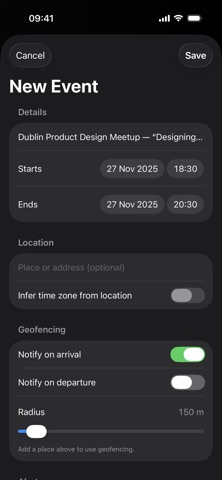
• Add to Calendar — Detects dates/times in text and creates an event. Optional location, alert, travel-time alarm, and geofenced arrive/leave notifications.
• Create Reminder — Finds tasks/deadlines and makes a reminder in the list you choose.
• Extract Contact — Pulls names, emails, phones and addresses into Contacts (you review before saving).
• Receipt → CSV — Converts receipt-like text into a clean CSV you can save or share.
Ways to use it
• Safari Web Extension — Select text on any webpage, tap the extension, and choose an action.
• Share Extension — Send text or images from any app into Screen Actions.
• Scan (live) — Use the camera to scan text or barcodes/QR and jump straight into the right editor.
• Auto Detect — Paste/scan once; the app picks the best action and opens its editor so you can tweak before saving.
iOS 26 “Document Mode” (on supported iPhones)
• Reads real tables and structured text on device for better results.
• Receipts → CSV v2: photos/screenshots become accurate rows & columns.
• Batch contacts: a photographed sign-up sheet can become multiple Contacts.
Privacy by design
• Everything runs on your device using Apple frameworks (Vision OCR/Document Mode, Data Detectors, EventKit, Contacts, MapKit).
• We don’t collect personal data, don’t run servers and don’t use third-party analytics.
• Permissions are only requested when you use a feature that needs them (Calendars, Reminders, Contacts, Camera, Location for geofencing).
Free vs Pro
• Free includes daily usage for key features.
• Screen Actions Pro (optional in-app purchase) removes daily limits and adds quality-of-life extras such as “Remember last action” in the Safari popup. Prices are shown locally in the app.
Why Screen Actions?
• Fast: turn messy text into clean, structured data in seconds.
• Accurate: on-device intelligence improves detection and table reading.
• Private: no accounts, no tracking, no ads.
• Flexible: works from Safari, the share sheet, live scan or paste.
Requirements
• iPhone, iOS 26 or later. Availability of Document Mode features may vary by device/language.
Support: support@screenactions.com
Terms of Use (EULA): https://www.apple.com/legal/internet-services/itunes/dev/stdeula/
Privacy Policy: https://screenactions.com/privacy.html
Safety and technology
Found in the app by AppBrain- Price
- Free
- App size
- 3.44 MB
- Content rating
- Everyone
Technologies used by Screen Actions
Releases
Updates seen on the App Store- Version
- 1.0.1
- Launched
- September 2025
No changelog data
Alternatives
Similar apps and more from Conor NolanMore from Conor Nolan


Rankings
App Store top chartsApp Store Rankings for Screen Actions
About the app and developer
About Screen Actions
Screen Actions is a productivity app developed by Conor Nolan.
What is the rating of Screen Actions?
Screen Actions has no ratings yet.
Is Screen Actions free?
Screen Actions is free. The app size is 3.44 MB. The latest version available is 1.0.1. The last update was on September 27, 2025.
What are the requirements for Screen Actions?
The app has a content rating of Everyone. The app has been available on the App Store since September 2025.
Developer information for Conor Nolan
Address:
Frequently asked questions about Screen Actions
Is Screen Actions free?
Yes. Screen Actions is free on the App Store.
Is Screen Actions still available?
Yes. Screen Actions is on the App Store, and the last update we saw was on September 27, 2025.
How large is Screen Actions?
Screen Actions is 3.44 MB.
Is Screen Actions suitable for children?
App Store rates the content of Screen Actions as suitable for everyone.
Who made Screen Actions?
Screen Actions was developed by Conor Nolan. It is listed in the productivity category on the App Store.