

AOD Clock - StandBy
AOD Clock - StandBy is made and published by Ajul Raj. AppBrain is an independent app data site and isn't affiliated with Ajul Raj. The app name, icon, screenshots and description belong to Ajul Raj and are shown as published on the App Store.
AppBrain's verdict
- Last updated
- October 1, 2026
Rankings
App Store top chartsApp Store Rankings for AOD Clock - StandBy
Competitors
Similar apps and more from Ajul RajAlternatives to AOD Clock - StandBy


More from Ajul Raj

Releases
Updates seen on the App Store- Version
- 1.0
- Launched
- October 2026
No changelog data
User feedback
Ratings and reviews on the App StoreComments on AOD Clock - StandBy for iOS
We don't have enough comments to show example comments. Please check back later.
Technology
Found in the app by AppBrain- Price
- Free
- App size
- 5.46 MB
- Content rating
- Everyone
Technologies used by AOD Clock - StandBy
About the app and developer
About AOD Clock - StandBy
AOD Clock - StandBy is an utilities app developed by Ajul Raj.
What is the rating of AOD Clock - StandBy?
AOD Clock - StandBy has no ratings yet.
Is AOD Clock - StandBy free?
AOD Clock - StandBy is free. The app size is 5.46 MB. The latest version available is 1.0. The last update was on October 1, 2026.
What are the requirements for AOD Clock - StandBy?
The app has a content rating of Everyone. The app has been available on the App Store since October 2026.
Developer information for Ajul Raj
Address:
Frequently asked questions about AOD Clock - StandBy
Is AOD Clock - StandBy free?
Yes. AOD Clock - StandBy is free on the App Store.
Is AOD Clock - StandBy still available?
Yes. AOD Clock - StandBy is on the App Store, and the last update we saw was on October 1, 2026.
How large is AOD Clock - StandBy?
AOD Clock - StandBy is 5.46 MB.
Is AOD Clock - StandBy suitable for children?
App Store rates the content of AOD Clock - StandBy as suitable for everyone.
Who made AOD Clock - StandBy?
AOD Clock - StandBy was developed by Ajul Raj. It is listed in the utilities category on the App Store.
What are the best alternatives to AOD Clock - StandBy?
People looking at AOD Clock - StandBy also look at these utilities apps: History Lib, Countdown48, Just Nice Clock, Cyatal: Digital Clock & Widget, Stay Clock: Flip Desk Clock.
Store listing
By Ajul Raj, from the App Store


Description by Ajul Raj Written by the developer, not by AppBrain. Click to read.
LIVE ANIMATED BACKGROUNDS
Every clock face sits on a smooth, moving backdrop, rendered live on your device:
• Fluid Pastels – soft, drifting color that reacts to your touch
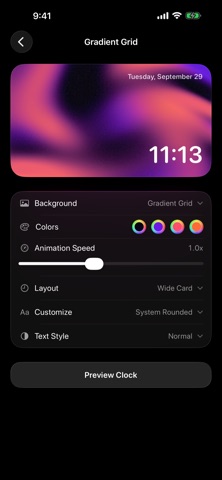
• Gradient Grid – rich, flowing gradients
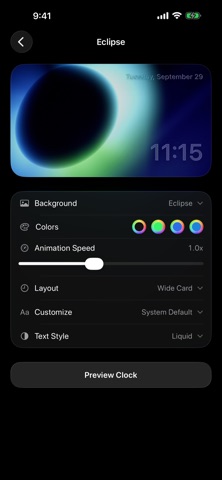
• Eclipse – a glowing ring of light
• Drifting Contours – slow-moving topographic lines
• Paint Flow, Synthesis and more
MAKE IT YOURS
• Pick your own colors for every background
• Adjust animation speed, from calm and slow to lively
• Choose a layout: Wide Card, Center Stack, Bottom Row, Minimal, Glass Flip, Glass Ribbon or a classic Analog dial
• Choose a font: System, Rounded, Serif or Monospaced
• Choose a text style: Normal, Tinted, Liquid or Liquid Glass
BUILT FOR ALWAYS-ON USE
• Fullscreen clock view with no distractions
• Keep Screen Awake option so your clock stays on
• 12-hour or 24-hour time
• Dark, low-glare design that's easy on the eyes at night
HOW TO USE
Pick a clock, customize it, and tap Preview Clock. Set your iPhone on a stand or charger, and you have an elegant bedside or desk clock that's always on.
PRIVATE BY DESIGN
No account, no ads, no tracking. Your clocks and settings stay on your device.