

ArchitectScaler
ArchitectScaler is made and published by Pratheek Balakrishna. AppBrain is an independent app data site and isn't affiliated with Pratheek Balakrishna. The app name, icon, screenshots and description belong to Pratheek Balakrishna and are shown as published on the App Store.
AppBrain's verdict
- Last updated
- September 7, 2026
Rankings
App Store top chartsApp Store Rankings for ArchitectScaler
Competitors
Similar apps and more from Pratheek BalakrishnaAlternatives to ArchitectScaler


More from Pratheek Balakrishna

Releases
Updates seen on the App Store- Version
- 2.0.0
- Launched
- July 2025
No changelog data
User feedback
Ratings and reviews on the App StoreComments on ArchitectScaler for iOS
We don't have enough comments to show example comments. Please check back later.
Technology
Found in the app by AppBrain- Price
- Free
- App size
- 2.70 MB
- Content rating
- Everyone
Technologies used by ArchitectScaler
About the app and developer
About ArchitectScaler
ArchitectScaler is an utilities app developed by Pratheek Balakrishna.
User Ratings
The app has no ratings yet.
App Information
ArchitectScaler is freely available from the App Store. The app size is 2.70 MB. The latest version available is 2.0.0. The last update was on September 7, 2026.
Technical Requirements
The app has a content rating of Everyone. The app has been available on the App Store since July 2025.
Developer information for Pratheek Balakrishna
Address:
Frequently asked questions about ArchitectScaler
Is ArchitectScaler free?
Yes. ArchitectScaler is free on the App Store.
Is ArchitectScaler still available?
Yes. ArchitectScaler is on the App Store, and the last update we saw was on September 7, 2026.
How large is ArchitectScaler?
ArchitectScaler is 2.70 MB.
Is ArchitectScaler suitable for children?
App Store rates the content of ArchitectScaler as suitable for everyone.
Who made ArchitectScaler?
ArchitectScaler was developed by Pratheek Balakrishna. It is listed in the utilities category on the App Store.
What are the best alternatives to ArchitectScaler?
People looking at ArchitectScaler also look at these utilities apps: Architects Ruler, QR 2 CSV Pro, Spectrum-V: Audio analyzer, Scale Calculator Easy, Scala Architectural Scale.
Store listing
By Pratheek Balakrishna, from the App Store


Description by Pratheek Balakrishna Written by the developer, not by AppBrain. Click to read.
Version 2.0 opens on a Home screen of tools. Tap one and you are working.
THE CONVERTER
Set a scale once, then keep a live ledger of dimensions. Type a real-world length to get the drawing length, or type a drawing measurement to get the real thing - both directions, instantly. Name any row ("North wall", "Door", "Site") so a list of numbers reads as a list of things. Your rows, scale, and units are saved between launches.
FEET AND INCHES, PROPERLY
Type 12'-6 1/2" the way you would write it. Scales like 1/4" = 1'-0" are first-class, and a keyboard row puts the ' " - and / marks one tap away. Change a unit and the app converts the value rather than re-reading the same digits.
THE TOOLS
Find scale from a drawing - measure any labeled dimension on a print and get the ratio back, with the nearest named scale offered as a one-tap match.
Slope and pitch - convert between 1:20, percent, degrees, and roof pitch, and get the fall over a run.
Area and volume - scale squared and cubed, from square millimeters through hectares and square inches through acres, plus cubic meters, feet, and yards.
Rescale and print - the copier percentage that takes a drawing from one scale to another, and what a line measures after the change.
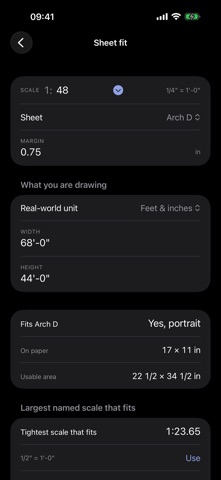
Sheet fit - whether a plan fits a sheet inside its margins, and the largest named scale that would. ISO A0 to A4, ANSI A to E, and Arch A to E1.
Feet and inches - add and subtract lengths in drafting notation without converting to decimal first.
Scale bar - generate a printable graphic scale and share it straight into a drawing.
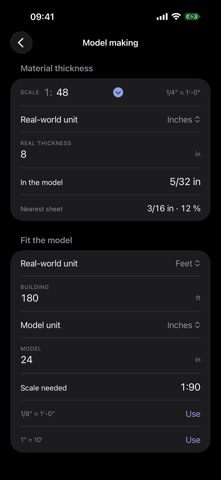
Model making - turn a real wall thickness into the nearest card, foam board, or acrylic sheet, and see how far off that substitution puts you.
BUILT FOR THE WAY YOU WORK
Metric and imperial: mm, cm, m, km, in, ft.
Metric, architect, and engineering scale presets, or type any ratio you like - 1:48 and 1:37.5 are both fine.
iPhone and iPad.
Light and dark, following your system appearance.
No account, no ads, no tracking, no data collection. Every calculation stays on your device.
Built by an architect, for architects, interior designers, engineers, students, model makers, and anyone who works from a scaled drawing.