

Audio Tools - Vocal Remover
Audio Tools - Vocal Remover is made and published by 泓 段. AppBrain is an independent app data site and isn't affiliated with 泓 段. The app name, icon, screenshots and description belong to 泓 段 and are shown as published on the App Store.
AppBrain's verdict
- Rating on App Store
- 5.00
- 2 ratings
- Last updated
- January 12, 2026
- Size
- 32.8 MB
It doesn't have enough ratings yet to judge what users think.
User feedback
Ratings and reviews on the App StoreComments on Audio Tools - Vocal Remover for iOS
We don't have enough comments to show example comments. Please check back later.
Store listing
By 泓 段, from the App Store
Description by 泓 段 Written by the developer, not by AppBrain. Click to read.
Core Features:
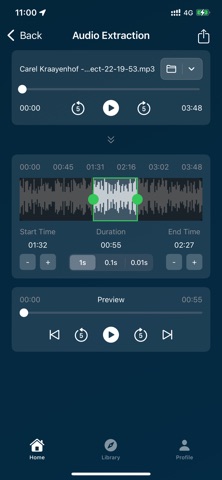
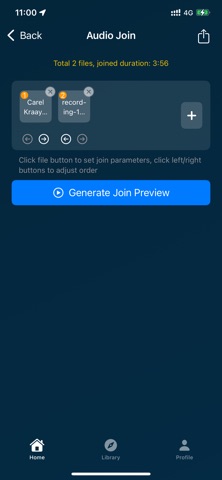
- Audio Trimming & Merging: Precisely trim, merge, and insert audio clips, with support for audio reversal.
- Volume & Effects: Adjust volume, apply fade-in/fade-out, and add professional effects like reverb, delay, and chorus.
- Format & Channel Conversion: Easily convert between audio formats (MP3, WAV, M4A, FLAC, etc.) and switch between mono and stereo channels.
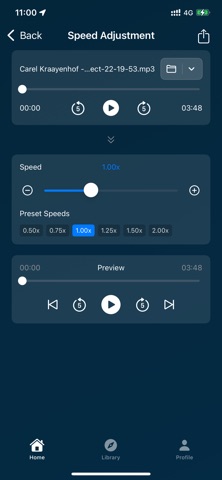
- Speed & Pitch Shifting: Adjust playback speed and apply fun voice-changing effects.
- Audio Restoration: Automatically trim silent segments, with future support for noise reduction and vocal separation.
- Specialty Tools: Extract audio from videos, apply radio effects, and generate white/pink noise.
- Recording: Built-in high-quality recorder to capture inspiration on the go.
Use Cases:
- Podcast production and editing
- Music creation and mixing
- Video voice-overs and sound effects
- Audiobook recording and editing
- Daily audio memos and sharing
Technical Advantages:
- Supports a wide range of popular audio formats for import and export.
- Powered by the robust FFmpeg engine for professional-quality results.
- Intuitive user interface with all tools clearly accessible.
- All processing is done locally on your device to protect your privacy.
【Auto-Renewable Subscription Instructions】
1. Subscription Services: Weekly subscription (1 week) and Monthly subscription (1 month).
2. Subscription Price: Subject to the information submitted in the IAP application.
3. Payment: Subscriptions are managed by the user. After confirmation of purchase, the payment will be charged to the user’s iTunes account.
4. Renewal: The Apple iTunes account will be charged within 24 hours before the end of the subscription period. Upon successful payment, the subscription will automatically renew for the next period.
5. Cancel Renewal: To cancel the subscription, open “Settings” → “iTunes & App Store” → tap “Apple ID” → “View Apple ID” → enter “Account Settings” → tap “Subscriptions”, then select the subscription and cancel it. If you do not turn off auto-renewal at least 24 hours before the end of the subscription period, the subscription will be automatically renewed.
Privacy Policy:
https://tapaudio.github.io//privacy/audiotools/en/
End User License Agreement (EULA):
https://www.apple.com/legal/internet-services/itunes/dev/stdeula/
Feedback:
For any questions, please contact us at: tapaudio@qq.com
Safety and technology
Found in the app by AppBrain- Price
- Free
- App size
- 32.8 MB
- Content rating
- Everyone
Technologies used by Audio Tools - Vocal Remover
Releases
Updates seen on the App Store- Version
- 1.2.2
- Launched
- October 2025
No changelog data
Alternatives
Similar apps and more from 泓 段Alternatives to Audio Tools - Vocal Remover






More from 泓 段


Rankings
App Store top chartsApp Store Rankings for Audio Tools - Vocal Remover
About the app and developer
About Audio Tools - Vocal Remover
Audio Tools - Vocal Remover is an utilities app developed by 泓 段.
User Ratings
Audio Tools - Vocal Remover is rated 5.00 out of 5 stars. The rating is based on 2 ratings.
App Information
Audio Tools - Vocal Remover is freely available from the App Store. The app size is 32.82 MB. The latest version available is 1.2.2. The last update was on January 12, 2026.
Technical Requirements
The app has a content rating of Everyone. The app has been available on the App Store since October 2025.
Developer information for 泓 段
Address:
Frequently asked questions about Audio Tools - Vocal Remover
Is Audio Tools - Vocal Remover free?
Yes. Audio Tools - Vocal Remover is free on the App Store.
Is Audio Tools - Vocal Remover still available?
Yes. Audio Tools - Vocal Remover is on the App Store, and the last update we saw was on January 12, 2026.
How large is Audio Tools - Vocal Remover?
Audio Tools - Vocal Remover is 32.82 MB.
Is Audio Tools - Vocal Remover suitable for children?
App Store rates the content of Audio Tools - Vocal Remover as suitable for everyone.
How do people rate Audio Tools - Vocal Remover?
Audio Tools - Vocal Remover scores 5.00 out of 5 stars, from 2 ratings on the App Store.
Who made Audio Tools - Vocal Remover?
Audio Tools - Vocal Remover was developed by 泓 段. It is listed in the utilities category on the App Store.
What are the best alternatives to Audio Tools - Vocal Remover?
People looking at Audio Tools - Vocal Remover also look at these utilities apps: Pixelclip - Pixel art camera, Ronin - Timesheet Tracker, Tuner Wave, FinderQuery Client, ExSpenda.