

Audio Visualizer: BeatLuster
Audio Visualizer: BeatLuster is made and published by Codepaint Inc. AppBrain is an independent app data site and isn't affiliated with Codepaint Inc. The app name, icon, screenshots and description belong to Codepaint Inc. and are shown as published on the App Store.
AppBrain's verdict
- Last updated
- September 15, 2026
- Size
- 26.3 MB
User feedback
Ratings and reviews on the App StoreComments on Audio Visualizer: BeatLuster for iOS
We don't have enough comments to show example comments. Please check back later.
Store listing
By Codepaint Inc., from the App Store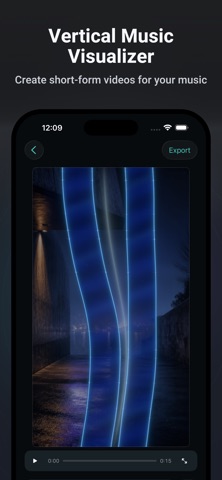
Description by Codepaint Inc. Written by the developer, not by AppBrain. Click to read.
Promote a new track, share a release, create short-form videos for social media and video-sharing platforms such as YouTube and TikTok, create ads, or deliver client work. In addition to vertical 9:16 video, BeatLuster supports 1:1 and 16:9 formats.
◆ Create in Three Steps
1. Choose your audio and set the Clip you want to use.
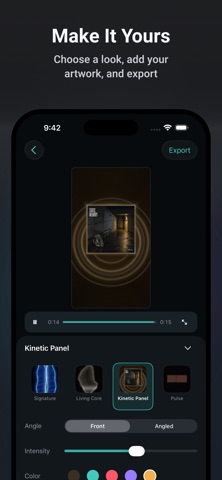
2. Pick a Look and optionally add Artwork.
3. Check the result in Preview and export your video.
◆ Four Production Looks
• Kinetic Panel
• Signature
• Living Core
• Pulse
Each Look responds to music with its own motion and visual character. Artwork treatment and available controls vary by Look. Where controls are available, you can adjust settings such as reactivity and color. Save your edits as a Project so it is ready for your next export.
◆ Export Options
Videos are exported as MP4 files with audio.
• Clip: Load the full audio, choose where the Clip starts, and use up to 60 seconds. Depending on the audio length, choose 15, 30, or 60 seconds. When the audio is shorter than 60 seconds and its full length is not already one of those choices, you can also choose Whole track. Audio shorter than 15 seconds uses the full source automatically.
• Aspect ratio: 9:16, 1:1, or 16:9
• Frame rate: 30fps or 60fps
• Destinations: Photos, Files, or other apps through Share
◆ Free and BeatLuster Pro
With Free, you can keep one Project at a time and export one video in total with no watermark. Free and Pro use the same export quality. Editing and Preview remain available after you have used your free export.
With Pro, you can create and duplicate Projects and export videos without these limits.
◆ Using Your Completed Videos
Completed videos created with BeatLuster may be used for the following purposes under the Terms of Use:
• Social media posts
• Distribution and monetization on video-sharing platforms such as YouTube and TikTok
• Advertising and promotion
• Client work and delivery of completed videos
You may not sell or distribute BeatLuster visuals as stock footage, reusable video or loop assets, templates, or other materials intended for reuse in another creative work. You are responsible for securing the necessary rights and permissions for the audio, Artwork, and other materials you use.
See the BeatLuster License Guide for details:
https://www.codepaint.app/license-guide-beatluster
◆ BeatLuster Pro Plans
BeatLuster offers Weekly and Monthly auto-renewable subscriptions and a Lifetime one-time purchase.
Prices may vary by country, region, and time of year. Weekly and Monthly plans renew automatically unless canceled at least 24 hours before the end of the current period. Your Apple Account is charged within 24 hours before renewal. You can manage or cancel a subscription in Settings > Apple Account > Subscriptions. Lifetime is a one-time purchase and does not auto-renew.
◆ Terms of Use
https://www.codepaint.app/terms-beatluster
◆ Privacy Policy
https://www.codepaint.app/privacy-policy-beatluster
◆ Disclaimer & Trademarks
BeatLuster is an independent tool and is not sponsored, endorsed, or affiliated with any third-party social media platform.
Safety and technology
Found in the app by AppBrain- Price
- Free
- App size
- 26.3 MB
- Content rating
- Everyone
Technologies used by Audio Visualizer: BeatLuster
Releases
Updates seen on the App Store- Version
- 1.0.1
- Launched
- September 2026
No changelog data
Alternatives
Similar apps and more from Codepaint Inc.Alternatives to Audio Visualizer: BeatLuster


More from Codepaint Inc.


Rankings
App Store top chartsApp Store Rankings for Audio Visualizer: BeatLuster
About the app and developer
About Audio Visualizer: BeatLuster
Audio Visualizer: BeatLuster is a photo & video app developed by Codepaint Inc.
User Ratings
The app has no ratings yet.
App Information
Audio Visualizer: BeatLuster is freely available from the App Store. The app size is 26.31 MB. The latest version available is 1.0.1. The last update was on September 15, 2026.
Technical Requirements
The app has a content rating of Everyone. The app has been available on the App Store since September 2026.
Developer information for Codepaint Inc.
Address:
Frequently asked questions about Audio Visualizer: BeatLuster
Is Audio Visualizer: BeatLuster free?
Yes. Audio Visualizer: BeatLuster is free on the App Store.
Is Audio Visualizer: BeatLuster still available?
Yes. Audio Visualizer: BeatLuster is on the App Store, and the last update we saw was on September 15, 2026.
How large is Audio Visualizer: BeatLuster?
Audio Visualizer: BeatLuster is 26.31 MB.
Is Audio Visualizer: BeatLuster suitable for children?
App Store rates the content of Audio Visualizer: BeatLuster as suitable for everyone.
Who made Audio Visualizer: BeatLuster?
Audio Visualizer: BeatLuster was developed by Codepaint Inc. It is listed in the photo & video category on the App Store.
What are the best alternatives to Audio Visualizer: BeatLuster?
People looking at Audio Visualizer: BeatLuster also look at these photo & video apps: Hypnogram: Music Visualizer, Super Wide Recorder, Photo Dance Party!, Symvi - Facial Symmetry Video, Particle.ly.