No Crop Resize: Repicture
No Crop Resize: Repicture is made and published by Codepaint Inc. AppBrain is an independent app data site and isn't affiliated with Codepaint Inc. The app name, icon, screenshots and description belong to Codepaint Inc. and are shown as published on the App Store.
AppBrain's verdict
Established- Rating on App Store
- 4.77
- 71 ratings
- Last updated
- September 28, 2026
- Size
- 65.9 MB
It doesn't have enough ratings yet to judge what users think.
User feedback
Ratings and reviews on the App StoreComments on No Crop Resize: Repicture for iOS
We don't have enough comments to show example comments. Please check back later.
Store listing
By Codepaint Inc., from the App StoreDescription by Codepaint Inc. Written by the developer, not by AppBrain. Click to read.
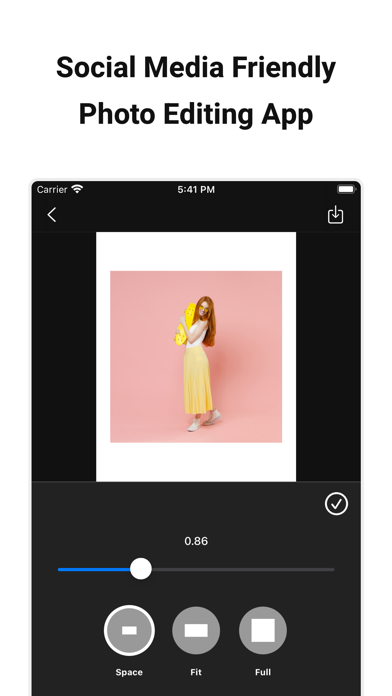
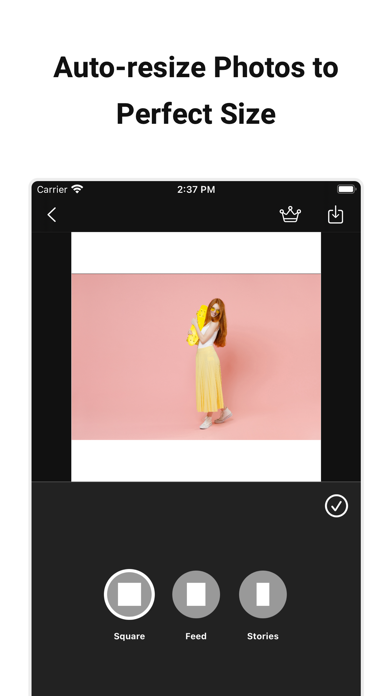
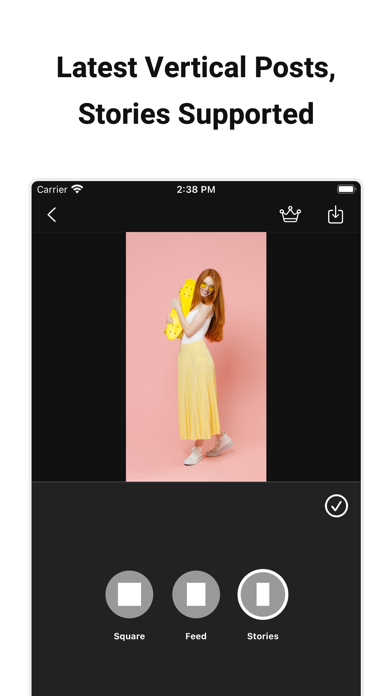
With Repicture, you can edit your images to perfectly fit social media’s latest vertical feed, Stories/Reels, and square formats.
**Perfect for users who:**
- Want to effortlessly create photos optimized for social media latest vertical feed
- Need to adapt their images to social media recommended sizes
- Wish to maintain a consistent, unified aesthetic across their social media posts
- Wish to add frames to their photos
- Want to customize frame colors or images
- Want to apply photo filters and adjust their intensity
- Desire to fine-tune image adjustments
- Plan to add text overlays to images
- Need to remove backgrounds from photos
**Key Features:**
- Format Selection: Choose from vertical portrait, Stories/Reels, square, and horizontal landscape sizes
- Frame Fitting: Options include fit, full, and margins
- Background Customization: Change colors, add blur, or use any image
- Photo Filters: Choose from six styles and adjust the intensity
- Image Adjustment: Control brightness, contrast, exposure, and more
- Text Overlay: Customize font, size, color, and rotation
- Background Removal: Isolate subjects by removing backgrounds
**Secure privacy**
This app processes images on your device. Your images are never sent to an external server.
**Paid version**
We offer a subscription-based or one-time purchase option for our paid version.
Features convenient for editing photos for social media posts are available.
Features:
- Batch edit: Settings for batch processing multiple images are available.
- Custom size: You can edit images in high resolution without compression.
- Save space settings: The app can remember the previously selected frame fit type and save the custom space values.
- Edit with original aspect ratio: You can edit the image while maintaining the aspect ratio of the loaded original image.
- No ads: Ads will not be displayed and you can use the app comfortably.
Paid plans:
- Monthly subscription
- Yearly subscription
- One-time purchase
Please confirm the current price on the in-app purchase screen before purchase.
**Notes on paid version (subscription)**
- If the automatic renewal is not canceled more than 24 hours before the end of the period, the contract period will be renewed automatically.
- Automatic renewal will be charged from 24 hours before the end of the period until the end of the period.
- You will be charged via your Apple ID account.
- Cancellations for the current month or year are not accepted.
- Cancellation cannot be performed by any method other than the following.
**Confirmation and cancellation of paid version contract (subscription)**
You can check and cancel the subscription from device's settings.app -> Apple ID -> Show Apple ID -> Subscription -> Repicture.
* If automatic billing is not registered, “Subscription” is not displayed.
**Notes on paid version (one-time purchase)**
- You will be charged via your Apple ID account
- Cancellations are not accepted.
**Terms of Use**
https://www.codepaint.app/terms/repicture
**Disclaimer & Trademarks**
- Repicture is an independent tool and is not sponsored, endorsed, or affiliated with Meta Platforms, Inc. or Instagram LLC in any way.
- Instagram is a trademark of Instagram LLC.
Safety and technology
Found in the app by AppBrain- Price
- Free
- App size
- 65.9 MB
- Content rating
- Everyone
Technologies used by No Crop Resize: Repicture
Releases
Updates seen on the App Store- Version
- 2.4.6
- Launched
- July 2021
No changelog data
Alternatives
Similar apps and more from Codepaint Inc.Alternatives to No Crop Resize: Repicture
More from Codepaint Inc.
Rankings
App Store top chartsApp Store Rankings for No Crop Resize: Repicture
About the app and developer
About No Crop Resize: Repicture
No Crop Resize: Repicture is a graphics & design app developed by Codepaint Inc.
User Ratings
No Crop Resize: Repicture is rated 4.77 out of 5 stars. The rating is based on 71 ratings.
App Information
No Crop Resize: Repicture is freely available from the App Store. The app size is 65.89 MB. The latest version available is 2.4.6. The last update was on September 28, 2026.
Technical Requirements
The app has a content rating of Everyone. The app has been available on the App Store since July 2021.
Developer information for Codepaint Inc.
Address:
Frequently asked questions about No Crop Resize: Repicture
Is No Crop Resize: Repicture free?
Yes. No Crop Resize: Repicture is free on the App Store.
Is No Crop Resize: Repicture still available?
Yes. No Crop Resize: Repicture is on the App Store, and the last update we saw was on September 28, 2026.
How large is No Crop Resize: Repicture?
No Crop Resize: Repicture is 65.89 MB.
Is No Crop Resize: Repicture suitable for children?
App Store rates the content of No Crop Resize: Repicture as suitable for everyone.
How do people rate No Crop Resize: Repicture?
No Crop Resize: Repicture scores 4.77 out of 5 stars, from 71 ratings on the App Store.
Who made No Crop Resize: Repicture?
No Crop Resize: Repicture was developed by Codepaint Inc. It is listed in the graphics & design category on the App Store.
What are the best alternatives to No Crop Resize: Repicture?
People looking at No Crop Resize: Repicture also look at these graphics & design apps: Square Crop & Fit SquareFitter, No Crop Square Fit Photo,Video, Square Fit Photo editor nocrop, Image resizer, converter iSize, StoryPop - Story Creator.