AppBrain
AppBrain
  • Apps
  • Apps being viewed right now Trending apps today Most popular apps All-time most installed apps Top rated apps iPhone and iPad apps
  • Intelligence ▾
    Intelligence overview → Track any Android app or your whole market
    Track & analyze
    Keyword Tracker & OptimizerTrack & improve Play rankings App Performance ReportOne-off PDF for any app StatisticsFree Android & Play market stats
    Promote your app
    Featured Apps App Links
  • Intelligence
  • Pricing
  • Dashboard
  • Sign up
  • Log in
App Store Apps > Photo & Video > Auto Face Blur: Video Mosaic
Auto Face Blur: Video Mosaic icon

Auto Face Blur: Video Mosaic

by YUYA SATO · Photo & Video · Free
On the App Store since August 2026 · Data updated 2026-10-23

Auto Face Blur: Video Mosaic is made and published by YUYA SATO. AppBrain is an independent app data site and isn't affiliated with YUYA SATO. The app name, icon, screenshots and description belong to YUYA SATO and are shown as published on the App Store.

AppBrain's verdict

Last updated
September 7, 2026
Size
2.28 MB
Official page on the App Store

User feedback

Ratings and reviews on the App Store

Comments on Auto Face Blur: Video Mosaic for iOS

We don't have enough comments to show example comments. Please check back later.

Store listing

By YUYA SATO, from the App Store
Auto Face Blur: Video Mosaic Screenshot 1 of 6
Auto Face Blur: Video Mosaic Screenshot 2 of 6
Auto Face Blur: Video Mosaic Screenshot 3 of 6
Auto Face Blur: Video Mosaic Screenshot 4 of 6
Auto Face Blur: Video Mosaic Screenshot 5 of 6
Auto Face Blur: Video Mosaic Screenshot 6 of 6
Screenshots by YUYA SATO, from the the App Store listing
Description by YUYA SATO Written by the developer, not by AppBrain. Click to read.
There's a stranger's face in your video. That alone is enough to stop you from sending it to family or posting it anywhere.

Auto Face Blur does one thing: it hides faces in videos. Pick a video and every face is found for you, blurred to start. Set the ones you want to show to "Keep" - everyone else stays hidden.

The app is free to download, so you can check that faces are actually found in your own video before you decide to pay.

■ Your video never leaves your iPhone
Nothing is uploaded. Finding the faces, blurring them, and saving all happen on your device. No account, no sign-up, no data collected. (The app goes online only for a purchase, for restoring a purchase, and if you tap the Terms or Privacy Policy link.)

■ Three steps
1. Pick a video - faces are found automatically
2. Set each face to "Blur" or "Keep"
3. Save

There is nothing to learn. If you have never used a video editor, you can still finish in a minute.

■ What you can do
- Automatic face detection
The whole video is scanned, and moving faces are tracked and blurred.
- "Blur" or "Keep", face by face
Every face found is listed as a thumbnail. They all start on "Blur," so setting your kid to "Keep" leaves only the people around them hidden.
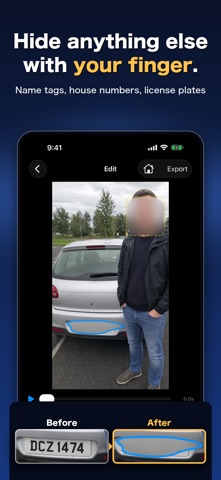
- Hide anything else
Trace with your finger or drag a box over name tags, house signs, license plates, or documents.
- Decide where a blur ends
A blur you add by hand starts where you drew it and runs to the end of the video. To stop it sooner, play up to that point and tap "End here."
- Blur or mosaic
Two looks to choose from, with a strength slider.
- Check it before you save
Play the video with the blur already applied, so you can see the result before saving.
- Nudge and resize
Drag a face frame to move it, pinch to resize.
- Undo and redo
Step back through your edits one at a time, and forward again if you go too far.

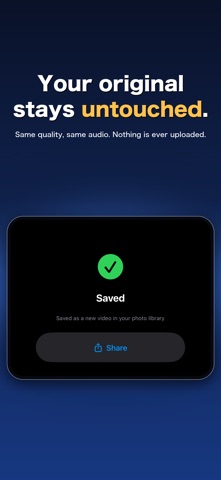
■ Your original video stays untouched
The result is added to your photo library as a new video. Your original is never changed or deleted. Resolution stays the same, audio is passed through without re-encoding, and no watermark is added.

■ Free to download, one-time purchase to save
The app is free. Automatic face detection, blur and mosaic, the strength slider, tracing extra areas by finger, and previewing the result are all free, with no time or count limits.

The only thing you pay for is saving the finished video to your photo library. It is a single one-time purchase - not a subscription. Buy it once and it stays unlocked. If you switch devices, use "Restore Purchase."

No ads. No watermarks. Ever.

■ Before you start
- iPhone only.
- Faces in profile, or faces that are very small in the frame, may not be found automatically. Check the preview before saving and trace over anything that was missed.
- If someone leaves the frame and comes back, they may be listed as a separate face. Set each one to "Blur" or "Keep" as you like.
- Long videos and 4K videos can take a few minutes to save.
- Available in English and Japanese.

Terms of Use: https://yuyasato1986.github.io/auto-face-blur/terms.html
Privacy Policy: https://yuyasato1986.github.io/auto-face-blur/privacy.html
Official page on the App Store

Safety and technology

Found in the app by AppBrain
Price
Free
App size
2.28 MB
Content rating
Everyone

Technologies used by Auto Face Blur: Video Mosaic

Releases

Updates seen on the App Store
Version
1.1
Launched
August 2026

No changelog data

Alternatives

Similar apps and more from YUYA SATO

Alternatives to Auto Face Blur: Video Mosaic

ABUKU/CAMERA 7-day camera icon ABUKU/CAMERA 7-day camera
YUKIYA SHIMODA
0.0
Free
MosaicMachine – Video Blur icon MosaicMachine – Video Blur
Takahiro Ito
0.0
Free
SMART MOSAIC: Private Blur icon SMART MOSAIC: Private Blur
Takahiro Aminaga
0.0
Free
CrossSnap: Vertical+Horizontal icon CrossSnap: Vertical+Horizontal
hayate kakizaki
0.0
Free
Blur It: Face Mosaic & Video icon Blur It: Face Mosaic & Video
Anh Trinh
0.0
Free
Mosaic & Blur - Hide Faces icon Mosaic & Blur - Hide Faces
KUREHO
0.0
Free
DuoShot: Wide & Vertical icon DuoShot: Wide & Vertical
Hosung Hwang
0.0
Free
Face Blur Video: Auto Tracking icon Face Blur Video: Auto Tracking
Yuya Takamoto
3.7
Free
3 ratings

More from YUYA SATO

NoiseLog: Neighbor Noise Log icon NoiseLog: Neighbor Noise Log
YUYA SATO
5.0
Free
1 ratings
Before & After: Side by Side icon Before & After: Side by Side
YUYA SATO
4.0
Free
1 ratings
FutoVoice: Voice to Text Memo icon FutoVoice: Voice to Text Memo
YUYA SATO
0.0
$2.99
Impossible Commute: Pixel Rage icon Impossible Commute: Pixel Rage
YUYA SATO
0.0
Free
Swipe Blur: Face & Screenshot icon Swipe Blur: Face & Screenshot
YUYA SATO
0.0
Free
AudioPeel: Video to Audio icon AudioPeel: Video to Audio
YUYA SATO
0.0
$2.99
Louder Video: Volume Booster icon Louder Video: Volume Booster
YUYA SATO
0.0
$2.99
ShapeLapse: Gym Progress Pics icon ShapeLapse: Gym Progress Pics
YUYA SATO
0.0
Free

Rankings

App Store top charts

App Store Rankings for Auto Face Blur: Video Mosaic

This app is not ranked

About the app and developer

About Auto Face Blur: Video Mosaic

Auto Face Blur: Video Mosaic is a photo & video app developed by YUYA SATO.

What is the rating of Auto Face Blur: Video Mosaic?

Auto Face Blur: Video Mosaic has no ratings yet.

Is Auto Face Blur: Video Mosaic free?

Auto Face Blur: Video Mosaic is free. The app size is 2.28 MB. The latest version available is 1.1. The last update was on September 7, 2026.

What are the requirements for Auto Face Blur: Video Mosaic?

The app has a content rating of Everyone. The app has been available on the App Store since August 2026.

Developer information for YUYA SATO

YUYA SATO

Address:

Share Auto Face Blur: Video Mosaic

Apps other people are watching Popular Photo & Video Apps Price drops on Google Play Today's trending apps Top new apps
ABUKU/CAMERA 7-day camera icon ABUKU/CAMERA 7-day camera
MosaicMachine – Video Blur icon MosaicMachine – Video Blur
SMART MOSAIC: Private Blur icon SMART MOSAIC: Private Blur
CrossSnap: Vertical+Horizontal icon CrossSnap: Vertical+Horizontal
Blur It: Face Mosaic & Video icon Blur It: Face Mosaic & Video
Mosaic & Blur - Hide Faces icon Mosaic & Blur - Hide Faces
DuoShot: Wide & Vertical icon DuoShot: Wide & Vertical
Face Blur Video: Auto Tracking icon Face Blur Video: Auto Tracking
Overview Alternatives Reviews Rankings Technology
AppBrain Intelligence premium content

Subscribe now to get full and unlimited access to AppBrain Intelligence. You'll have access to:

  • App Intelligence dashboard (performance timeline, competitor comparison, country rankings, insight cards)
  • Detailed ranking data per app
  • Full timeline per developer
  • Device market shares data per country
  • Unlimited keyword tracking
1 Month

$75/mo
(billed every month)

SAVE 0%
Subscribe
3 Months

$65/mo
($195 billed every 3 months)

SAVE 13%
Subscribe
1 Year

$57.50/mo
($690 billed every year)

SAVE 23%
Subscribe
Each subscription will automatically renew 3 days before the expiration date for the same time period. Subscriptions can be cancelled at any time before the renewal.

AppBrain is an app data site, we track rankings, ratings, installs for all apps and games on Google Play and the App Store. AppBrain doesn't host app files or APKs, all install links go directly to the official store. All trademarks are owned by their respective owners.

More apps

  • Top Android apps being viewed
  • Photo Recovery: Fast Restore
  • View Easy Invoice Maker
  • TargetIR Android App

App statistics

  • Android statistics
  • Google Play Developer stats
  • Trending Android Apps
  • Trending iOS apps
  • Top popular Apps
  • Buy the best Android phone
  • Buy & sell app businesses

About AppBrain

  • Contact
  • Privacy
  • Documentation
  • DMCA takedowns
  • Blog
  • Android app Install tracking and attribution options for the AppBrain ad network
© 2010-2026 - AppBrain