It doesn't have enough ratings yet to judge what users think.
AvNav is made and published by
AvNav, LLC.
AppBrain is an independent app data site and isn't affiliated with AvNav, LLC.
The app name, icon, screenshots and description belong to AvNav, LLC and are shown as
published on the App Store.
About AvNav
AvNav is a navigation app developed by AvNav, LLC.
User Ratings
AvNav is rated 4.20 out of 5 stars. The rating is based on 5 ratings.
App Information
AvNav is freely available from the App Store. The app size is 1.16 MB. The latest version available is 5.36. The last update was on July 15, 2026.
Technical Requirements
The app has a content rating of Everyone. The app has been available on the App Store since April 2026.
Description by AvNav, LLC(from the App Store)
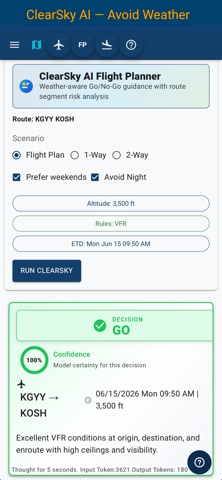
See airspace in 3D. Read ATC — not just hear it. Plan around weather with AI.
AvNav is a complete Electronic Flight Bag built for pilots flying in U.S. airspace. It combines the everyday EFB tools pilots expect — charts, plates, airport diagrams, aircraft profiles, weight and balance, checklists, weather, ADS-B traffic, flight logging, logbook, replay, and offline data — with advanced 3D visualization, live ATC transcription, simulator support, and AI-assisted flight planning.
Start with a free ground-mode preview, then unlock full cockpit capabilities with a CoPilot subscription.
FREE GROUND MODE — EXPLORER
Explore AvNav before subscribing.
• Live ATC audio and transcription • Real-time ADS-B traffic • 3D airspace and terrain visualization • Airport and traffic awareness from the ground
COPILOT — FULL EFB
Unlock the complete AvNav cockpit experience.
• AI-assisted flight planning and route analysis • FAA charts, plates, and airport diagrams • Offline maps, charts, plates, and airport data • Aircraft performance profiles • Weight and balance • Aircraft checklists • Fuel price information • Flight logging • Logbook entries • Recorded flight review and replay • PFD display support • X-Plane simulator integration • ADS-B receiver integration, including Stratux-compatible devices
BUILT FOR DAY-TO-DAY FLYING
AvNav now supports the core workflows pilots expect from an everyday EFB: plan the flight, review airports and weather, use aircraft-specific data, manage checklists, calculate weight and balance, fly with ADS-B traffic and weather, record flights, review them afterward, and build logbook entries.
ADVANCED 3D COCKPIT AWARENESS
AvNav goes beyond flat maps.
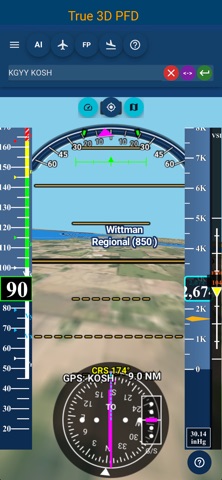
• 3D satellite terrain across U.S. airspace • 3D airspace visualization • ADS-B traffic display • Weather overlays including NEXRAD and METARs • Live ATC transcription where supported • Fused navigation from GPS, ADS-B, X-Plane, and replay sources • PFD support when attitude data is available
FLIGHT LOGGING, LOGBOOK, AND REPLAY
Record, review, and replay your flights.
• Automatic and manual flight logging • Recorded flight list • Flight replay with play, pause, seek, rate, loop, and review controls • Replay feeds the same navigation system used by the map and PFD • Create and edit logbook entries • Link recorded flights to logbook entries
X-PLANE SIMULATOR SUPPORT
Use X-Plane at home to test AvNav before flying.
• Connect AvNav to X-Plane over your local network • Drive the 3D map and PFD from simulator data • Record simulator flights • Replay simulator flights for review and testing
OFFLINE-FIRST
Download the data you need before flight.
• Maps • Charts • Plates • Airport diagrams • Airport and navigation data
Continue navigating when cockpit connectivity is limited or unavailable.
SUBSCRIPTION
• Monthly and annual CoPilot plans • Includes a 30-day trial • Auto-renews unless canceled
AvNav brings complete EFB utility, 3D situational awareness, AI planning, live ATC transcription, ADS-B traffic, flight logging, logbook, replay, and simulator testing together in one cockpit system.
Terms of Use: https://www.apple.com/legal/internet-services/itunes/dev/stdeula/
Each subscription will automatically renew 3 days before the expiration date for
the same time period. Subscriptions can be cancelled at any time before the renewal.