

Bagging: Receipts & Expenses
Bagging: Receipts & Expenses is made and published by 1576136 B.C. Ltd. AppBrain is an independent app data site and isn't affiliated with 1576136 B.C. Ltd. The app name, icon, screenshots and description belong to 1576136 B.C. Ltd. and are shown as published on the App Store.
AppBrain's verdict
- Last updated
- September 14, 2026
- Size
- 9.00 MB
User feedback
Ratings and reviews on the App StoreComments on Bagging: Receipts & Expenses for iOS
We don't have enough comments to show example comments. Please check back later.
Store listing
By 1576136 B.C. Ltd., from the App Store

Description by 1576136 B.C. Ltd. Written by the developer, not by AppBrain. Click to read.
Bagging is a free, private receipt and invoice keeper for your iPhone. Snap a photo of any receipt or invoice and Bagging reads the vendor, the total, and the date, right there on your device. Glance at what it found, fix anything that looks off, and save. The paper can go in the recycling.
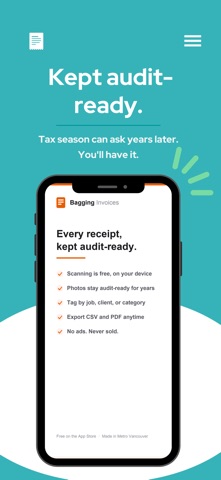
Still readable in year six.
Thermal receipts can fade within months, and the tax office can ask you to back up a claim years later. Bagging keeps the original photo and the details together, intact and exportable. When an audit, your accountant, or an expense report comes calling, you already have everything.
Built for real life, not bookkeeping homework.
Scan at the counter, or pull one in from your photo library. Bagging gives you a dated list of everything you've saved, with a running total at the top. Tap any entry to see the full photo, edit a detail, or delete it.
Find it in seconds.
New: tap search and type what you remember. A store name, a note you wrote, an invoice number, even words printed on the receipt itself. Bagging already read that text on your device, so it's all searchable.
Sort it your way.
Add a tag as you save: a category, a job, or a client. Tags autocomplete, everyone in the workspace shares the same list, and one tap filters the month to just that tag. You can also record how a receipt was paid, then filter by payment method. Both are optional.
Bring in the backlog.
Moving from another app, or sitting on a camera roll full of old receipts? Select up to 100 photos and Bagging reads them into one review list: confident reads pre-checked, unclear ones flagged, each filed under its printed date. Scanning a paper stack works too: each page becomes its own receipt.
Forward it in.
Forward an emailed receipt, a bill, or a PDF to your personal Bagging address, and it arrives ready to confirm.
See where the money goes.
The Insights tab charts your spending by week, month, or year, with totals by tag, spend by payment method, and top vendors.
Share the load.
Keep receipts in shared workspaces: one for the shop, one for the rental, one for home. Invite your partner, bookkeeper, or team with a code, and everyone sees the same tidy list. Separate businesses stay separate.
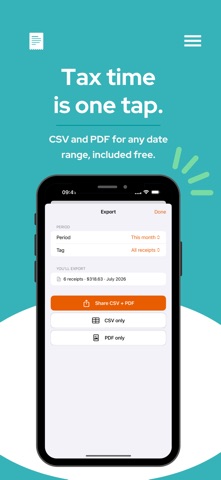
Ready when tax time or an expense report is.
Choose a date range and Bagging hands you a CSV spreadsheet and a printable PDF summary, with a grand total, straight to the share sheet to email, save to Files, or send to your accountant.
Private by design.
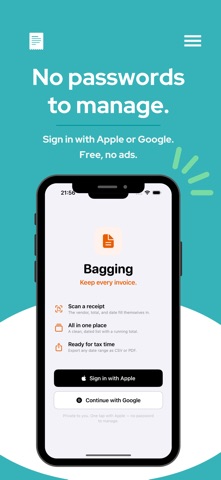
Your receipts are yours. Text recognition happens on your device. Your invoices and the details pulled from them are private to your account and the workspaces you share: never sold, never handed to advertisers, no ads. Usage analytics are anonymous and never include your receipts. Sign in with Apple or Google and skip the passwords.
WHAT YOU CAN DO
• Scan receipts and invoices with the built-in document scanner, or import from your photo library
• Let on-device text recognition fill in the vendor, total, and date
• Search by store, note, invoice number, or the text printed on the receipt
• Keep the original photo on every entry, and add a second when it takes two
• Tag receipts by category, job, or client, filter by tag, and export tags in the CSV
• Record how a receipt was paid and filter the list by payment method
• Import up to 100 receipt photos in one batch, with likely duplicates called out
• See spending charts by week, month, or year, with totals by tag, payment method, and top vendors
• Share a workspace with your partner, bookkeeper, or team using a simple invite code
• Export any date range as a CSV spreadsheet and a PDF summary via the share sheet
A FEW HONEST NOTES
Bagging records the receipt as a whole (vendor, total, and date), not individual line items, and it doesn't connect to your bank or convert currencies. It's a simple, private keeper, on purpose. And it's free.
Safety and technology
Found in the app by AppBrain- Price
- Free
- App size
- 9.00 MB
- Content rating
- Everyone
Technologies used by Bagging: Receipts & Expenses
Releases
Updates seen on the App Store- Version
- 1.0.8
- Launched
- July 2026
No changelog data
Alternatives
Similar apps and more from 1576136 B.C. Ltd.Alternatives to Bagging: Receipts & Expenses


More from 1576136 B.C. Ltd.

Rankings
App Store top chartsApp Store Rankings for Bagging: Receipts & Expenses
About the app and developer
About Bagging: Receipts & Expenses
Bagging: Receipts & Expenses is a finance app developed by 1576136 B.C. Ltd.
User Ratings
The app has no ratings yet.
App Information
Bagging: Receipts & Expenses is freely available from the App Store. The app size is 9.00 MB. The latest version available is 1.0.8. The last update was on September 14, 2026.
Technical Requirements
The app has a content rating of Everyone. The app has been available on the App Store since July 2026.
Developer information for 1576136 B.C. Ltd.
Address:
Frequently asked questions about Bagging: Receipts & Expenses
Is Bagging: Receipts & Expenses free?
Yes. Bagging: Receipts & Expenses is free on the App Store.
Is Bagging: Receipts & Expenses still available?
Yes. Bagging: Receipts & Expenses is on the App Store, and the last update we saw was on September 14, 2026.
How large is Bagging: Receipts & Expenses?
Bagging: Receipts & Expenses is 9.00 MB.
Is Bagging: Receipts & Expenses suitable for children?
App Store rates the content of Bagging: Receipts & Expenses as suitable for everyone.
Who made Bagging: Receipts & Expenses?
Bagging: Receipts & Expenses was developed by 1576136 B.C. Ltd. It is listed in the finance category on the App Store.
What are the best alternatives to Bagging: Receipts & Expenses?
People looking at Bagging: Receipts & Expenses also look at these finance apps: Finn: Receipt Tracker, Crumple: Receipts & Taxes, Receipto: Receipt Scanner, BillSnap AI, ScanKeep Receipts-Scanner.