






AppBrain's verdict
- Rating on App Store
- 4.67
- 9 ratings
- Last updated
- November 18, 2026
- Size
- 85.1 MB
It doesn't have enough ratings yet to judge what users think.
User feedback
Ratings and reviews on the App StoreComments on Breveto: Writing App & Notes for iOS
We don't have enough comments to show example comments. Please check back later.
Store listing
By IdeaPunch, from the App StoreDescription by IdeaPunch Written by the developer, not by AppBrain. Click to read.
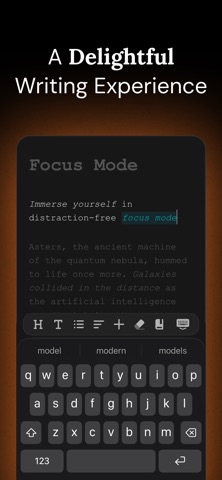
## A DELIGHTFUL WRITING EXPERIENCE
Once you’ve tried Breveto, you’ll never look back. Every detail has been crafted to make writing a joy.
• Immerse yourself in distraction-free focus mode, or keep your cursor centered with typewriter mode.
• Format text just by selecting it, or with slash commands.
• Add images, tables, diagrams, file attachments, audio, math, and more to your notes.
• Built-in grammar checking catches mistakes as you write, privately on your device.
• Find zen with Breveto’s minimalist and aesthetic design.
## YOUR FILES, FINALLY ORGANIZED
Drag, drop, and organize your files with Breveto’s folder system. Pin essential files, or give each project a dedicated workspace. Nest folders as deep as you need, and sort them by name, date, or your own order. Everything stays exactly where you left it, so older files never get buried in a sea of new ones.
## BEAUTIFUL THEMES
Your words are personal. Your workspace should be too. Make Breveto your own with stunning themes, typography, and shortcuts, or build a theme from scratch.
## SEAMLESS SYNC
Your library syncs privately and conflict-free through iCloud, and Breveto is local-first, so you can write offline anytime.
## FOR POWER USERS
Customize every shortcut, link notes with wiki links and deep links, and use Quick Open, Breveto’s command palette, to jump to any file, rename and move files, change text case, switch workspaces, and more, all from the keyboard.
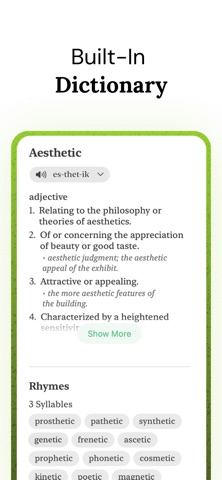
## BUILT-IN DICTIONARY, THESAURUS, & RHYMES
Look up definitions, synonyms, antonyms, pronunciations, and rhymes in one click. Breveto is your dictionary, thesaurus, and rhyme book all in one place.
## MARKDOWN
Write at the speed of Markdown, without the clutter. Format with Markdown shortcuts, and copy, paste, import, and export as Markdown too.
## IMPORT & EXPORT
Easily bring over your notes from other apps, or import Markdown, RTF, HTML, and TextBundle files. Export to PDF, Word (DOCX), EPUB, Markdown, and more, or print in beautiful styles.
## MORE FEATURES
• View word count, reading time, and more for a document or a selection.
• See your file's structure in the outline, jump to any section, or drag to rearrange sections.
• Create flowcharts and diagrams with Mermaid, and write math equations with LaTeX.
• Stay organized with checklists and to-do lists.
• Create tables, resize and rearrange columns, and copy them as Markdown or CSV.
• Add captions to almost anything: images, tables, diagrams, math, and code.
• Use rich formatting like multi-color highlights, first-line indents, syntax-highlighted code blocks, and more.
• Search all your documents and attachments.
• Enjoy peace of mind with automatic backups.
## WHAT CAN I USE IT FOR?
You can use Breveto for note-taking, writing books, journaling, to-do lists, novels, essays, class notes, blogging, screenplays, poetry, lyrics, mind mapping; you name it!
> “I use Breveto to keep all my notes, reading list, Breveto’s roadmap, songs I write, and more. It’s my personal knowledge base.” — Jordan, Founder of Breveto
## PRICING
Breveto is a premium app and requires a subscription. We offer a free trial for new users, and you can explore most of Breveto for free in read-only mode.
Along with everything else, Breveto Pro lets you:
• Create and edit an unlimited number of files and workspaces.
• Look up definitions, synonyms, and rhymes in the dictionary.
• Support the app and a tiny independent software company.
------
## QUESTIONS? FEEDBACK?
We’d love to hear your feedback!
Learn how to use Breveto at: https://breveto.com/docs
Email: contact@ideapunch.com
Twitter: @IdeaPunchLLC
Terms of Use: https://breveto.com/terms-and-conditions
Privacy Policy: https://breveto.com/privacy-policy
Safety and technology
Found in the app by AppBrain- Price
- Free
- App size
- 85.1 MB
- Content rating
- Everyone
Technologies used by Breveto: Writing App & Notes
Releases
Updates seen on the App Store- Version
- 2.5.0
- Launched
- March 2023
No changelog data
Alternatives
Similar apps and more from IdeaPunchAlternatives to Breveto: Writing App & Notes





More from IdeaPunch



Rankings
App Store top chartsApp Store Rankings for Breveto: Writing App & Notes
About the app and developer
About Breveto: Writing App & Notes
Breveto: Writing App & Notes is a productivity app developed by IdeaPunch.
User Ratings
Breveto: Writing App & Notes is rated 4.67 out of 5 stars. The rating is based on 9 ratings.
App Information
Breveto: Writing App & Notes is freely available from the App Store. The app size is 85.13 MB. The latest version available is 2.5.0. The last update was on November 18, 2026.
Technical Requirements
The app has a content rating of Everyone. The app has been available on the App Store since March 2023.
Breveto: Writing App & Notes is made and published by IdeaPunch. AppBrain is an independent app data site and isn't affiliated with IdeaPunch. The app name, icon, screenshots and description belong to IdeaPunch and are shown as published on the App Store.
Developer information for IdeaPunch
Address: