

Brother iPrint
Brother iPrint is made and published by Supplier Relations US, LLC. AppBrain is an independent app data site and isn't affiliated with Supplier Relations US, LLC. The app name, icon, screenshots and description belong to Supplier Relations US, LLC. and are shown as published on the App Store.
AppBrain's verdict
- Last updated
- June 15, 2024
Rankings
App Store top chartsApp Store Rankings for Brother iPrint
Competitors
Similar apps and more from Supplier Relations US, LLC.More from Supplier Relations US, LLC.







Releases
Updates seen on the App Store- Version
- 1.0
- Launched
- June 2024
No changelog data
User feedback
Ratings and reviews on the App StoreComments on Brother iPrint for iOS
We don't have enough comments to show example comments. Please check back later.
Technology
Found in the app by AppBrain- Price
- $0.99
- App size
- 8.00 MB
- Content rating
- Everyone
Technologies used by Brother iPrint
About the app and developer
About Brother iPrint
Brother iPrint is an utilities app developed by Supplier Relations US, LLC.
User Ratings
The app has no ratings yet.
App Information
Brother iPrint costs $0.99. The app size is 8.00 MB. The latest version available is 1.0. The last update was on June 15, 2024.
Technical Requirements
The app has a content rating of Everyone. The app has been available on the App Store since June 2024.
Developer information for Supplier Relations US, LLC.
Address:
Store listing
By Supplier Relations US, LLC., from the App Store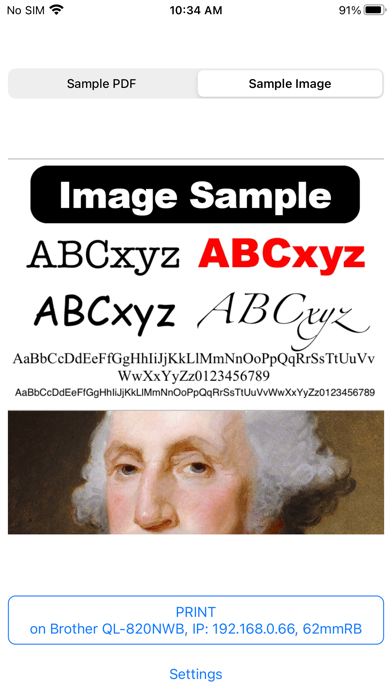




Description by Supplier Relations US, LLC. Written by the developer, not by AppBrain. Click to read.
Whether you have a Brother TD, QL, MW, RJ, PT, or PJ printer with WiFi, Bluetooth, Direct WiFi, or MFi, this app is your bridge to print any PDF files or images from any app that supports Print or Share features. It's also a great app to test any Brother printers. It automatically defaults to the most commonly used settings. If you don’t have a Brother printer connected, the app still allows you to view the settings of any supported printers. Setup is super fast! The app remembers all your settings, no matter how many Brother printers you have. The next time you wish to print, it takes only one tap.
### Initial Setup:
1. **Download the app.**
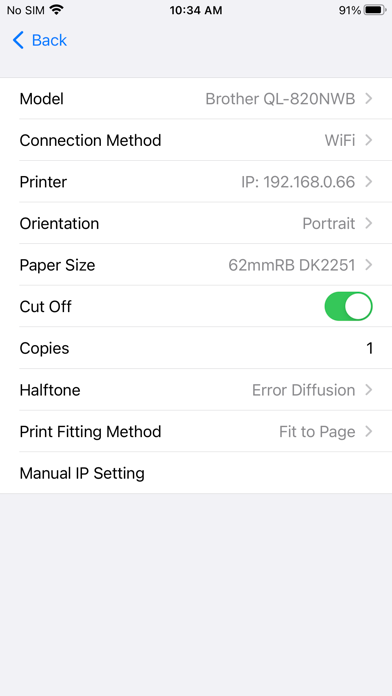
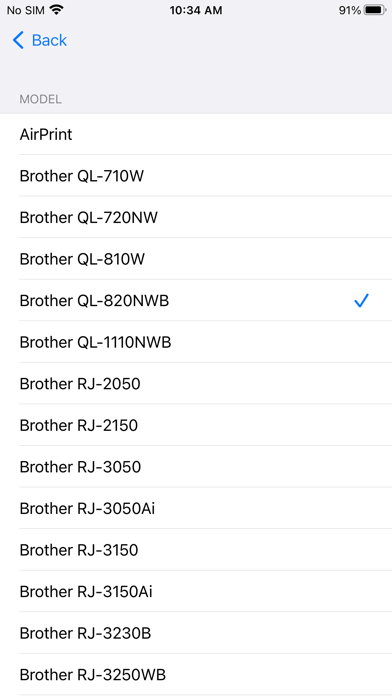
2. **Tap Settings and select a model.**
3. **Tap Printer to find all printers connected to your network (WiFi or Bluetooth).** Some networks may be slower and require you to tap the Printer again.
Now you are ready to print! The entire initial setup process, from download to print, should take less than 10 seconds. Subsequently, printing is just ONE TAP. You do not need to open the app to print; it will automatically appear when you select Brother iPrint from the pop-up menu.
### Advantages over AirPrint:
1. Set Halftone (Threshold, Dither, Error Diffusion)
2. Choose a specific media
3. Enable or disable auto cut
4. Set orientation (Portrait, Landscape)
5. Default to the previously selected printer
6. Faster printing
7. Support for Bluetooth and MFi (AirPrint is only WiFi)
Supported Brother Printers:
QL-710W
QL-720NW
QL-810W
QL-820NWB
QL-1110NWB
QL-810Wc
QL-1110NWBc
RJ-2050
RJ-2150
RJ-3050
RJ-3050Ai
RJ-3150
RJ-3150Ai
RJ-3230B
RJ-3250WB
RJ-4230B
RJ-4250WB
RJ-4030Ai
RJ-4040
TD-2120W
TD-2120B
TD-2130W
TD-2130B
TD-2125NWB
TD-2135NWB
TD-4550DNWB
MW-145MF
MW-260MF
PT-P300BT
PT-P710BT
PT-P750W
PT-P900W
PT-P910BT
PT-P950NW
PT-D460BT
PT-D610BT
PJ-673
PJ-763MFi
PJ-773
PJ-862
PJ-863
PJ-883
AirPrint Printers
The developer is not affiliated with, endorsed by, or in any way connected to Brother Industries, Ltd. or its subsidiaries.