

BTFind: Bluetooth Finder
BTFind: Bluetooth Finder is made and published by Optimize IT. AppBrain is an independent app data site and isn't affiliated with Optimize IT. The app name, icon, screenshots and description belong to Optimize IT and are shown as published on the App Store.
AppBrain's verdict
- Rating on App Store
- 4.83
- 6 ratings
- Last updated
- September 9, 2026
It doesn't have enough ratings yet to judge what users think.
Rankings
App Store top chartsApp Store Rankings for BTFind: Bluetooth Finder
Competitors
Similar apps and more from Optimize ITMore from Optimize IT


Releases
Updates seen on the App Store- Version
- 1.0.5
- Launched
- August 2024
No changelog data
User feedback
Ratings and reviews on the App StoreComments on BTFind: Bluetooth Finder for iOS
We don't have enough comments to show example comments. Please check back later.
Technology
Found in the app by AppBrain- Price
- Free
- App size
- 17.1 MB
- Content rating
- Everyone
Technologies used by BTFind: Bluetooth Finder
About the app and developer
About BTFind: Bluetooth Finder
BTFind: Bluetooth Finder is an utilities app developed by Optimize IT.
What is the rating of BTFind: Bluetooth Finder?
BTFind: Bluetooth Finder is rated 4.83 out of 5 stars, based on 6 ratings.
Is BTFind: Bluetooth Finder free?
BTFind: Bluetooth Finder is free. The app size is 17.10 MB. The latest version available is 1.0.5. The last update was on September 9, 2026.
What are the requirements for BTFind: Bluetooth Finder?
The app has a content rating of Everyone. The app has been available on the App Store since August 2024.
Developer information for Optimize IT
Address:
Frequently asked questions about BTFind: Bluetooth Finder
Is BTFind: Bluetooth Finder free?
Yes. BTFind: Bluetooth Finder is free on the App Store.
Is BTFind: Bluetooth Finder still available?
Yes. BTFind: Bluetooth Finder is on the App Store, and the last update we saw was on September 9, 2026.
How large is BTFind: Bluetooth Finder?
BTFind: Bluetooth Finder is 17.10 MB.
Is BTFind: Bluetooth Finder suitable for children?
App Store rates the content of BTFind: Bluetooth Finder as suitable for everyone.
How do people rate BTFind: Bluetooth Finder?
BTFind: Bluetooth Finder scores 4.83 out of 5 stars, from 6 ratings on the App Store.
Who made BTFind: Bluetooth Finder?
BTFind: Bluetooth Finder was developed by Optimize IT. It is listed in the utilities category on the App Store.
Store listing
By Optimize IT, from the App Store


Description by Optimize IT Written by the developer, not by AppBrain. Click to read.
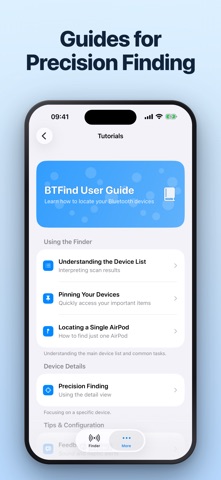
BTFind scans for the Bluetooth devices around you and shows how close each one is. Walk toward it, watch the reading rise, and find what you misplaced.
# SEE EVERY DEVICE IN RANGE
Every Bluetooth device nearby appears in one list with a live reading. Pick the one you are looking for and start tracking it.
# TRACK IT AS YOU GET CLOSER
The closeness reading updates as you move, and a history graph shows whether you are getting warmer or colder. Sound and vibration can tell you the same thing without looking at the screen.
# PIN WHAT YOU TRACK OFTEN
Pin the devices you look for most and they stay at the top of the list, above everything else in range.
# CHOOSE YOUR UNITS
Read distance in metres or feet, whichever you think in.
# WHAT IT FINDS
- AirPods, and Bluetooth earbuds, earphones and headphones
- iPhone, iPad, and Apple Watch
- Portable speakers and smart devices
- Fitness trackers and smartwatches
# HOW TO USE IT
1. Open BTFind and let it scan.
2. Choose the device you are looking for.
3. Move around and watch the reading rise.
4. Follow it until you have it in hand.
# WORTH KNOWING
- The device has to be powered on and in Bluetooth range to appear.
- Start looking before the battery runs out — a device that is off cannot be found.
- Closeness is an indicator derived from signal strength, not a measured distance. It moves with orientation and with anything standing between you and the device.
- BTFind is not affiliated with any company named here. AirPods and Apple Watch are trademarks of Apple Inc.
# SUBSCRIPTIONS AND AUTOMATIC RENEWAL
- Your subscription includes access to the features listed above.
- Payment will be charged to your Apple ID Account at confirmation of purchase.
- Subscription automatically renews unless auto-renewal is turned off at least 24 hours before the end of the current period.
- Your account will be charged for renewal within 24 hours prior to the end of your selected subscription period.
- Subscriptions can be managed and auto-renewal turned off in your App Store Account Settings.
# LEGAL
Terms of Service: https://cooptimizeit.com/terms-of-service
Privacy Policy: https://cooptimizeit.com/privacy-policy
# SUPPORT
Contact us at info@cooptimizeit.com. We reply within 48 hours.