

RecorAI: AI Note Recorder
RecorAI: AI Note Recorder is made and published by Optimize IT. AppBrain is an independent app data site and isn't affiliated with Optimize IT. The app name, icon, screenshots and description belong to Optimize IT and are shown as published on the App Store.
AppBrain's verdict
- Rating on App Store
- 4.20
- 5 ratings
- Last updated
- September 8, 2026
- Size
- 27.1 MB
It doesn't have enough ratings yet to judge what users think.
User feedback
Ratings and reviews on the App StoreComments on RecorAI: AI Note Recorder for iOS
We don't have enough comments to show example comments. Please check back later.
Store listing
By Optimize IT, from the App Store




Description by Optimize IT Written by the developer, not by AppBrain. Click to read.
RecorAI records meetings, lectures, and ideas, transcribes every word, and lets you ask questions about what was said. Built for people who need more from a recording than a file they have to listen to again.
# RECORD WITHOUT WATCHING THE SCREEN
Recording continues while you use other apps, through calls and long sessions. Pause and resume as you go, and import audio you already have from Voice Memos or anywhere else.
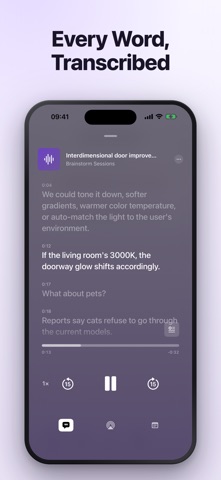
# EVERY WORD, TRANSCRIBED
Transcription arrives shortly after a recording finishes, timestamped line by line, and the player follows along as it plays. Edit anything the transcriber misheard.
# TRANSCRIBES 90+ LANGUAGES
Including English, Spanish, French, German, Portuguese, Italian, Dutch, Russian, Ukrainian, Polish, Turkish, Arabic, Hebrew, Hindi, Chinese, Japanese, Korean, Indonesian, Vietnamese, Thai, Swedish, Danish, Norwegian, Finnish, Greek, Czech, and Romanian. The language is detected from the audio — there is nothing to set before you record.
# ASK ABOUT YOUR RECORDINGS
Chat with a recording and get answers drawn from what was actually said, each one citing the moment it came from. Open a chat across several recordings to connect what was decided in one with what was said in another.
# AI SUMMARY AND ACTION ITEMS
A summary of any recording, with the tasks it produced pulled out as a list. If you do not know what to ask, the app proposes questions about that recording's own content.
# NOTES AND PHOTOS AS YOU RECORD
Add a note or take a photo without stopping the recording. Each one is pinned to the second it happened and sits on the timeline beside the audio.
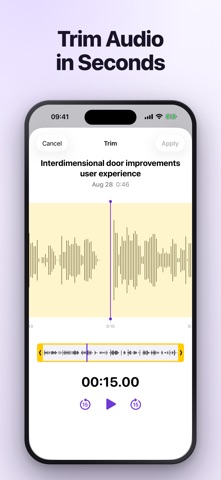
# TRIM IN SECONDS
Cut the dead air off either end with a zoomable waveform. The transcript, the notes, and the photos move with the cut.
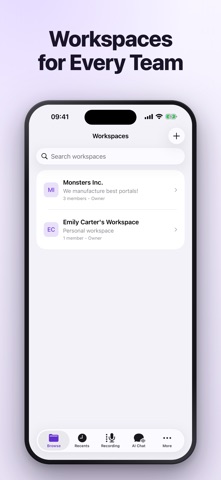
# WORKSPACES FOR EVERY TEAM
Keep your own recordings in a personal workspace and shared work in a team one. Invite members, and everything syncs to whichever device they open it on.
# EXPORT AUDIO, TEXT, AND NOTES
Share the audio, the transcript, the notes, and the images — together in one archive or separately. AirPlay support for playback on speakers and other devices.
# WHAT PEOPLE USE IT FOR
- Meetings, so decisions and action items are written down without anyone taking minutes
- Lectures and seminars, so you can listen instead of writing
- Interviews, recorded and searchable afterwards
- Ideas and voice memos, thought through with the AI later
- Study sessions, turned into text you can search
# SUBSCRIPTIONS AND AUTOMATIC RENEWAL
- Your subscription includes access to all AI features, unlimited recording, and cloud storage.
- Payment will be charged to your Apple ID Account at confirmation of purchase.
- Subscription automatically renews unless auto-renewal is turned off at least 24 hours before the end of the current period.
- Your account will be charged for renewal within 24 hours prior to the end of your selected subscription period.
- Subscriptions can be managed and auto-renewal turned off in your App Store Account Settings.
# LEGAL
Terms of Service: https://cooptimizeit.com/terms-of-service
Privacy Policy: https://cooptimizeit.com/privacy-policy
# SUPPORT
Contact us at info@recorai.io. We reply within 48 hours.
Safety and technology
Found in the app by AppBrain- Price
- Free
- App size
- 27.1 MB
- Content rating
- Everyone
Technologies used by RecorAI: AI Note Recorder
Releases
Updates seen on the App Store- Version
- 1.0.4
- Launched
- November 2025
No changelog data
Alternatives
Similar apps and more from Optimize ITAlternatives to RecorAI: AI Note Recorder


More from Optimize IT


Rankings
App Store top chartsApp Store Rankings for RecorAI: AI Note Recorder
About the app and developer
About RecorAI: AI Note Recorder
RecorAI: AI Note Recorder is a productivity app developed by Optimize IT.
User Ratings
RecorAI: AI Note Recorder is rated 4.20 out of 5 stars. The rating is based on 5 ratings.
App Information
RecorAI: AI Note Recorder is freely available from the App Store. The app size is 27.10 MB. The latest version available is 1.0.4. The last update was on September 8, 2026.
Technical Requirements
The app has a content rating of Everyone. The app has been available on the App Store since November 2025.
Developer information for Optimize IT
Address:
Frequently asked questions about RecorAI: AI Note Recorder
Is RecorAI: AI Note Recorder free?
Yes. RecorAI: AI Note Recorder is free on the App Store.
Is RecorAI: AI Note Recorder still available?
Yes. RecorAI: AI Note Recorder is on the App Store, and the last update we saw was on September 8, 2026.
How large is RecorAI: AI Note Recorder?
RecorAI: AI Note Recorder is 27.10 MB.
Is RecorAI: AI Note Recorder suitable for children?
App Store rates the content of RecorAI: AI Note Recorder as suitable for everyone.
How do people rate RecorAI: AI Note Recorder?
RecorAI: AI Note Recorder scores 4.20 out of 5 stars, from 5 ratings on the App Store.
Who made RecorAI: AI Note Recorder?
RecorAI: AI Note Recorder was developed by Optimize IT. It is listed in the productivity category on the App Store.
What are the best alternatives to RecorAI: AI Note Recorder?
People looking at RecorAI: AI Note Recorder also look at these productivity apps: AI QuickNote: Smart Note Taker, Transcribe AI Voice Note Taker, AI Note Taker: Meeting Minutes, ChatConnect - AI Assistant, Wispr Flow: AI Voice Keyboard.