

Stud Finder Wall Detector Tool
Stud Finder Wall Detector Tool is made and published by Optimize IT. AppBrain is an independent app data site and isn't affiliated with Optimize IT. The app name, icon, screenshots and description belong to Optimize IT and are shown as published on the App Store.
AppBrain's verdict
Well rated- Rating on App Store
- 4.10
- 255 ratings
- Last updated
- September 5, 2026
Users rate it well: 4.1 stars from 255 ratings.
Rankings
App Store top chartsApp Store Rankings for Stud Finder Wall Detector Tool
Competitors
Similar apps and more from Optimize ITAlternatives to Stud Finder Wall Detector Tool






More from Optimize IT


Releases
Updates seen on the App Store- Version
- 2.0.5
- Launched
- February 2024
No changelog data
User feedback
Ratings and reviews on the App StoreComments on Stud Finder Wall Detector Tool for iOS
We don't have enough comments to show example comments. Please check back later.
Technology
Found in the app by AppBrain- Price
- Free
- App size
- 19.3 MB
- Content rating
- Everyone
Technologies used by Stud Finder Wall Detector Tool
About the app and developer
About Stud Finder Wall Detector Tool
Stud Finder Wall Detector Tool is an utilities app developed by Optimize IT.
What is the rating of Stud Finder Wall Detector Tool?
Stud Finder Wall Detector Tool is rated 4.10 out of 5 stars, based on 260 ratings.
Is Stud Finder Wall Detector Tool free?
Stud Finder Wall Detector Tool is free. The app size is 19.27 MB. The latest version available is 2.0.5. The last update was on September 5, 2026.
What are the requirements for Stud Finder Wall Detector Tool?
The app has a content rating of Everyone. The app has been available on the App Store since February 2024.
Developer information for Optimize IT
Address:
Frequently asked questions about Stud Finder Wall Detector Tool
Is Stud Finder Wall Detector Tool free?
Yes. Stud Finder Wall Detector Tool is free on the App Store.
Is Stud Finder Wall Detector Tool still available?
Yes. Stud Finder Wall Detector Tool is on the App Store, and the last update we saw was on September 5, 2026.
How large is Stud Finder Wall Detector Tool?
Stud Finder Wall Detector Tool is 19.27 MB.
Is Stud Finder Wall Detector Tool suitable for children?
App Store rates the content of Stud Finder Wall Detector Tool as suitable for everyone.
How do people rate Stud Finder Wall Detector Tool?
Stud Finder Wall Detector Tool scores 4.10 out of 5 stars, from 255 ratings on the App Store.
Who made Stud Finder Wall Detector Tool?
Stud Finder Wall Detector Tool was developed by Optimize IT. It is listed in the utilities category on the App Store.
What are the best alternatives to Stud Finder Wall Detector Tool?
People looking at Stud Finder Wall Detector Tool also look at these utilities apps: Stud Finder Detector, Stud Finder & Wall Detector, Metal Stud Finder & Detector, Stud Finder - Metal Detector, Wall Stud Magnetic Detector.
Store listing
By Optimize IT, from the App Store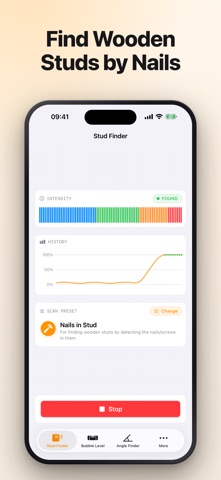


Description by Optimize IT Written by the developer, not by AppBrain. Click to read.
Find the studs behind a wall, check whether a surface is level, and measure or match an angle. Every reading comes with visual, sound, and haptic feedback, so you can keep the phone against the wall and still know what it found.
# MAGNETIC STUD FINDER WITH FIVE PRESETS
Wooden studs are held by nails and screws, and those are what the magnetometer sees. Choose the preset that matches what you are looking for — Nails in Stud, Metal Stud, Metal Pipe, Electrical Wiring, or High Precision — and the filtering adjusts to it.
# ACCURATE BUBBLE LEVEL
Horizontal, vertical, and surface bubbles, with the exact tilt in degrees beside them. Set the sound to any axis and you can level a shelf without watching the screen.
# ANGLE FINDER WITH A LOCKED REFERENCE
Measure an angle, lock it as a target, and match the second cut to the first. The dial shades the gap between the two, so how far off you are is something you see rather than calculate.
# FEEDBACK YOU CHOOSE
Sound and haptics are configurable per axis and per intensity. Work quietly, or set it loud enough to hear over a drill.
# APPLE WATCH COMPANION
Mirror the readings to your wrist. The phone stays flat against the wall while you read detection strength, bubble alignment, or the current angle on the watch.
# VISUAL INDICATORS THAT SHOW THEIR WORK
A strength meter and a history graph, so a peak is visible as a peak rather than as a single number that has already moved. The angle finder draws a full compass with degree markings.
# TUTORIALS INCLUDED
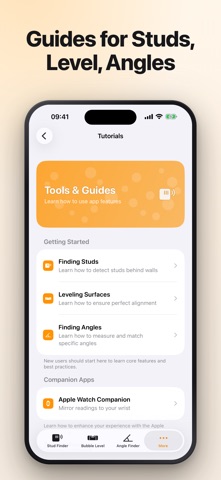
Step-by-step guides for finding studs, levelling surfaces, and measuring angles, plus how to use the Apple Watch companion.
# SUBSCRIPTIONS AND AUTOMATIC RENEWAL
- Your subscription includes access to all tools and the Apple Watch companion app.
- Payment will be charged to your Apple ID Account at confirmation of purchase.
- Subscription automatically renews unless auto-renewal is turned off at least 24 hours before the end of the current period.
- Your account will be charged for renewal within 24 hours prior to the end of your selected subscription period.
- Subscriptions can be managed and auto-renewal turned off in your App Store Account Settings.
# LEGAL
Terms of Service: https://cooptimizeit.com/terms-of-service
Privacy Policy: https://cooptimizeit.com/privacy-policy
# SUPPORT
Contact us at info@cooptimizeit.com. We reply within 48 hours.