

Call Scheduler is made and published by Seiya.k. AppBrain is an independent app data site and isn't affiliated with Seiya.k. The app name, icon, screenshots and description belong to Seiya.k and are shown as published on the App Store.
AppBrain's verdict
- Rating on App Store
- 5.00
- 1 ratings
- Last updated
- October 15, 2026
It doesn't have enough ratings yet to judge what users think.
Rankings
App Store top chartsApp Store Rankings for Call Scheduler
Competitors
Similar apps and more from Seiya.kMore from Seiya.k


Releases
Updates seen on the App Store- Version
- 1.0.18
- Launched
- March 2026
No changelog data
User feedback
Ratings and reviews on the App StoreComments on Call Scheduler for iOS
We don't have enough comments to show example comments. Please check back later.
Technology
Found in the app by AppBrain- Price
- Free
- App size
- 49.9 MB
- Content rating
- Everyone
Technologies used by Call Scheduler
About the app and developer
About Call Scheduler
Call Scheduler is a productivity app developed by Seiya.k.
What is the rating of Call Scheduler?
Call Scheduler is rated 5.00 out of 5 stars, based on one rating ratings.
Is Call Scheduler free?
Call Scheduler is free. The app size is 49.91 MB. The latest version available is 1.0.18. The last update was on October 15, 2026.
What are the requirements for Call Scheduler?
The app has a content rating of Everyone. The app has been available on the App Store since March 2026.
Developer information for Seiya.k
Address:
Store listing
By Seiya.k, from the App Store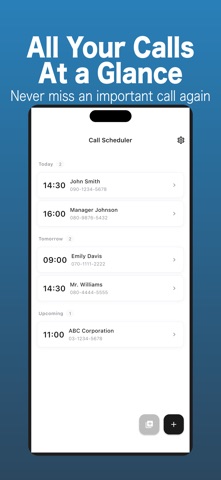

Description by Seiya.k Written by the developer, not by AppBrain. Click to read.
Call Scheduler reminds you at the right moment, and one tap on the reminder opens the number ready to dial.
Set the date, time and number once. The app does the remembering.
This app does not make calls automatically.
All calls are started manually by the user.
Key Features
Call Reminders
Schedule phone calls and receive a notification before the scheduled time so you never forget.
Tap to Call
Open the call preparation screen from the reminder and start dialing with a single tap.
Contact Selection
Choose phone numbers directly from your iOS contacts for quick scheduling.
Edit and Manage Calls
Update the date, time, number, or notes for any scheduled call.
Simple Call Preparation Screen
View the phone number, notes, and scheduled time before placing the call.
Use Cases
Perfect for situations where you must remember to call someone at a specific time:
Business callbacks
Appointment confirmations
Freelancers managing client calls
Daily reminders for important phone calls
Elderly users who want help remembering to call
Privacy Focused
Your scheduled calls are stored locally on your device.
Contact access is requested only when you choose to select a number from your contacts.
Free Version
Up to three active scheduled calls
Call reminders
Manual call helper
Contact import
Pro Version
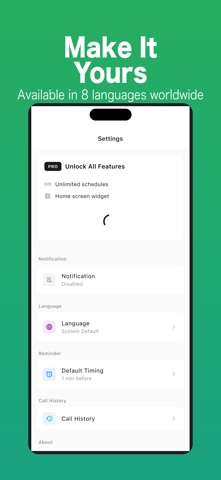
Unlimited scheduled calls
Ad-free experience
Call history
Search by phone number or notes
Home screen widget for the next scheduled call
Reusable call templates
Important Notes
Call Scheduler does not perform automatic dialing.
The app only reminds you and helps you start a call manually using the iPhone dialer.
Pricing
Free: schedule calls (with a limit), call history, and reusable templates.
Call Scheduler Pro (monthly / yearly auto-renewable subscription): removes the scheduling limit and hides ads.
Prices are shown in the app. Payment is charged to your Apple ID account and renews automatically unless auto-renew is turned off at least 24 hours before the end of the current period. You can manage or cancel your subscription anytime in your App Store account settings.
Terms of Use (EULA): https://www.apple.com/legal/internet-services/itunes/dev/stdeula/
Privacy Policy: https://fillapps.com/privacy/