

PC View Mode for Safari
PC View Mode for Safari is made and published by Seiya.k. AppBrain is an independent app data site and isn't affiliated with Seiya.k. The app name, icon, screenshots and description belong to Seiya.k and are shown as published on the App Store.
AppBrain's verdict
- Last updated
- October 4, 2026
- Size
- 6.63 MB
User feedback
Ratings and reviews on the App StoreComments on PC View Mode for Safari for iOS
We don't have enough comments to show example comments. Please check back later.
Store listing
By Seiya.k, from the App Store

Description by Seiya.k Written by the developer, not by AppBrain. Click to read.
Or a site told you "Please use a PC to access this page" and stopped you there.
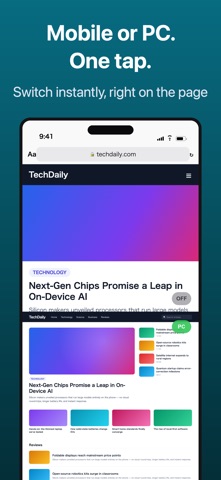
PC View Mode is a Safari extension that opens those sites on iPhone and iPad as the real desktop version.
▼ What it does
· Tap the button once and the site switches to its desktop layout
· The site is remembered, so it opens in desktop view automatically from then on
· Tap the same button again to go back to the mobile layout
▼ Why it works where Safari's built-in option doesn't
Safari's built-in option only changes how your browser identifies itself (the User-Agent).
Your screen width stays the same, so sites that pick a layout by width stay in mobile mode.
PC View Mode changes both: how the browser identifies itself and the page width it reports.
That is why sites that ignored the built-in option switch to their desktop layout here.
▼ Made for
· Working in company systems and admin panels (WordPress, AWS, internal tools) while away from your desk
· Booking and member sites that show "desktop only" or block phones
· YouTube, Amazon, eBay and Wikipedia with the full desktop UI, filters and comparison tables
· Using an iPad as a laptop replacement, with sites looking exactly as they do on a PC
▼ Key features
· One-tap switch between desktop and mobile view
· Per-site rules remembered automatically (manage or delete them from the settings list)
· Three page widths to choose from (1024px / 1280px / 1440px)
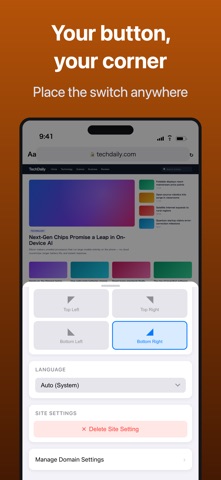
· Floating button on the page: pick any of the four corners, or hide it
· UI in 33 languages, with a manual language override
▼ No surprises
· One-time purchase. No subscription, no in-app purchases
· No ads
· No data collection. All settings stay on your device
Requirements: Safari on iOS 16 or later (iPhone / iPad). iOS 16.4 or later recommended.
On first use, turn on PC View Mode under Settings → Safari → Extensions. A step-by-step guide is included in the app.
Safety and technology
Found in the app by AppBrain- Price
- $1.99
- App size
- 6.63 MB
- Content rating
- Everyone
Technologies used by PC View Mode for Safari
Releases
Updates seen on the App Store- Version
- 1.3.6
- Launched
- December 2025
No changelog data
Alternatives
Similar apps and more from Seiya.kMore from Seiya.k


Rankings
App Store top charts- Highest rank
- #11
- Chart
- Top Paid
- Utilities
- Country
- Indonesia
App Store Rankings for PC View Mode for Safari
Top rankings
| Rank | Country | Category | List |
|---|---|---|---|
| 11 | Indonesia | Utilities | Top Paid |
Ranking history in Indonesia
About the app and developer
About PC View Mode for Safari
PC View Mode for Safari is an utilities app developed by Seiya.k.
User Ratings
The app has no ratings yet.
App Information
PC View Mode for Safari costs $1.99. The app size is 6.63 MB. The latest version available is 1.3.6. The last update was on October 4, 2026.
Technical Requirements
The app has a content rating of Everyone. The app has been available on the App Store since December 2025.
Developer information for Seiya.k
Address: