

Capster: AI Captions for Video
Capster: AI Captions for Video is made and published by Arjesh Vadadoriya. AppBrain is an independent app data site and isn't affiliated with Arjesh Vadadoriya. The app name, icon, screenshots and description belong to Arjesh Vadadoriya and are shown as published on the App Store.
AppBrain's verdict
- Last updated
- October 1, 2026
- Size
- 32.5 MB
User feedback
Ratings and reviews on the App StoreComments on Capster: AI Captions for Video for iOS
We don't have enough comments to show example comments. Please check back later.
Store listing
By Arjesh Vadadoriya, from the App Store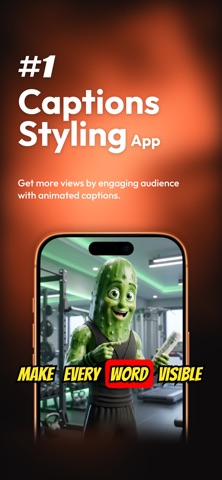


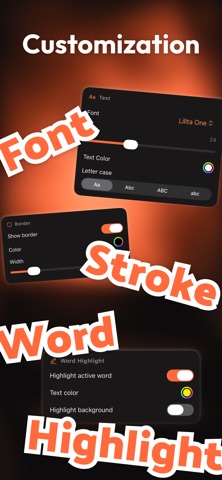
Description by Arjesh Vadadoriya Written by the developer, not by AppBrain. Click to read.
Most people scroll with the sound off. Captions keep them watching, and Capster saves you from timing them by hand.
AUTO CAPTIONS IN 99 LANGUAGES
- Import videos from Photos or Files
- Speech is transcribed automatically, with timing for every word
- The spoken language is detected automatically, across 99 languages
- Translate captions into 86 languages, including Spanish, French, German, Portuguese, Hindi and Japanese
- Long lines split into short, readable captions automatically
- No speech in the clip? Add captions yourself
ANIMATED CAPTION STYLES
- 17 ready-made presets: Plain, Yellow Desert, Comics, Pink Sun, Midnight, Glow and One Word
- 6 cinematic real estate shorts type styles
- Every preset plays a live animated preview
- 18 caption fonts, with size, color, letter case and alignment
- Outline, drop shadow, and a background with color, corner radius and padding
- Karaoke-style highlighting gives the spoken word its own color and background
- Word pop, plus fade, slide, scale and pop in and out animations
- Top, center or bottom placement, or place captions exactly where you want
- Save your own styles and reuse them on other videos
Some styles and controls require Capster Pro.
EDIT WORDS AND TIMING
- Tap any caption to fix its text
- Retime a caption by setting its start or end to the playhead
- Split, merge, add or delete captions
- Every change shows on the video instantly
WHAT YOU SEE IS WHAT YOU EXPORT
- Preview and export use the same rendering engine, so your final video matches the preview exactly
- Captions are burned in, so they play everywhere: Reels, TikTok, YouTube Shorts, Stories
- Portrait, square and landscape video, including rotated iPhone footage
- Save to Photos in one tap as a high-quality MP4
YOUR PROJECTS STAY ON YOUR DEVICE
- Every project is saved on device. Rename it, reopen it, or export it again any time
- Try the built-in sample clip with every Pro feature unlocked
- No account or sign-up needed
CAPSTER PRO
The free version includes 5 transcriptions and videos up to 2 minutes. Free exports include a Capster watermark and end card.
Upgrade to Pro for:
- Unlimited automatic captions
- Videos of any length
- No watermark and no end card
- All presets and animations
- Full style controls, including precise caption placement
Transcription requires an internet connection.
Pro is an auto-renewing subscription. Payment is charged to your Apple Account at confirmation of purchase. The subscription renews automatically unless cancelled at least 24 hours before the end of the current period. Manage or cancel any time in your Apple Account settings.
Privacy Policy: https://capster.cc/privacy/
Terms of Use: https://capster.cc/terms/
Questions or feedback? arjeshvadadoriya@gmail.com
Safety and technology
Found in the app by AppBrain- Price
- Free
- App size
- 32.5 MB
- Content rating
- Everyone
Technologies used by Capster: AI Captions for Video
Releases
Updates seen on the App Store- Version
- 1.3.2
- Launched
- September 2026
No changelog data
Alternatives
Similar apps and more from Arjesh VadadoriyaAlternatives to Capster: AI Captions for Video


Rankings
App Store top chartsApp Store Rankings for Capster: AI Captions for Video
About the app and developer
About Capster: AI Captions for Video
Capster: AI Captions for Video is a photo & video app developed by Arjesh Vadadoriya.
User Ratings
The app has no ratings yet.
App Information
Capster: AI Captions for Video is freely available from the App Store. The app size is 32.47 MB. The latest version available is 1.3.2. The last update was on October 1, 2026.
Technical Requirements
The app has a content rating of Everyone. The app has been available on the App Store since September 2026.
Developer information for Arjesh Vadadoriya
Address:
Frequently asked questions about Capster: AI Captions for Video
Is Capster: AI Captions for Video free?
Yes. Capster: AI Captions for Video is free on the App Store.
Is Capster: AI Captions for Video still available?
Yes. Capster: AI Captions for Video is on the App Store, and the last update we saw was on October 1, 2026.
How large is Capster: AI Captions for Video?
Capster: AI Captions for Video is 32.47 MB.
Is Capster: AI Captions for Video suitable for children?
App Store rates the content of Capster: AI Captions for Video as suitable for everyone.
Who made Capster: AI Captions for Video?
Capster: AI Captions for Video was developed by Arjesh Vadadoriya. It is listed in the photo & video category on the App Store.
What are the best alternatives to Capster: AI Captions for Video?
People looking at Capster: AI Captions for Video also look at these photo & video apps: CapSnap: AI Video Captions, Captionist: AI Video Studio, CaptionLab: AI Subtitles, Tello: AI Captions for Video, AI Subtitle Maker.