

CaptureOnTouch Mobile
CaptureOnTouch Mobile is made and published by Canon Electronics Inc. AppBrain is an independent app data site and isn't affiliated with Canon Electronics Inc. The app name, icon, screenshots and description belong to Canon Electronics Inc. and are shown as published on the App Store.
AppBrain's verdict
Established- Rating on App Store
- 2.50
- 2 ratings
- Last updated
- October 1, 2024
- Size
- 16.7 MB
It doesn't have enough ratings yet to judge what users think.
User feedback
Ratings and reviews on the App StoreComments on CaptureOnTouch Mobile for iOS
We don't have enough comments to show example comments. Please check back later.
Store listing
By Canon Electronics Inc., from the App Store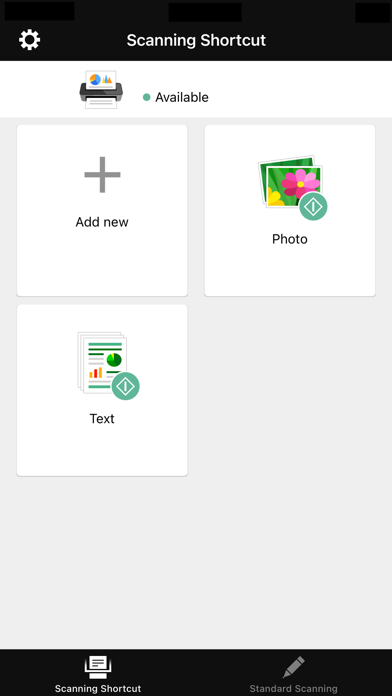


Description by Canon Electronics Inc. Written by the developer, not by AppBrain. Click to read.
CaptureOnTouch Mobile allows you to operate Canon imageFORMULA document scanners directly from your iOS devices.
The intuitive user interface enables you to scan paper documents with ease and to send scanned images to other applications.
Key Features
- Simple menus for easy use
- Convert paper documents to PDF or JPEG format (Black and White mode only supports saving to PDF)
- Can scan directly to your iOS device.
- Scan directly to cloud services or other applications
Supported scanners
- Canon imageFORMULA DR-C230/ DR-C240/ DR-M140/ DR-M160II/ DR-M260/ DR-M1060 (either optional NA10 or WA10 unit is required)
- Canon imageFORMULA DR-C225WII/ DR-S150/ DR-S130/ R50
- WU10 is no longer supported. If you are using WU10, please continue to use CaptureOnTouch Mobile V3.1.7 or earlier.
- To use this version, the DR-C225W users need to update the firmware of the scanner by using a personal computer.
Available scanner settings
- Document side (Simplex/ Duplex/ Skip Blank Page)
- Resolution (150 dpi/ 300 dpi)
- Scanning mode (Color/ Grayscale/ Black and White)
- Document Size (A4 / LETTER / Auto-detection / Auto-detection by Text)
- Ultrasonic Double feed detection (always efective)
Safety and technology
Found in the app by AppBrain- Price
- Free
- App size
- 16.7 MB
- Content rating
- Everyone
Technologies used by CaptureOnTouch Mobile
Releases
Updates seen on the App Store- Version
- 4.3.1
- Launched
- November 2012
No changelog data
Alternatives
Similar apps and more from Canon Electronics Inc.Alternatives to CaptureOnTouch Mobile





Rankings
App Store top chartsApp Store Rankings for CaptureOnTouch Mobile
About the app and developer
About CaptureOnTouch Mobile
CaptureOnTouch Mobile is a productivity app developed by Canon Electronics Inc.
What is the rating of CaptureOnTouch Mobile?
CaptureOnTouch Mobile is rated 2.50 out of 5 stars, based on 2 ratings.
Is CaptureOnTouch Mobile free?
CaptureOnTouch Mobile is free. The app size is 16.71 MB. The latest version available is 4.3.1. The last update was on October 1, 2024.
What are the requirements for CaptureOnTouch Mobile?
The app has a content rating of Everyone. The app has been available on the App Store since November 2012.
Developer information for Canon Electronics Inc.
Address:
Frequently asked questions about CaptureOnTouch Mobile
Is CaptureOnTouch Mobile free?
Yes. CaptureOnTouch Mobile is free on the App Store.
Is CaptureOnTouch Mobile still available?
Yes. CaptureOnTouch Mobile is on the App Store, and the last update we saw was on October 1, 2024.
How large is CaptureOnTouch Mobile?
CaptureOnTouch Mobile is 16.71 MB.
Is CaptureOnTouch Mobile suitable for children?
App Store rates the content of CaptureOnTouch Mobile as suitable for everyone.
How do people rate CaptureOnTouch Mobile?
CaptureOnTouch Mobile scores 2.50 out of 5 stars, from 2 ratings on the App Store.
Who made CaptureOnTouch Mobile?
CaptureOnTouch Mobile was developed by Canon Electronics Inc. It is listed in the productivity category on the App Store.
What are the best alternatives to CaptureOnTouch Mobile?
People looking at CaptureOnTouch Mobile also look at these productivity apps: Quick Print - Print & Scan PDF, PrintHand Mobile Print, Printing App - Wireless Print, EML Viewer, PrinterShare: WiFi & PDF.