

PrintHand Mobile Print
PrintHand Mobile Print is made and published by Dynamix Software. AppBrain is an independent app data site and isn't affiliated with Dynamix Software. The app name, icon, screenshots and description belong to Dynamix Software and are shown as published on the App Store.
AppBrain's verdict
Established- Rating on App Store
- 5.00
- 19 ratings
- Last updated
- September 4, 2026
- Size
- 52.2 MB
It doesn't have enough ratings yet to judge what users think.
User feedback
Ratings and reviews on the App StoreComments on PrintHand Mobile Print for iOS
We don't have enough comments to show example comments. Please check back later.
Store listing
By Dynamix Software, from the App Store
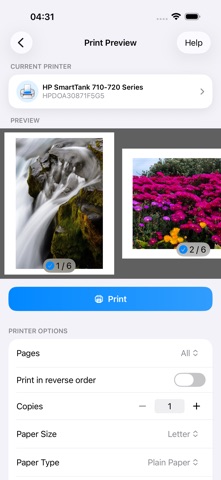
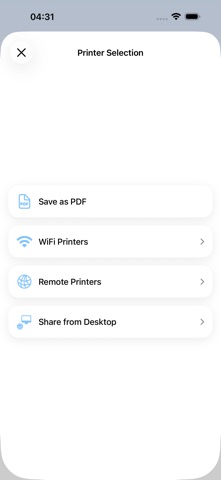
Description by Dynamix Software Written by the developer, not by AppBrain. Click to read.
Easily share content to be printed from any other app using the standard iOS Share menu.
Print over WiFi (thousands of printer models supported), AirPrint, save as PDF, and even over the internet via our desktop app.
IMPORTANT
The PrintHand Mobile Print app is not completely free. It is free to install and to print a test page to make sure the app works with your printer model prior to purchase, but actual printing requires a payment.
To unlock the full functionality, you need to buy the Premium mode available as an in-app purchase inside this app or by purchasing the PrintHand Mobile Print Premium app from the App Store.
If your printer is not supported, you can still print by sharing your printer through our desktop app (see instructions in the app). Please visit https://www.printhand.com/install.php to download the PrintHand Remote desktop software.
FEATURES
Using PrintHand you can print the following content:
- PDFs;
- Photos and images;
- Office documents and keynotes;
- Markdown and text files;
- Web pages;
- Contacts;
- Content copied to clipboard (using Paste to Print);
- Content shared from other apps using the Action button.
You can print via:
- Wi-Fi (using a Wi-Fi Direct printer or using a Wi-Fi router as a middleman);
- PC or Mac (if your printer is shared using PrintHand Remote desktop client);
- AirPrint;
- Save as PDF;
USING PRINTERS
Printing on Nearby wireless printers
Most of the Wi-Fi printers are detected automatically. PrintHand can print on such printers directly in case they are supported by the app.
As long as your printer is available from a Windows or Mac computer, you can print via the PrintHand desktop app. To use it, please visit https://www.printhand.com/install.php to download the PrintHand desktop app.
The mobile app will find printers shared via the PrintHand Remote desktop app automatically (see instructions in the app). However, please note that your printer should be connected to the same Wi-Fi network to which your mobile device is connected.
Remote printing via the Internet
Also, you can print on printers located anywhere in the world via the Internet. This will require the same PrintHand desktop software installed on the computer at the receiving end, and a PrintHand desktop account registered. Complimentary 100 pages for Remote Printing under the same account.
You can read the Terms of Use here: https://printhand.com/terms.php
Safety and technology
Found in the app by AppBrain- Price
- Free
- App size
- 52.2 MB
- Content rating
- High
Technologies used by PrintHand Mobile Print
Releases
Updates seen on the App Store- Version
- 5.0.1
- Launched
- June 2013
No changelog data
Alternatives
Similar apps and more from Dynamix Software










Rankings
App Store top chartsApp Store Rankings for PrintHand Mobile Print
About the app and developer
About PrintHand Mobile Print
PrintHand Mobile Print is a productivity app developed by Dynamix Software.
What is the rating of PrintHand Mobile Print?
PrintHand Mobile Print is rated 5.00 out of 5 stars, based on 19 ratings.
Is PrintHand Mobile Print free?
PrintHand Mobile Print is free. The app size is 52.17 MB. The latest version available is 5.0.1. The last update was on September 4, 2026.
What are the requirements for PrintHand Mobile Print?
The app has a content rating of High Maturity. The app has been available on the App Store since June 2013.
Developer information for Dynamix Software
Address:
Frequently asked questions about PrintHand Mobile Print
Is PrintHand Mobile Print free?
Yes. PrintHand Mobile Print is free on the App Store.
Is PrintHand Mobile Print still available?
Yes. PrintHand Mobile Print is on the App Store, and the last update we saw was on September 4, 2026.
How large is PrintHand Mobile Print?
PrintHand Mobile Print is 52.17 MB.
Is PrintHand Mobile Print suitable for children?
App Store gives PrintHand Mobile Print a high maturity rating. It is meant for adults.
How do people rate PrintHand Mobile Print?
PrintHand Mobile Print scores 5.00 out of 5 stars, from 19 ratings on the App Store.
Who made PrintHand Mobile Print?
PrintHand Mobile Print was developed by Dynamix Software. It is listed in the productivity category on the App Store.
What are the best alternatives to PrintHand Mobile Print?
People looking at PrintHand Mobile Print also look at these productivity apps: Quick Print - Print & Scan PDF, ThinPrint Cloud Printer, Print 4 Printers, Cloud Ready printer, Mobile Print..