

CarShowroom
CarShowroom is made and published by Hologram Co.,Ltd. AppBrain is an independent app data site and isn't affiliated with Hologram Co.,Ltd. The app name, icon, screenshots and description belong to Hologram Co.,Ltd. and are shown as published on the App Store.
AppBrain's verdict
- Last updated
- October 8, 2026
Rankings
App Store top chartsApp Store Rankings for CarShowroom
Competitors
Similar apps and more from Hologram Co.,Ltd.Alternatives to CarShowroom






More from Hologram Co.,Ltd.




Releases
Updates seen on the App Store- Version
- 1.4.0
- Launched
- November 2019
No changelog data
User feedback
Ratings and reviews on the App StoreComments on CarShowroom for iOS
We don't have enough comments to show example comments. Please check back later.
Technology
Found in the app by AppBrain- Price
- Free
- App size
- 164.5 MB
- Content rating
- Everyone
Technologies used by CarShowroom
About the app and developer
About CarShowroom
CarShowroom is a lifestyle app developed by Hologram Co.,Ltd.
What is the rating of CarShowroom?
CarShowroom has no ratings yet.
Is CarShowroom free?
CarShowroom is free. The app size is 164.45 MB. The latest version available is 1.4.0. The last update was on October 8, 2026.
What are the requirements for CarShowroom?
The app has a content rating of Everyone. The app has been available on the App Store since November 2019.
Developer information for Hologram Co.,Ltd.
Address:
Store listing
By Hologram Co.,Ltd., from the App Store




Description by Hologram Co.,Ltd. Written by the developer, not by AppBrain. Click to read.
1: Tilt the iPhone 90 degrees to the left and launch the app, then set the MR glass “Dangra”.
2: You can check the menu by looking into Dandan. If you don't see it well in the field of view, tap the left button of the screen while facing the front to display the menu in front.
3: Turn your body to the right, and “Align the sphere cursor and tap the right button” (hereinafter referred to as “Select”) that appears in the center of the screen to the right end of the 3 menu [System menu].
4: When “Screen Size” at the left end of the menu that appears next is “Selected”, a list of compatible models appears. Select “Select” the iPhone model you are using, and “Select” “Decision” to confirm the model you are using. .
5: “Select” the scene you want to experience from [MR] [VR] [AR] on the main menu and enjoy the app.
6: While using the app, you can tap the left button at any time to display the menu. The functions and roles of each menu are as follows.
7: Move the cursor to the door knob and tap the right button to open and close the door.
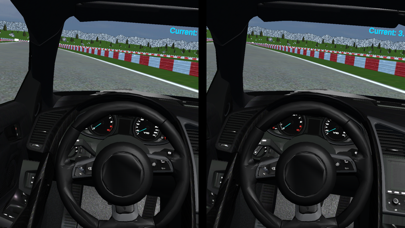
8: Get into the driver's seat, place the cursor on the handle and tap to change to circuit driving mode. Long press of right button moves forward, long press of left and right button backs.
[Menu immediately after application startup or restart]
[Restart] Returns to the state immediately after starting the application
[Color box] Change the color of the car.
Go to the [System menu] main menu
【Main menu】
[ScreenSize] Select the model to be used from iPhone 6S to XS MAX
* Since the display screen of the iPhone is adjusted to the size of the mirror or lens, the screen display will be relatively reduced as the iPhone size increases.
[Two eyes / Single eye] Toggles between single-lens / binocular mode
[IPD] Correct pupil distance with software
[MR] Mixed Reality = Mixed Reality mode, background image is overlaid with live-action image through Dangra half mirror
[VR] Virtual Reality = Virtual reality mode, displays the 3D video produced by the car and background.
[AR] Augmented Reality = Augmented Reality mode, background image is displayed by overlaying the live-action image through the iPhone camera
[Startup setting] (Preliminary menu for developers)
iPad
1: Tilt the iPad 90 degrees to the left to launch the app. Since the iPad can not be set to the graduation, please enjoy the single eye (single eye mode) alone. (Explained in 5 :)
2: A menu appears on the iPad screen. If the planetary motion is not displayed and there is no menu, or if it is not displayed well in the field of view, the menu will be displayed in the front by lightly tapping around the lower left corner of the screen.
3: Turn your body to the right and move the cursor to the lower right corner of the 3 menu [System menu] and place the sphere cursor in the center of the screen and tap lightly around the lower right corner of the screen (hereinafter referred to as “Select”).
4: When “Screen Size” at the left end of the menu that appears next is “selected”, a list of compatible models appears. Select “Minimum 6S-7-8 Full Screen” (not “Maximum XS-Max”), “Select” “Decision”.
5: Next, “Select” for “Two eyes / Single eye”, and “Select” for “Single eye” when the screen changes.
6: “Select” the scene you want to experience from [MR] [VR] [AR] on the main menu and enjoy the app.
7: When using the app, tap the bottom left of the iPad screen at any time to display the menu. The functions and roles of each menu are the same as those for iPhone.
【please note】
・ Do not use this app on public roads or places with many people.
・ Always use small children with a guardian to ensure safety.
・ Please do not point the sun toward the sun.
・ If you are under 13 years of age in visual development, do not use in twin-lens mode.
・ Damage caused by the use of this app will not be compensated directly or indirectly.
Distributor
https://dangla.jp/