holochan is made and published by
Hologram Co.,Ltd..
AppBrain is an independent app data site and isn't affiliated with Hologram Co.,Ltd..
The app name, icon, screenshots and description belong to Hologram Co.,Ltd. and are shown as
published on the App Store.
About holochan
holochan is an entertainment app developed by Hologram Co.,Ltd..
User Ratings
The app has no ratings yet.
App Information
holochan is freely available from the App Store. The app size is 446.88 MB. The latest version available is 1.1.3. The last update was on October 28, 2024.
Technical Requirements
The app has a content rating of Medium Maturity. The app has been available on the App Store since August 2019.
Description by Hologram Co.,Ltd.(from the App Store)
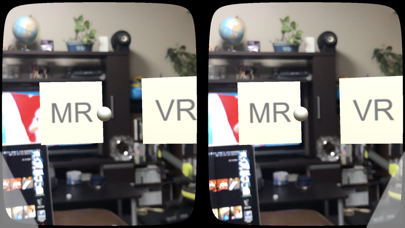
iPhone 1: Start the app while tilting the iPhone 90 degrees left, then set the iPhone to the MR glass "Dangla". 2: You can check the menu by looking at Dangla. When only planetary motion is displayed or the menu does not display well in the field of view, tapping the left button of Dangla with the front facing will display the menu in the front. 3: With the body facing to the right, move the sphere cursor at the center of the screen to the right edge [System menu] of the three menus, and tap the right button (hereinafter "Select"). 4: Next, Select the [Screen size] at the left end of the menu, and a list of compatible models will appear. Select the iPhone model you are using, and then Select [Decision] to confirm the model you are using. 5: Select the scene you want to experience from the [MR] [VR] [AR] that on main menu, and enjoy the application. 6: While using the app, tap the left button of Dangla at any time to display the menu. The functions and roles of each menu are as follows.
***Menu immediately after app start or restart*** [Restart] Returns to the state(menu) immediately after the application start [front] Display the content (SolarSystem) to the Straight ahead. [System menu] Move to main menu
***Main menu*** [ScreenSize] Select the model from iPhone 6S to XS MAX ※ In order to fit the size of the iPhone screen to the size of the mirror and lens, the screen display will be relatively shrunk as the LCD screen size of the iPhone increases. [Two eyes / Single eye] Switch the single eye / both eyes mode [IPD] Correct inter-pupil distance by program [MR] Mixed reality mode, background image is displayed superimposed with live-action image through the half mirror [VR] Virtual reality mode, both solar system and background space display 3D produced images [AR] Augmented reality mode, background image is displayed superimposed with live-action image through iPhone camera [Startup setting] (a preliminary menu for developers)
iPad 1: Start the app while tilting the iPad 90 degrees left. Since the iPad can not be put in a Dangla, please enjoy using single eye mode alone. (Explained in 5 :) 2: Menu is displayed on the screen of iPad. If you only see the planet or if the menu does not look well, tapping the lower left corner of the screen while facing the front will bring the menu to the front. 3: Point the your body to the right, place the sphere cursor on the [System menu] on the far right, and tap the lower right of the screen (hereinafter "Select"). 4: Next, Select the [Screen Size] at the left end of the menu to display the list of compatible models. Select (Not [Maximum XS-Max])[Minimum 6S-7-8 Full Screen] and Select [Decision]. 5: Next, Select [Two eyes / Single eye], and when the screen changes, Select [Single eye]. 6: While using the app, tap the lower left of the iPad screen at any time to display the menu. The function and role of each menu are the same as the above iPhone.
【please note】 ・ Do not use this app on public roads or places with many people. ・ Please be sure to play small children always in the safe with parents. ・ Don't aim "Dangla” at the sun. ・ Don't use in the two eyes mode if you are under the age of 13 in the developmental stage of vision ・ We do not compensate for the damage caused by using this application directly or indirectly.
Each subscription will automatically renew 3 days before the expiration date for
the same time period. Subscriptions can be cancelled at any time before the renewal.