

MazeMakerMR
MazeMakerMR is made and published by Hologram Co.,Ltd. AppBrain is an independent app data site and isn't affiliated with Hologram Co.,Ltd. The app name, icon, screenshots and description belong to Hologram Co.,Ltd. and are shown as published on the App Store.
AppBrain's verdict
- Last updated
- September 28, 2026
Rankings
App Store top chartsApp Store Rankings for MazeMakerMR
Competitors
Similar apps and more from Hologram Co.,Ltd.Alternatives to MazeMakerMR







More from Hologram Co.,Ltd.





Releases
Updates seen on the App Store- Version
- 2.4.1
- Launched
- October 2020
No changelog data
User feedback
Ratings and reviews on the App StoreComments on MazeMakerMR for iOS
We don't have enough comments to show example comments. Please check back later.
Technology
Found in the app by AppBrain- Price
- Free
- App size
- 109.9 MB
- Content rating
- Everyone
Technologies used by MazeMakerMR
About the app and developer
About MazeMakerMR
MazeMakerMR is an education app developed by Hologram Co.,Ltd.
User Ratings
The app has no ratings yet.
App Information
MazeMakerMR is freely available from the App Store. The app size is 109.89 MB. The latest version available is 2.4.1. The last update was on September 28, 2026.
Technical Requirements
The app has a content rating of Everyone. The app has been available on the App Store since October 2020.
Developer information for Hologram Co.,Ltd.
Address:
Frequently asked questions about MazeMakerMR
Is MazeMakerMR free?
Yes. MazeMakerMR is free on the App Store.
Is MazeMakerMR still available?
Yes. MazeMakerMR is on the App Store, and the last update we saw was on September 28, 2026.
How large is MazeMakerMR?
MazeMakerMR is 109.89 MB.
Is MazeMakerMR suitable for children?
App Store rates the content of MazeMakerMR as suitable for everyone.
Who made MazeMakerMR?
MazeMakerMR was developed by Hologram Co.,Ltd. It is listed in the education category on the App Store.
What are the best alternatives to MazeMakerMR?
People looking at MazeMakerMR also look at these education apps: Repit-学び始め、学び直しの英会話「リピート練習アプリ」, 風景パズル 〜日本の名所〜(あそんでまなぶ!シリーズ), Muller-Lyer illusion, ひゃくますプリント, 名言・格言.
Store listing
By Hologram Co.,Ltd., from the App Store




Description by Hologram Co.,Ltd. Written by the developer, not by AppBrain. Click to read.
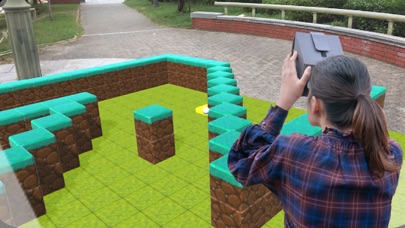
You can not only play existing mazes, but also create your own maze, so you can make your own maze, have others play it, or challenge time attack.
With only one app, you can easily experience creating and playing 3D mazes, so you can enjoy the 3D maze experience alone or with others in a variety of places, from a room in your home to a large space.
Although it is possible to play as an AR application using only a smartphone,
However, by using Dangla, you can have a more immersive experience as an MR or VR application.
https://ho-lo.jp/products/hardware/dangla/
This app uses the camera. Please be aware that if you block the camera with your fingers or other objects during use, unexpected behavior may occur.
------ -------------------------
How to operate the camera
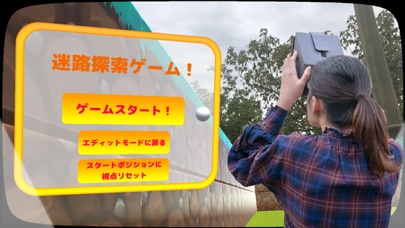
Press the right button in Dangla or the ▲ button in the lower right corner of the smartphone to make decisions in the menu or to move forward while searching the maze.
In Dangla, press the left button, or the bottom left ▲ button in the case of smartphones alone,
(If you press the button while the menu is open, the menu will reappear in front of you.)
A white round cursor appears in the center of the screen. Move the cursor to the menu, etc., and press the right button to make a selection.
From the system menu of the menu, you can switch between AR/MR/VR modes, switch between monocular and binocular, set the screen size, etc.
For danglers, use MR or VR mode,
For smartphones alone, set to monocular in AR mode and enjoy.
The size of the screen can be adjusted to match the size of the smartphone to adjust the appearance when using Dangla.
Basically, adjusting the screen size according to whether the smartphone screen is large or small will ensure that it is displayed beautifully.
Maze Search Mode
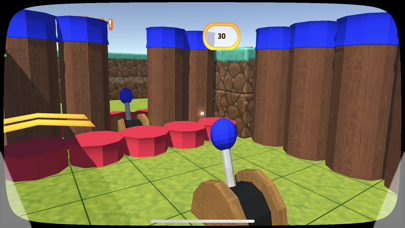
In the maze exploration mode, players compete for the time it takes to clear the maze by actually walking and moving through the maze from the starting point to the goal.
A maze of several meters in length is displayed in front of you for you to explore,
The maze is displayed in front of you, and as you explore the maze, you can experience the experience of actually exploring a three-dimensional maze by using the dangler in a large space and actually walking through the maze.
Maze Creation Mode
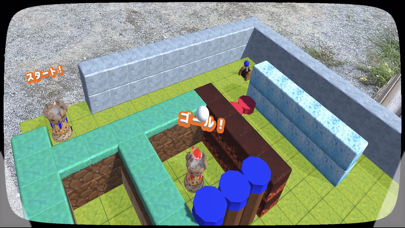
In the maze creation mode, players can create their own original mazes by placing blocks and other objects that will serve as walls in the miniature maze displayed in front of them.
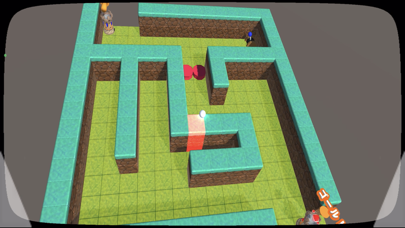
By moving around the miniature maze, you can observe the maze from various angles from a bird's eye view, making it easy to create a three-dimensional maze.
After selecting blocks and other objects to be placed in the maze, you can place blocks by pressing the right button on the squares on the maze, or delete blocks if they have already been placed.
About AR Markers
You can use AR markers to set the starting position of the maze.
Please use the AR marker image available at the following URL.
(The marker image is intended for use on A4-sized paper.)
https://drive.google.com/drive/folders/1Pd-IXDh1Nciqajypl6yfb4KRdDApwdl8?usp=sharing
Caution
Do not use this application on public roads or in crowded places.
Please do not use this application on public roads or in crowded places.
Do not point the dangler at the sun.
Do not use this app in binocular mode if you are under 13 years old and your vision is still developing.
We will not compensate for any damage caused directly or indirectly by the use of this application.