AppBrain
AppBrain
  • Apps
  • Apps being viewed right now Trending apps today Most popular apps All-time most installed apps Top rated apps iPhone and iPad apps
  • Intelligence ▾
    Intelligence overview → Track any Android app or your whole market
    Track & analyze
    Keyword Tracker & OptimizerTrack & improve Play rankings App Performance ReportOne-off PDF for any app StatisticsFree Android & Play market stats
    Promote your app
    Featured Apps App Links
  • Intelligence
  • Pricing
  • Dashboard
  • Sign up
  • Log in
App Store Apps > Utilities > Click Assistant, Auto Clicker
App profile & analytics · Utilities · Data updated 2026-10-05
Click Assistant, Auto Clicker icon

Click Assistant, Auto Clicker

by Damuben Kachhad · Free · Version 1.0
Availability On the App Store since January 2026 ↗
Rating on App Store
2.32/5
22 ratings
Rating
2.32
22 reviews
Best rank
–
not in the top lists
Last updated
January 5, 2026
1.0
AppBrain's verdict

It doesn't have enough ratings yet to judge what users think.

Click Assistant, Auto Clicker is made and published by Damuben Kachhad. AppBrain is an independent app data site and isn't affiliated with Damuben Kachhad. The app name, icon, screenshots and description belong to Damuben Kachhad and are shown as published on the App Store.

About Click Assistant, Auto Clicker

Click Assistant, Auto Clicker is an utilities app developed by Damuben Kachhad.

User Ratings

Click Assistant, Auto Clicker is rated 2.32 out of 5 stars. The rating is based on 22 ratings.

App Information

Click Assistant, Auto Clicker is freely available from the App Store. The app size is 8.40 MB. The latest version available is 1.0. The last update was on January 5, 2026.

Technical Requirements

The app has a content rating of High Maturity. The app has been available on the App Store since January 2026.

Description by Damuben Kachhad (from the App Store)
Auto Assistant is a thoughtfully designed iOS utility that helps simplify everyday digital actions through a clean and intuitive experience. The app focuses on clarity and speed, allowing users to interact with multiple tools without feeling overwhelmed.

The home screen is built with a completely unique layout, making navigation feel natural from the first launch. Different working modes give users flexibility based on their needs.

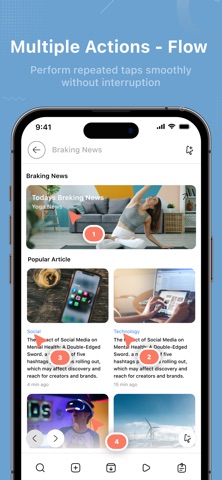
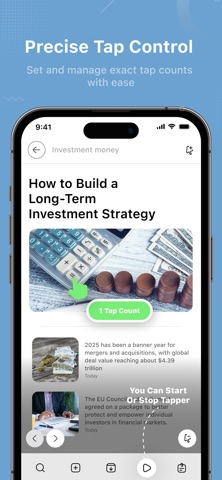
Auto mode helps streamline repeated actions, while single point mode is ideal for focused tasks. Sync point mode connects actions in a smooth sequence, and multi point mode offers greater control for more advanced use.

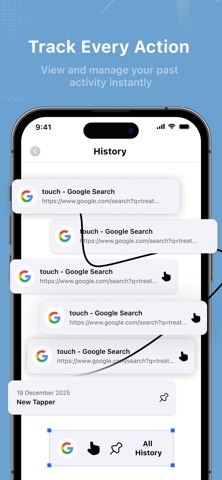
Auto reload keeps content refreshed automatically, reducing the need for manual interaction. The history section provides a clear view of past activity, and pinned tappers allow quick access to frequently used actions, saving time during daily use.

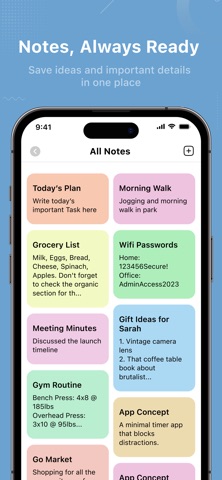
A secure built-in browser enables fast and private browsing without leaving the app. QR scanning and QR generation make sharing and accessing information quick and effortless. The notes feature offers a simple space to store short ideas, reminders, or important information whenever needed.

Auto Assistant is built for users who value a smooth iOS experience, where design, performance, and usability work together. It is not just a collection of tools, but a reliable assistant designed to keep everyday tasks organized, efficient, and easy to manage.

Privacy Policy : https://clickassistantautoclicker.blogspot.com/2025/12/privacy-policy-for-click-assistant-auto.html
Terms Condition : https://clickassistantautoclicker.blogspot.com/2025/12/terms-conditions-for-click-assistant.html
EULA : https://clickassistantautoclicker.blogspot.com/2025/12/end-user-license-agreement-eula-of.html
Show more Show less

Screenshots

Click Assistant, Auto Clicker Screenshot 1 of 9
Click Assistant, Auto Clicker Screenshot 2 of 9
Click Assistant, Auto Clicker Screenshot 3 of 9
Click Assistant, Auto Clicker Screenshot 4 of 9
Click Assistant, Auto Clicker Screenshot 5 of 9
Click Assistant, Auto Clicker Screenshot 6 of 9
Click Assistant, Auto Clicker Screenshot 7 of 9
Click Assistant, Auto Clicker Screenshot 8 of 9
Click Assistant, Auto Clicker Screenshot 9 of 9
Screenshots by Damuben Kachhad, from the the App Store listing
Official page on the App Store

Alternatives to Click Assistant, Auto Clicker

Auto Clicker: Super Fast Click icon Auto Clicker: Super Fast Click
Pankil Patel
4.1
Free
265 ratings
Auto Clicker - Auto Click AI icon Auto Clicker - Auto Click AI
Anh Ngo
3.9
Free
16 ratings
Auto Clicker Tap Automation icon Auto Clicker Tap Automation
Appsy Digital
4.5
Free
193 ratings
Auto Clicker,Click Assistant icon Auto Clicker,Click Assistant
鹏 刘
4.2
Free
156 ratings
Auto Clicker PRO Tap Assistant icon Auto Clicker PRO Tap Assistant
MURAT SAROGLU
4.3
Free
11 ratings
AutoClicker - Auto Scroll: OP icon AutoClicker - Auto Scroll: OP
My Media and Entertainment
4.4
Free
2.9K ratings
AutoClicker: Click Assistant⁺ icon AutoClicker: Click Assistant⁺
HALOHUB., LTD
3.0
Free
3 ratings
OC Auto Clicker: Auto Tapper icon OC Auto Clicker: Auto Tapper
Octopus Internet Technology Co., Limited
4.3
Free
254 ratings

More from Damuben Kachhad

Room Temperature Thermometer. icon Room Temperature Thermometer.
Damuben Kachhad
3.9
Free
437 ratings
App Hider : App Locker icon App Hider : App Locker
Damuben Kachhad
4.4
Free
175 ratings
Bluetooth Auto Connect icon Bluetooth Auto Connect
Damuben Kachhad
4.1
Free
41 ratings
lPlayer - Offline Video Player icon lPlayer - Offline Video Player
Damuben Kachhad
5.0
Free
4 ratings
MobiSaver: Data&Photo Recovery icon MobiSaver: Data&Photo Recovery
Damuben Kachhad
2.3
Free
3 ratings
Hide Photo, Video icon Hide Photo, Video
Damuben Kachhad
0.0
Free

Changelog of Click Assistant, Auto Clicker

No changelog data

Developer information for Damuben Kachhad

Damuben Kachhad

Address:

Share Click Assistant, Auto Clicker

Comments on Click Assistant, Auto Clicker for iOS

We don't have enough comments to show example comments. Please check back later.

App Store Rankings for Click Assistant, Auto Clicker

This app is not ranked

Technologies used by Click Assistant, Auto Clicker

Frequently asked questions about Click Assistant, Auto Clicker

Is Click Assistant, Auto Clicker free?

Yes. Click Assistant, Auto Clicker is free on the App Store.

Is Click Assistant, Auto Clicker still available?

Yes. Click Assistant, Auto Clicker is on the App Store, and the last update we saw was on January 5, 2026.

How large is Click Assistant, Auto Clicker?

Click Assistant, Auto Clicker is 8.40 MB.

Is Click Assistant, Auto Clicker suitable for children?

App Store gives Click Assistant, Auto Clicker a high maturity rating. It is meant for adults.

How do people rate Click Assistant, Auto Clicker?

Click Assistant, Auto Clicker scores 2.32 out of 5 stars, from 22 ratings on the App Store.

Who made Click Assistant, Auto Clicker?

Click Assistant, Auto Clicker was developed by Damuben Kachhad. It is listed in the utilities category on the App Store.

What are the best alternatives to Click Assistant, Auto Clicker?

People looking at Click Assistant, Auto Clicker also look at these utilities apps: Auto Clicker: Super Fast Click, Auto Clicker - Auto Click AI, Auto Clicker Tap Automation, Auto Clicker,Click Assistant, Auto Clicker PRO Tap Assistant.

Top new apps Apps other people are watching Popular Utilities Apps Price drops on Google Play Today's trending apps
Auto Clicker: Super Fast Click icon Auto Clicker: Super Fast Click
Auto Clicker - Auto Click AI icon Auto Clicker - Auto Click AI
Auto Clicker Tap Automation icon Auto Clicker Tap Automation
Auto Clicker,Click Assistant icon Auto Clicker,Click Assistant
Auto Clicker PRO Tap Assistant icon Auto Clicker PRO Tap Assistant
AutoClicker - Auto Scroll: OP icon AutoClicker - Auto Scroll: OP
AutoClicker: Click Assistant⁺ icon AutoClicker: Click Assistant⁺
OC Auto Clicker: Auto Tapper icon OC Auto Clicker: Auto Tapper
Overview Alternatives Reviews Rankings Technology
AppBrain Intelligence premium content

Subscribe now to get full and unlimited access to AppBrain Intelligence. You'll have access to:

  • App Intelligence dashboard (performance timeline, competitor comparison, country rankings, insight cards)
  • Detailed ranking data per app
  • Full timeline per developer
  • Device market shares data per country
  • Unlimited keyword tracking
1 Month

$75/mo
(billed every month)

SAVE 0%
Subscribe
3 Months

$65/mo
($195 billed every 3 months)

SAVE 13%
Subscribe
1 Year

$57.50/mo
($690 billed every year)

SAVE 23%
Subscribe
Each subscription will automatically renew 3 days before the expiration date for the same time period. Subscriptions can be cancelled at any time before the renewal.

AppBrain is an app data site, we track rankings, ratings, installs for all apps and games on Google Play and the App Store. AppBrain doesn't host app files or APKs, all install links go directly to the official store. All trademarks are owned by their respective owners.

More apps

  • Top Android apps being viewed
  • Onn Smart TV Remote
  • Box.Live - Boxing Schedule
  • Well Played Soccer stats

App statistics

  • Android statistics
  • Google Play Developer stats
  • Trending Android Apps
  • Trending iOS apps
  • Top popular Apps
  • Buy the best Android phone
  • Buy & sell app businesses

About AppBrain

  • Contact
  • Privacy
  • Documentation
  • DMCA takedowns
  • Articles
  • Blog
  • Free webpage for your Android app
© 2010-2026 - AppBrain