

0.00
0 reviews
$49.99
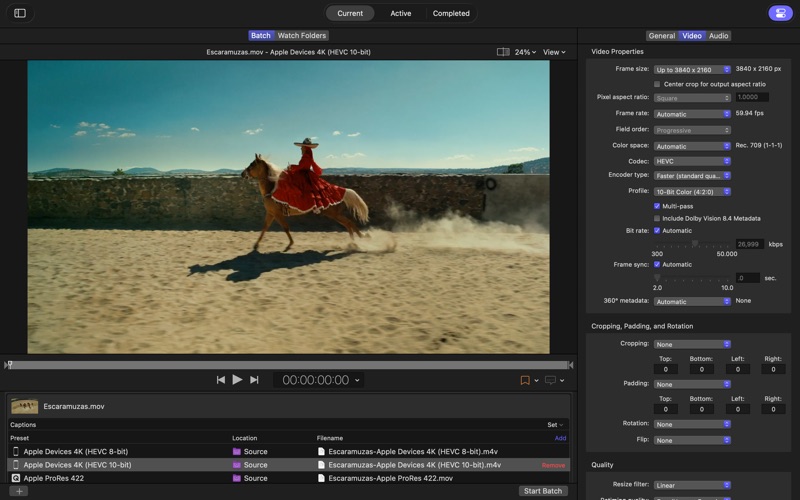
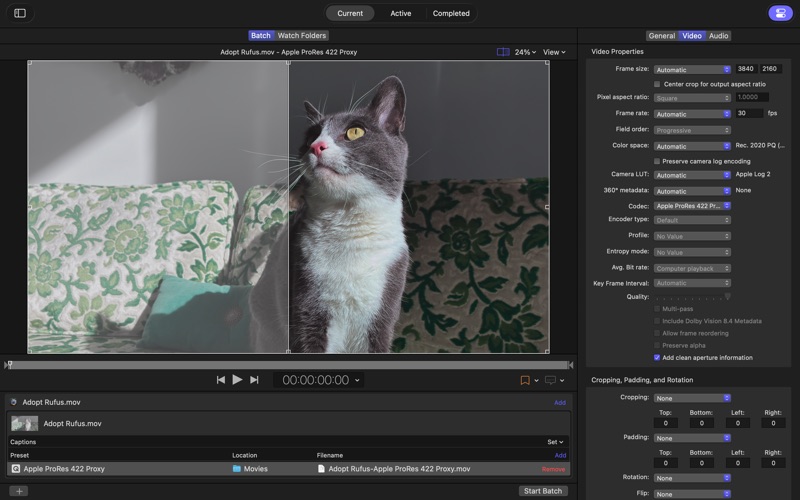
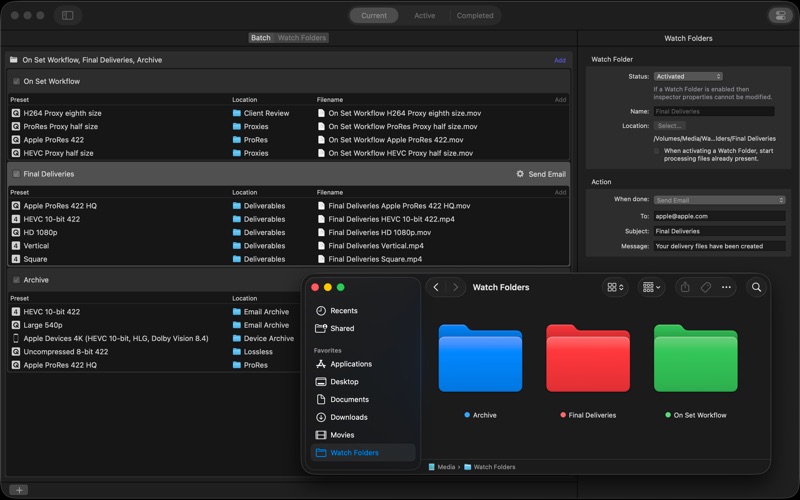
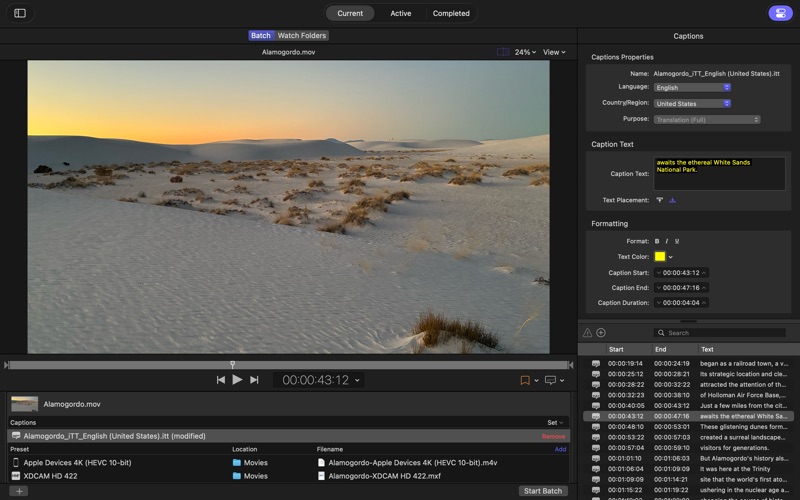
Screenshots by Apple, from the the App Store listing
AppBrain's verdict
- Last updated
- September 29, 2026
- Size
- 97.2 MB
User feedback
Ratings and reviews on the App StoreComments on Compressor for iOS
We don't have enough comments to show example comments. Please check back later.
Store listing
By Apple, from the App StoreDescription by Apple Written by the developer, not by AppBrain. Click to read.
Compressor integrates tightly with Final Cut Pro and Motion to add power and flexibility to your video conversions. Quickly customize output settings, enhance images, and package your movie for sale on the iTunes Store.
Advanced Encoding for Final Cut Pro
• Use Compressor to customize encoding settings for use in Final Cut Pro and Motion
• Set up batch processes to streamline the encoding of large numbers of files
• Create self-contained Droplets to encode on the desktop with drag-and-drop ease
• Automatically encode videos that are added to selected folders in the file system
• Encode stereoscopic spatial video and deliver directly to Apple Vision Pro
• Encode videos recorded with iPhone in Cinematic mode
• Unrivaled performance with optimizations for the latest generation of Apple silicon
iTunes Store Package Creation
• Import and organize your movie, trailer, closed captions, audio descriptions, and subtitles into an iTunes Store-compliant package for submission to an Apple-certified iTunes delivery partner
• Audition video with any audio, caption, or subtitle to verify sync
• Built-in error detection helps you identify issues with your iTunes Store Package
• Deliver HDR video as P3 D65 PQ, Rec. 2020 HLG, and Rec. 2020 PQ for HDR10
• Support in the iTunes Store Package to link a Dolby Vision graded video file to a Dolby Vision XML
Support for Industry Standards
• Encode to a broad range of industry standard formats including HEVC, MV-HEVC, H.264, MXF and ProRes
• Import Targa, DPX, TIFF, PSD, PNG or OpenEXR image sequences and encode them using any setting
• Create, view, adjust, and deliver closed captions in CEA-608, SRT, and iTT formats
Pristine Format Conversions
• Convert any file between formats — such as NTSC to PAL, SD to HD or progressive to interlaced video
• Import and manipulate wide color video, then deliver in standard Rec. 601 and Rec. 709 color spaces or in wide Rec. 2020 color space
• Deliver High Dynamic Range (HDR) video with controls for color space conversions and HDR metadata
• Deliver HDR video as P3 D65 PQ, Rec. 2020 HLG, and Rec. 2020 PQ
• Add effects to your content like custom LUTs, a timecode overlay, and watermarks
• Speed up video, slow it down, or adjust the frame rate to make the duration match a runtime
• Convert log-encoded video to SDR and HDR color spaces using built in camera LUTs for Panasonic, Sony, Canon, Blackmagic, Nikon and ARRI or add a custom camera LUT
• Convert ProRes RAW and ProRes RAW HQ media to other professional file formats
• Play and transcode Canon Cinema RAW Light to other video codecs and formats
System Requirements: macOS 26.6 or later, 8 GB of memory, 1.2 GB of available disk space. Apple Immersive Video processing requires 32 GB memory (64 GB recommended). Storage read speed of 2 GB/s or faster is recommended. Some features require a Mac with Apple silicon.
Advanced Encoding for Final Cut Pro
• Use Compressor to customize encoding settings for use in Final Cut Pro and Motion
• Set up batch processes to streamline the encoding of large numbers of files
• Create self-contained Droplets to encode on the desktop with drag-and-drop ease
• Automatically encode videos that are added to selected folders in the file system
• Encode stereoscopic spatial video and deliver directly to Apple Vision Pro
• Encode videos recorded with iPhone in Cinematic mode
• Unrivaled performance with optimizations for the latest generation of Apple silicon
iTunes Store Package Creation
• Import and organize your movie, trailer, closed captions, audio descriptions, and subtitles into an iTunes Store-compliant package for submission to an Apple-certified iTunes delivery partner
• Audition video with any audio, caption, or subtitle to verify sync
• Built-in error detection helps you identify issues with your iTunes Store Package
• Deliver HDR video as P3 D65 PQ, Rec. 2020 HLG, and Rec. 2020 PQ for HDR10
• Support in the iTunes Store Package to link a Dolby Vision graded video file to a Dolby Vision XML
Support for Industry Standards
• Encode to a broad range of industry standard formats including HEVC, MV-HEVC, H.264, MXF and ProRes
• Import Targa, DPX, TIFF, PSD, PNG or OpenEXR image sequences and encode them using any setting
• Create, view, adjust, and deliver closed captions in CEA-608, SRT, and iTT formats
Pristine Format Conversions
• Convert any file between formats — such as NTSC to PAL, SD to HD or progressive to interlaced video
• Import and manipulate wide color video, then deliver in standard Rec. 601 and Rec. 709 color spaces or in wide Rec. 2020 color space
• Deliver High Dynamic Range (HDR) video with controls for color space conversions and HDR metadata
• Deliver HDR video as P3 D65 PQ, Rec. 2020 HLG, and Rec. 2020 PQ
• Add effects to your content like custom LUTs, a timecode overlay, and watermarks
• Speed up video, slow it down, or adjust the frame rate to make the duration match a runtime
• Convert log-encoded video to SDR and HDR color spaces using built in camera LUTs for Panasonic, Sony, Canon, Blackmagic, Nikon and ARRI or add a custom camera LUT
• Convert ProRes RAW and ProRes RAW HQ media to other professional file formats
• Play and transcode Canon Cinema RAW Light to other video codecs and formats
System Requirements: macOS 26.6 or later, 8 GB of memory, 1.2 GB of available disk space. Apple Immersive Video processing requires 32 GB memory (64 GB recommended). Storage read speed of 2 GB/s or faster is recommended. Some features require a Mac with Apple silicon.
Safety and technology
Found in the app by AppBrain- Price
- $49.99
- App size
- 97.2 MB
- Content rating
- Everyone
Technologies used by Compressor
Releases
Updates seen on the App Store- Version
- 5.4
- Launched
- June 2011
No changelog data
Alternatives
Similar apps and more from AppleMore from Apple


Rankings
App Store top chartsApp Store Rankings for Compressor
This app is not ranked
About the app and developer
About Compressor
Compressor is a photo & video app developed by Apple.
What is the rating of Compressor?
Compressor has no ratings yet.
Is Compressor free?
Compressor costs $49.99. The app size is 97.21 MB. The latest version available is 5.4. The last update was on September 29, 2026.
What are the requirements for Compressor?
The app has a content rating of Everyone. The app has been available on the App Store since June 2011.
Compressor is made and published by Apple. AppBrain is an independent app data site and isn't affiliated with Apple. The app name, icon, screenshots and description belong to Apple and are shown as published on the App Store.
Developer information for Apple
Address: