AppBrain
AppBrain
  • Apps
  • Apps being viewed right now Trending apps today Most popular apps All-time most installed apps Top rated apps iPhone and iPad apps
  • Intelligence ▾
    Intelligence overview → Track any Android app or your whole market
    Track & analyze
    Keyword Tracker & OptimizerTrack & improve Play rankings App Performance ReportOne-off PDF for any app StatisticsFree Android & Play market stats
    Promote your app
    Featured Apps App Links
  • Intelligence
  • Pricing
  • Dashboard
  • Sign up
  • Log in
App Store Apps > Productivity > Pages: Create Documents
Pages: Create Documents icon

Pages: Create Documents

by Apple · Productivity · Free
On the App Store since April 2010 · Data updated 2026-10-14
App Store

Pages: Create Documents is made and published by Apple. AppBrain is an independent app data site and isn't affiliated with Apple. The app name, icon, screenshots and description belong to Apple and are shown as published on the App Store.

AppBrain's verdict

EstablishedLoved by users
Rating on App Store
4.64
573,558 ratings
Last updated
September 29, 2026
Size
682.8 MB

Users love it: 4.6 stars from 573,558 ratings.

User feedback

Ratings and reviews on the App Store

Comments on Pages: Create Documents for iOS

We don't have enough comments to show example comments. Please check back later.

Store listing

By Apple, from the App Store
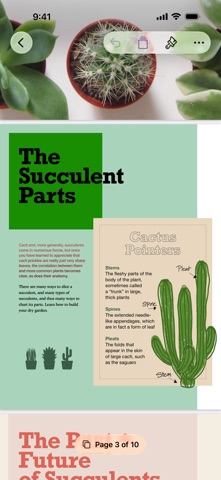
Pages: Create Documents Screenshot 1 of 10
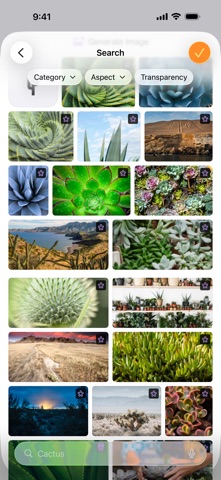
Pages: Create Documents Screenshot 2 of 10
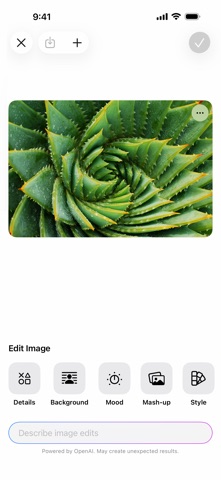
Pages: Create Documents Screenshot 3 of 10
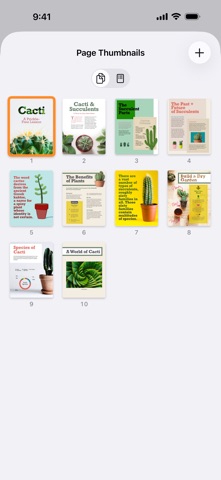
Pages: Create Documents Screenshot 4 of 10
Pages: Create Documents Screenshot 5 of 10
Pages: Create Documents Screenshot 6 of 10
Pages: Create Documents Screenshot 7 of 10
Pages: Create Documents Screenshot 8 of 10
Pages: Create Documents Screenshot 9 of 10
Pages: Create Documents Screenshot 10 of 10
Screenshots by Apple, from the the App Store listing
Description by Apple Written by the developer, not by AppBrain. Click to read.
Pages is now part of Apple Creator Studio, an amazing collection of Apple’s most powerful creative apps designed to help you bring your ideas to life. The suite includes Final Cut Pro, Logic Pro, Pixelmator Pro, Motion, Compressor, and MainStage — plus premium content and intelligence features in Keynote, Pages, Numbers, and Freeform, all in one simple plan. Creating, viewing, and editing documents in Pages, as well as collaborating with others in real time, does not require a subscription.

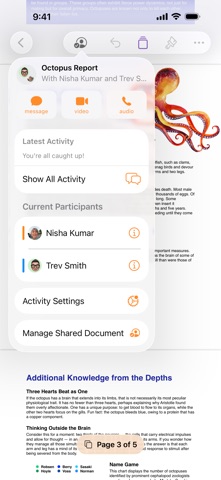
Create beautiful documents with Pages on iPhone, iPad and Mac. Start with an Apple-designed template for a report, resume, poster, or digital book. Easily add images, movies, audio, tables, charts, and shapes. Use comments, change tracking, and highlights to review your work. On iPhone and iPad, Screen View optimizes content for your screen, making it easier to edit.

Get Started Quickly
• Work from iPhone, iPad, Mac, or even a PC with iCloud.com
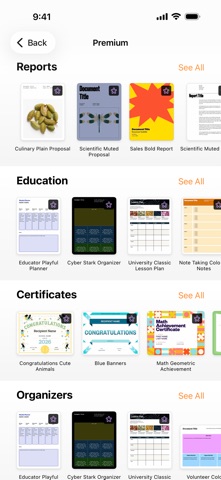
• Select from a wide variety of Apple-designed templates
• Add from a library of shapes, tables, and charts with pre-defined styles
• Import and edit Microsoft Word and text files

Create Beautiful Documents
• Format your document with gorgeous styles, fonts, and textures
• Make your content more engaging with recorded audio, video, and image galleries
• Create page templates to keep the design consistent across your page layout document
• Use powerful graphics tools including image background removal and masking
• Design interactive EPUB books that can be shared with others or published to Apple Books
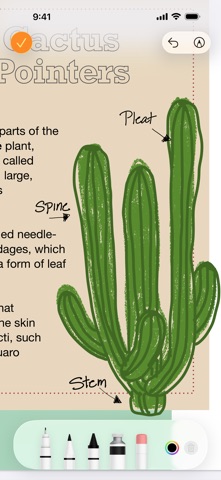
• Draw, write or annotate with Apple Pencil on iPad

Advanced Tools
• Use the table of contents view to easily navigate your document or book
• Add comments and join threaded conversations
• Turn on change tracking to mark up a document as you edit it
• Create footnotes and endnotes and view character, word, and paragraph counts
• Add elegant mathematical equations using LaTeX or MathML notation
• Use presenter mode on iPhone and iPad to auto scroll text while giving a speech
• Seamless integration with EndNote for inserting citations on Mac*

Share with Anyone
• Share your document publicly or collaborate with specific people using iCloud or Box
• Make changes from any device and see a list of changes from others in real-time
• Export your document in EPUB, Microsoft Word, RTF, TXT, and PDF format

Apple Intelligence
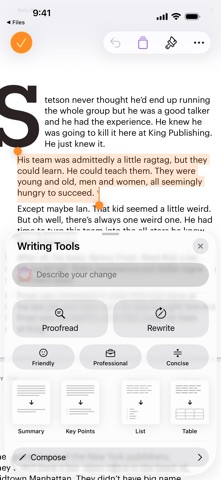
• Use Writing Tools to proofread, rewrite, summarize, and compose text
• Create your own fun images with Image Playground based on a description

Some features of Apple Creator Studio require an Apple Intelligence–capable device. For full system requirements and usage limits for Apple Creator Studio intelligence features, see Apple Support article 125029.
* EndNote sold separately. EndNote integration requires a plug-in available from Apple Support.
Official page on the App Store

Safety and technology

Found in the app by AppBrain
Price
Free
App size
682.8 MB
Content rating
Everyone

Technologies used by Pages: Create Documents

Releases

Updates seen on the App Store
Version
15.4
Launched
April 2010

No changelog data

Alternatives

Similar apps and more from Apple

Alternatives to Pages: Create Documents

LiquidText icon LiquidText
LiquidText, Inc.
4.6
Free
6.4K ratings
MyScript Notes: AI Handwriting icon MyScript Notes: AI Handwriting
MyScript
4.7
Free
38.7K ratings
MindNode – Classic icon MindNode – Classic
IdeasOnCanvas GmbH
4.5
Free
1.9K ratings
Notes Writer: PDF, Voice, AI icon Notes Writer: PDF, Voice, AI
Kairoos Solutions SL
4.5
Free
7.3K ratings
Post-it® icon Post-it®
3M Company
4.7
Free
13.5K ratings
Notability: AI Notes & Planner icon Notability: AI Notes & Planner
Ginger Labs
4.8
Free
458.1K ratings
PDF Expert: Editor & Reader icon PDF Expert: Editor & Reader
Readdle Technologies Limited
4.7
Free
216.2K ratings
Goodnotes: AI Notes, Docs, PDF icon Goodnotes: AI Notes, Docs, PDF
Goodnotes Limited
4.7
Free
462.9K ratings

More from Apple

Shazam: Find Music & Concerts icon Shazam: Find Music & Concerts
Apple
4.9
Free
8.9M ratings
Weather icon Weather
Apple
4.8
Free
1.9M ratings
Stocks icon Stocks
Apple
4.4
Free
897.1K ratings
iMovie icon iMovie
Apple
4.4
Free
317.0K ratings
Numbers: Make Spreadsheets icon Numbers: Make Spreadsheets
Apple
4.6
Free
224.2K ratings
Apple Sports icon Apple Sports
Apple
4.7
Free
215.0K ratings
Apple Store icon Apple Store
Apple
3.5
Free
171.2K ratings
GarageBand icon GarageBand
Apple
4.1
Free
117.8K ratings

Rankings

App Store top charts

App Store Rankings for Pages: Create Documents

This app is not ranked

About the app and developer

About Pages: Create Documents

Pages: Create Documents is a productivity app developed by Apple.

User Ratings

Pages: Create Documents is rated 4.64 out of 5 stars. The rating is based on 570 thousand ratings.

App Information

Pages: Create Documents is freely available from the App Store. The app size is 682.76 MB. The latest version available is 15.4. The last update was on September 29, 2026.

Technical Requirements

The app has a content rating of Everyone. The app has been available on the App Store since April 2010.

Developer information for Apple

Apple

Address:

Frequently asked questions about Pages: Create Documents

Is Pages: Create Documents free?

Yes. Pages: Create Documents is free on the App Store.

Is Pages: Create Documents still available?

Yes. Pages: Create Documents is on the App Store, and the last update we saw was on September 29, 2026.

How large is Pages: Create Documents?

Pages: Create Documents is 682.76 MB.

Is Pages: Create Documents suitable for children?

App Store rates the content of Pages: Create Documents as suitable for everyone.

How do people rate Pages: Create Documents?

Pages: Create Documents scores 4.64 out of 5 stars, from 573,558 ratings on the App Store.

Who made Pages: Create Documents?

Pages: Create Documents was developed by Apple. It is listed in the productivity category on the App Store.

What are the best alternatives to Pages: Create Documents?

People looking at Pages: Create Documents also look at these productivity apps: LiquidText, MyScript Notes: AI Handwriting, MindNode – Classic, Notes Writer: PDF, Voice, AI, Post-it®.

Share Pages: Create Documents

Today's trending apps Popular Productivity Apps Top new apps Price drops on Google Play Apps other people are watching
LiquidText icon LiquidText
MyScript Notes: AI Handwriting icon MyScript Notes: AI Handwriting
MindNode – Classic icon MindNode – Classic
Notes Writer: PDF, Voice, AI icon Notes Writer: PDF, Voice, AI
Post-it® icon Post-it®
Notability: AI Notes & Planner icon Notability: AI Notes & Planner
PDF Expert: Editor & Reader icon PDF Expert: Editor & Reader
Goodnotes: AI Notes, Docs, PDF icon Goodnotes: AI Notes, Docs, PDF
Overview Alternatives Reviews Rankings Technology
AppBrain Intelligence premium content

Subscribe now to get full and unlimited access to AppBrain Intelligence. You'll have access to:

  • App Intelligence dashboard (performance timeline, competitor comparison, country rankings, insight cards)
  • Detailed ranking data per app
  • Full timeline per developer
  • Device market shares data per country
  • Unlimited keyword tracking
1 Month

$75/mo
(billed every month)

SAVE 0%
Subscribe
3 Months

$65/mo
($195 billed every 3 months)

SAVE 13%
Subscribe
1 Year

$57.50/mo
($690 billed every year)

SAVE 23%
Subscribe
Each subscription will automatically renew 3 days before the expiration date for the same time period. Subscriptions can be cancelled at any time before the renewal.

AppBrain is an app data site, we track rankings, ratings, installs for all apps and games on Google Play and the App Store. AppBrain doesn't host app files or APKs, all install links go directly to the official store. All trademarks are owned by their respective owners. As an Amazon Associate AppBrain earns from qualifying purchases.

More apps

  • Top Android apps being viewed
  • Early Riser: Scientific Alarm
  • View Satellite Director
  • KJV Audio Bible offline

App statistics

  • Android statistics
  • Google Play Developer stats
  • Trending Android Apps
  • Trending iOS apps
  • Top popular Apps
  • Buy the best Android phone
  • Buy & sell app businesses

About AppBrain

  • Contact
  • Privacy
  • Documentation
  • DMCA takedowns
  • Articles
  • Blog
  • Android App Marketing: Learn how to better market your Android app
© 2010-2026 - AppBrain