Counter - Simple Tally Counter is a productivity app developed by Komorebi Inc.
User Ratings
Counter - Simple Tally Counter is rated 4.80 out of 5 stars. The rating is based on 5 ratings.
App Information
Counter - Simple Tally Counter is freely available from the App Store. The app size is 138.48 MB. The latest version available is 1.1.0. The last update was on October 27, 2026.
Technical Requirements
The app has a content rating of Everyone. The app has been available on the App Store since October 2026.
Counter - Simple Tally Counter is made and published by
Komorebi Inc.
AppBrain is an independent app data site and isn't affiliated with Komorebi Inc.
The app name, icon, screenshots and description belong to Komorebi Inc. and are shown as published on the App Store.
Description by Komorebi Inc.(from the App Store)
A simple tally counter for counting anything with one tap. It looks and feels like a real tally counter, with drum-style rolling digits and satisfying sound and haptic feedback. Free to download and ready to use right away.
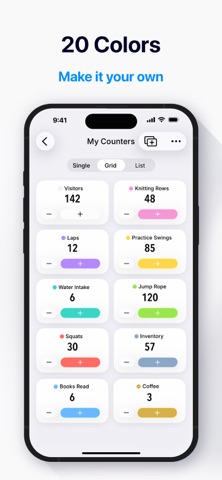
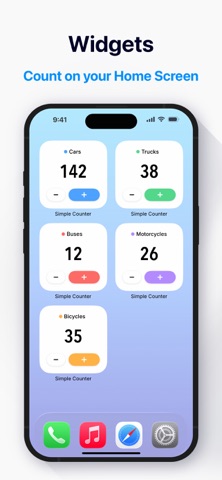
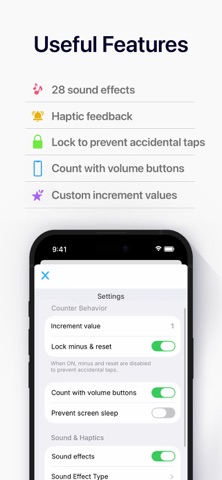
FEATURES - One-tap counting with no setup needed - Drum-style rolling digits and 20 body colors - Create multiple counters and organize them into groups - Single, grid and list views with automatic totals - 28 sound effects and haptic feedback - Home Screen widget and Apple Watch app - Lock to prevent accidental taps
FEATURE DETAILS
- Mechanical Tally Counter Design Modeled on a classic handheld tally counter. The drum-style digits roll into place as the number changes, and every tap responds with a click and a gentle vibration. The body comes in 20 colors, so you can tell your counters apart at a glance.
- Sounds & Haptics Choose from 16 sounds for counting up and 12 for counting down, and preview them in Settings. Sounds and haptics can be switched off together when you need to count quietly.
- Multiple Counters & Groups Create as many counters as you need, each with its own name and color. Organize them into groups such as "Workout" or "Work", and reset a whole group all at once when you start over.
- Three Views & Automatic Totals Switch between a large single view, a grid to see everything at once, and a compact list. In grid and list views, the values of the counters on screen are totaled automatically, which is handy for keeping score or counting stock.
- Home Screen Widget Put the widget on your Home Screen and count on the spot, without opening the app. You can choose which counter it shows, so quick counts stay quick.
- Apple Watch Use your counters on a paired Apple Watch. Counts sync automatically with your iPhone, so you can count on your wrist and check the numbers later.
- Accident-proof Lock & Count Steps Turn on the lock for the minus and reset buttons, and there is no need to worry about wiping a count by mistake. You can also set how much each tap adds, from 1 to 999, and count down with the minus button.
- Volume Buttons & Screen Always On Enable volume-button counting in the settings and you can count with the buttons on the side of your phone, without looking at the screen. The screen-awake option keeps the display on while you count.
- Share Your Counts Share your counter names, numbers and total as text, directly to a message or note.
GREAT FOR - Counting reps and sets at the gym - Knitting rows and stitches - Baby kick counts - Stock counts, inventory checks and foot traffic counts - Counting guests at events and venues - Game farming runs and collectibles - Keeping score in board games and darts - Tasbih and dhikr counting - Daily habits such as water intake or breathing exercises
WHO IT'S FOR - Anyone who wants to start counting right away with a simple counter app - People replacing a handheld tally counter (clicker) with their phone - Anyone who counts several things at once and wants to keep them organized - People who care about how a counter clicks, sounds and feels - People carrying out counting tasks at work, from inventory counts to site surveys
PRICING The app is free to use, with ads in the free version. If you would like to remove the ads and unlock everything, there is an optional premium upgrade, available as a monthly plan, a yearly plan or a one-time purchase.
DATA & COMPATIBILITY - Your counts are stored on your device. No account is needed, and the app works offline - Counts are kept when you close the app (up to 99,999 per counter) - Works on both iPhone and iPad - Transferring data to a new phone (backup and migration) is not currently supported - The app does not include count history, charts, or a timer. It is a counter that keeps counting simple
Each subscription will automatically renew 3 days before the expiration date for
the same time period. Subscriptions can be cancelled at any time before the renewal.