

Notepad - Simple Notes & Memo
Notepad - Simple Notes & Memo is made and published by Komorebi Inc. AppBrain is an independent app data site and isn't affiliated with Komorebi Inc. The app name, icon, screenshots and description belong to Komorebi Inc. and are shown as published on the App Store.
AppBrain's verdict
EstablishedLoved by users- Best rank
- #58
- Top Free, Japan
- Rating on App Store
- 4.80
- 6,632 ratings
- Last updated
- June 4, 2026
Users love it: 4.8 stars from 6,632 ratings. Its best ranking is #58 in Top Free, Business in Japan.
Rankings
App Store top charts- Highest rank
- #58
- Chart
- Top Free
- Business
- Country
- Japan
App Store Rankings for Notepad - Simple Notes & Memo
Top rankings
| Rank | Country | Category | List |
|---|---|---|---|
| 58 | Japan | Business | Top Free |
Ranking history in Japan
Competitors
Similar apps and more from Komorebi Inc.Alternatives to Notepad - Simple Notes & Memo




More from Komorebi Inc.


Releases
Updates seen on the App Store- Version
- 4.0.6
- Launched
- July 2015
No changelog data
User feedback
Ratings and reviews on the App StoreComments on Notepad - Simple Notes & Memo for iOS
We don't have enough comments to show example comments. Please check back later.
Technology
Found in the app by AppBrain- Price
- Free
- App size
- 51.8 MB
- Content rating
- Everyone
Technologies used by Notepad - Simple Notes & Memo
About the app and developer
About Notepad - Simple Notes & Memo
Notepad - Simple Notes & Memo is a business app developed by Komorebi Inc.
What is the rating of Notepad - Simple Notes & Memo?
Notepad - Simple Notes & Memo is rated 4.80 out of 5 stars, based on 6.6 thousand ratings.
Is Notepad - Simple Notes & Memo free?
Notepad - Simple Notes & Memo is free. The app size is 51.78 MB. The latest version available is 4.0.6. The last update was on June 4, 2026.
What are the requirements for Notepad - Simple Notes & Memo?
The app has a content rating of Everyone. The app has been available on the App Store since July 2015.
Developer information for Komorebi Inc.
Address:
Frequently asked questions about Notepad - Simple Notes & Memo
Is Notepad - Simple Notes & Memo free?
Yes. Notepad - Simple Notes & Memo is free on the App Store.
Is Notepad - Simple Notes & Memo still available?
Yes. Notepad - Simple Notes & Memo is on the App Store, and the last update we saw was on June 4, 2026.
How large is Notepad - Simple Notes & Memo?
Notepad - Simple Notes & Memo is 51.78 MB.
Is Notepad - Simple Notes & Memo suitable for children?
App Store rates the content of Notepad - Simple Notes & Memo as suitable for everyone.
How do people rate Notepad - Simple Notes & Memo?
Notepad - Simple Notes & Memo scores 4.80 out of 5 stars, from 6,632 ratings on the App Store.
Who made Notepad - Simple Notes & Memo?
Notepad - Simple Notes & Memo was developed by Komorebi Inc. It is listed in the business category on the App Store.
What are the best alternatives to Notepad - Simple Notes & Memo?
People looking at Notepad - Simple Notes & Memo also look at these business apps: Memo Pad - Simple Note Pad, Simple Notepad -BestNote-, Weekly Planner - Diary, Notes, Inkpad Notepad - Notes - To do, Notepad - handy quickly memo.
Store listing
By Komorebi Inc., from the App Store


Description by Komorebi Inc. Written by the developer, not by AppBrain. Click to read.
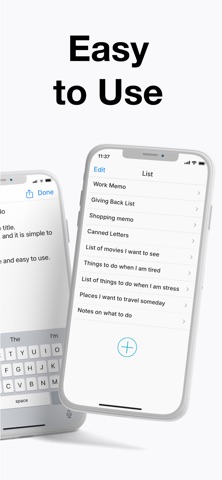
■ Features
- Search
- Dark mode
- Lock screen widget with 4 font sizes
- Home screen widget with 3 different sizes
- Automatic note saving with the auto-save feature
- Word count
- Choose from 6 different colors to brighten up your notes (swipe right on the note)
- Reorder your notes (press and hold the note to move it)
■ Usage
- Easily enter your thoughts in the notepad
- Make a shopping list
- Make a To Do list
- Temporarily save copy/paste items here
- Draft reports, minutes, collections, and stories
■ FAQ
** How do I delete notes?
Swipe left on the note to bring up the [Delete] button.
Or tap the [Edit] button, then tap the red symbol to bring up the [Delete] button.
** How do I sort notes?
Tap and hold the note you want to move, and then drag it up or down.
Or tap the [Edit] button, then pinch the tab on the right of the note to move it.
** How do I add a note to my Lock Screen? (How do I set up a Lock Screen widget?)
Please make sure your device is running the latest iOS version.
Once you have updated, touch and hold the center of the Lock Screen until the [Customize] button appears at the bottom of the screen, then tap [Customize].
Select [Lock Screen], tap [Add Widgets], select this app, and then select the widget you want to use.
If the name of this app is not displayed, restart your device to display it.
** How do I add a note to my Home Screen? (How do I set up a widget?)
Tap and hold an empty area on your Home Screen, then tap the [+] button in the top-left corner.
Select the [Notepad] widget in this app, select from three widget sizes, and then tap the [Add] button.
You can add as many widgets as you like!
To select a note to be displayed in the widget, tap and hold the widget on the Home Screen, then select the note you want to display from [Edit Widget] - [Notes].
** How do I change the color of my notes?
Change the color of your notes by swiping right.
** How do I display notes in the widget?
Swipe right on your iPhone's Home Screen to display the widget screen.
Press the [Edit] button at the bottom of the widget screen, then press the [+] symbol to allow the Notepad app to be displayed in the widget.
** What about data security?
This app never collects or sends any text entered by the user to servers or any external sources outside the app.
The only communication this app performs is related to advertising information.
This app has been operating for over 10 years through advertising revenue and in-app purchases.
All data entered by users is stored only within the app, so you can use it with confidence.
【Terms of Service】
https://komorebi-studio.com/tos_en.html
【Privacy Policy】
https://komorebi-studio.com/policyredirect.html