

Simple Diary - Daily Journal
Simple Diary - Daily Journal is made and published by Komorebi Inc. AppBrain is an independent app data site and isn't affiliated with Komorebi Inc. The app name, icon, screenshots and description belong to Komorebi Inc. and are shown as published on the App Store.
AppBrain's verdict
EstablishedLoved by users- Best rank
- #66
- Top Grossing, Japan
- Rating on App Store
- 4.75
- 909 ratings
- Last updated
- September 14, 2026
Users love it: 4.8 stars from 909 ratings. Its best ranking is #66 in Top Grossing, Lifestyle in Japan.
Rankings
App Store top charts- Highest rank
- #66
- Chart
- Top Grossing
- Lifestyle
- Country
- Japan
App Store Rankings for Simple Diary - Daily Journal
Top rankings
| Rank | Country | Category | List |
|---|---|---|---|
| 66 | Japan | Lifestyle | Top Grossing |
Ranking history in Japan
Competitors
Similar apps and more from Komorebi Inc.Alternatives to Simple Diary - Daily Journal








More from Komorebi Inc.


Releases
Updates seen on the App Store- Version
- 5.3.0
- Launched
- August 2018
No changelog data
User feedback
Ratings and reviews on the App StoreComments on Simple Diary - Daily Journal for iOS
We don't have enough comments to show example comments. Please check back later.
Technology
Found in the app by AppBrain- Price
- Free
- App size
- 206.0 MB
- Content rating
- Everyone
Technologies used by Simple Diary - Daily Journal
About the app and developer
About Simple Diary - Daily Journal
Simple Diary - Daily Journal is a lifestyle app developed by Komorebi Inc.
What is the rating of Simple Diary - Daily Journal?
Simple Diary - Daily Journal is rated 4.75 out of 5 stars, based on 910 ratings.
Is Simple Diary - Daily Journal free?
Simple Diary - Daily Journal is free. The app size is 205.95 MB. The latest version available is 5.3.0. The last update was on September 14, 2026.
What are the requirements for Simple Diary - Daily Journal?
The app has a content rating of Everyone. The app has been available on the App Store since August 2018.
Developer information for Komorebi Inc.
Address:
Frequently asked questions about Simple Diary - Daily Journal
Is Simple Diary - Daily Journal free?
Yes. Simple Diary - Daily Journal is free on the App Store.
Is Simple Diary - Daily Journal still available?
Yes. Simple Diary - Daily Journal is on the App Store, and the last update we saw was on September 14, 2026.
How large is Simple Diary - Daily Journal?
Simple Diary - Daily Journal is 205.95 MB.
Is Simple Diary - Daily Journal suitable for children?
App Store rates the content of Simple Diary - Daily Journal as suitable for everyone.
How do people rate Simple Diary - Daily Journal?
Simple Diary - Daily Journal scores 4.75 out of 5 stars, from 909 ratings on the App Store.
Who made Simple Diary - Daily Journal?
Simple Diary - Daily Journal was developed by Komorebi Inc. It is listed in the lifestyle category on the App Store.
What are the best alternatives to Simple Diary - Daily Journal?
People looking at Simple Diary - Daily Journal also look at these lifestyle apps: Diary, Journal, Notes - Diaro, Diary - Journal with password, Diarly: Diary, Private Journal, Diary - Private Note With Lock, DAILY NOTE - Day Note, Diary.
Store listing
By Komorebi Inc., from the App Store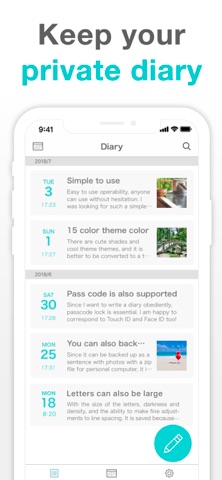



Description by Komorebi Inc. Written by the developer, not by AppBrain. Click to read.
Use it for daily journaling, baby milestones, travel memories, a record of your pet's growth, or a secret diary just for you.
Clean, simple screens help you keep going, even if diaries never stuck before.
No account registration. Download it and start writing.
Your diary stays on your device, and the app works offline.
[Features]
■ Add Photos to Entries (Up to 10 per Entry)
Like a blog, insert images between paragraphs. Attach photos from your camera roll.
■ Secure Passcode Lock
Protect your diary with a passcode. Supports Face ID and Touch ID for quick, secure access.
■ 22 Font Styles
Change the look of your diary with 22 font styles, from cute to classic serif. (Some fonts are premium.)
■ Theme Colors and App Icons
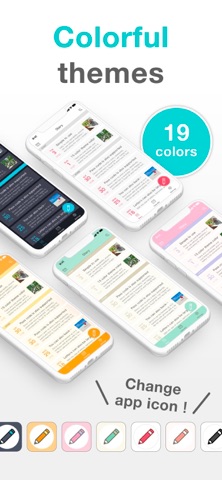
Choose from 19 theme colors, from cute to cool. You can also change the app icon. (Requires the latest iOS version.)
■ Data Export
Export your diary as PDF, HTML, RTFD, or TXT files (premium service). Open them on a computer to reread your diary on a bigger screen, or print entries on paper.
■ Turn an Entry into an Image or PDF
Save an entry as one image or a PDF to post to social media, send to family, or print.
■ Data Backup
Back up your data to iCloud or your computer. RTFD export (premium service) lets you move your entries to your notes app or cloud storage.
■ iCloud Backup
Back up your diary to iCloud and restore it on another device (premium service). It is a manual backup, not automatic sync: back up on your iPhone, then restore on your iPad.
■ Calendar and List Views
Look back at your diary on a calendar or as a list. Tap a date to reread that day.
■ Tag Search
Use the built-in search to find entries quickly. Write a tag such as "#travel" in the text, and searching for it brings up just those entries.
■ Font Settings
Adjust text size, contrast, and line spacing. Great if you prefer larger text.
■ Reminders
Set a reminder time and get a push notification, so you don't forget to write.
■ Multiple Entries Per Day
Write one entry per day, or add several for memos, work records, or passing thoughts. Change an entry's date and time to write about past days. There is no limit on entry length.
[Pricing]
The core diary features are all free: entries, photos, passcode lock, search, and reminders. The free version shows ads.
The premium service removes all ads and unlocks iCloud backup, data export, all theme colors, and all font styles.
Premium is available as a monthly plan, a yearly plan, or a one-time purchase, all with the same features, and covers both your iPhone and iPad under the same Apple Account.
[Your Data]
Your diary is stored on your device and is not synced to the cloud automatically. To protect your data, use the premium iCloud backup or Apple's iPhone backup.
There is no feature to publish your diary or share it with other users. To show someone an entry, turn it into an image and send it.
A backup moves your data to a new iPhone. Data transfer to or from other operating systems is not supported.
[Perfect For]
■ Students
A secret diary for your day, your feelings, and your crushes. Writing out what you can't post online helps you feel lighter.
■ Parents
Record your pregnancy and your baby's growth as a photo diary. Write several entries a day, and share special pages with family as images.
■ Anyone Who Wants to Keep a Record
Travel journals, reading and movie notes, food diaries, dream journals, daily work logs, or your pet's growth. Simple Diary fits whatever you want to remember, one day at a time.
[Help, Feedback]
For help, go to "Help / FAQ" in the app settings. Still have questions? Tap "Feedback" on the settings screen to contact us for faster support.
Terms of Use:
https://komorebi-studio.com/tos_en.html
Privacy Policy:
https://komorebi-studio.com/policyredirect.html