

Crew Hub - Roster & Social
Crew Hub - Roster & Social is made and published by Dion Lima Da Silva. AppBrain is an independent app data site and isn't affiliated with Dion Lima Da Silva. The app name, icon, screenshots and description belong to Dion Lima Da Silva and are shown as published on the App Store.
AppBrain's verdict
- Best rank
- #71
- Top Grossing, Brazil
- Last updated
- October 3, 2026
Rankings
App Store top charts- Highest rank
- #71
- Chart
- Top Grossing
- Business
- Country
- Brazil
App Store Rankings for Crew Hub - Roster & Social
Top rankings
| Rank | Country | Category | List |
|---|---|---|---|
| 71 | Brazil | Business | Top Grossing |
Ranking history in Brazil
Competitors
Similar apps and more from Dion Lima Da SilvaAlternatives to Crew Hub - Roster & Social


More from Dion Lima Da Silva

Also available on Google Play

Releases
Updates seen on the App Store- Version
- 2.10.0
- Launched
- June 2026
No changelog data
User feedback
Ratings and reviews on the App StoreComments on Crew Hub - Roster & Social for iOS
We don't have enough comments to show example comments. Please check back later.
Technology
Found in the app by AppBrain- Price
- Free
- App size
- 63.7 MB
- Content rating
- Everyone
Technologies used by Crew Hub - Roster & Social
About the app and developer
About Crew Hub - Roster & Social
Crew Hub - Roster & Social is a business app developed by Dion Lima Da Silva.
User Ratings
The app has no ratings yet.
App Information
Crew Hub - Roster & Social is freely available from the App Store. The app size is 63.67 MB. The latest version available is 2.10.0. The last update was on October 3, 2026.
Technical Requirements
The app has a content rating of Everyone. The app has been available on the App Store since June 2026.
Developer information for Dion Lima Da Silva
Address:
Store listing
By Dion Lima Da Silva, from the App Store


Description by Dion Lima Da Silva Written by the developer, not by AppBrain. Click to read.
ROSTER WITH HISTORY
• View your month as a calendar, list or blocks.
• Check home-base and local times with time-zone differences.
• Keep the published roster and successive current roster snapshots to compare changes.
• Archive associated roster PDFs and export events to your calendar.
FOR GOL CREW
• Sync your roster, crew and aircraft through IADP.
• Check notifications and reporting options available through the integration.
• Access the roster-trade portal and compare the estimated financial impact.
FOR LATAM CREW
• Sync your roster through iFlight.
• Import published and current rosters, with history and PDFs when provided by the airline system.
• Check hotel and transport information through CrewCare.
OPERATIONS AND PAY
• Look up gates and aircraft information when available from the sources.
• Review salary and per diem estimates for GOL and LATAM.
• Compare published and current rosters and enter supported manual adjustments.
• Explore flight statistics and aggregated group comparisons.
• Use duty, minimum rest, in-flight rest and acclimatization tools.
PEOPLE AND ORGANIZATION
• Have individual conversations with colleagues in Chat.
• Control crew-list visibility and general-search visibility separately.
• Find shared layovers and days off with friends through Nearby.
• Share your schedule through Family Mode.
• Organize documents in the digital wallet.
INTEGRATIONS
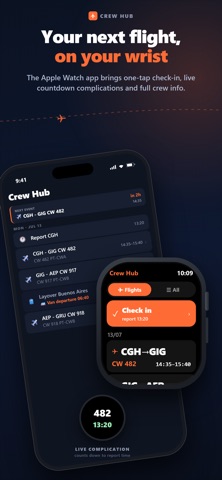
Apple Watch, Garmin and Alexa. Export completed flights to LogTen, subject to the available synchronized data.
You control profile visibility and roster sharing. Read about data handling at https://api.crewhub.app.br/privacy.
Support: https://api.crewhub.app.br/support.
Integrations require authorized access to airline systems. Features vary by airline, device and subscription. Pay and duty estimates are supporting tools: always check official documents and systems.
Crew Hub is independent and is not affiliated with, authorized by or endorsed by GOL, LATAM or any airline. Trademarks and logos belong to their owners and are used for identification.
Terms of Use (EULA): https://www.apple.com/legal/internet-services/itunes/dev/stdeula/