

Curb: Internet Speed Limiter
Curb: Internet Speed Limiter is made and published by Zippy IT Solutions Ltd. AppBrain is an independent app data site and isn't affiliated with Zippy IT Solutions Ltd. The app name, icon, screenshots and description belong to Zippy IT Solutions Ltd. and are shown as published on the App Store.
AppBrain's verdict
- Rating on App Store
- 5.00
- 1 ratings
- Last updated
- September 8, 2026
It doesn't have enough ratings yet to judge what users think.
Rankings
App Store top chartsApp Store Rankings for Curb: Internet Speed Limiter
Competitors
Similar apps and more from Zippy IT Solutions Ltd.More from Zippy IT Solutions Ltd.


Releases
Updates seen on the App Store- Version
- 1.1.1
- Launched
- June 2026
No changelog data
User feedback
Ratings and reviews on the App StoreComments on Curb: Internet Speed Limiter for iOS
We don't have enough comments to show example comments. Please check back later.
Technology
Found in the app by AppBrain- Price
- Free
- App size
- 16.6 MB
- Content rating
- Everyone
Technologies used by Curb: Internet Speed Limiter
About the app and developer
About Curb: Internet Speed Limiter
Curb: Internet Speed Limiter is an utilities app developed by Zippy IT Solutions Ltd.
User Ratings
Curb: Internet Speed Limiter is rated 5.00 out of 5 stars. The rating is based on one rating ratings.
App Information
Curb: Internet Speed Limiter is freely available from the App Store. The app size is 16.65 MB. The latest version available is 1.1.1. The last update was on September 8, 2026.
Technical Requirements
The app has a content rating of Everyone. The app has been available on the App Store since June 2026.
Developer information for Zippy IT Solutions Ltd.
Address:
Store listing
By Zippy IT Solutions Ltd., from the App Store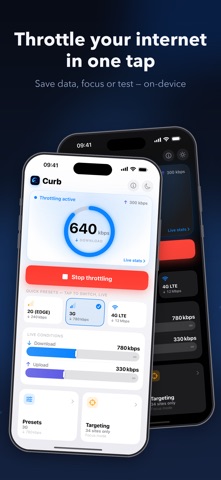


Description by Zippy IT Solutions Ltd. Written by the developer, not by AppBrain. Click to read.
Everything runs locally. No accounts, no servers, no analytics.
SAVE YOUR MOBILE DATA
Streaming, autoplay and background sync quietly burn through a data plan. Put a ceiling on how fast data-hungry apps can pull, and a heavy video stream settles for a lighter quality on its own.
• Cap video and streaming bandwidth so you stay under your monthly data allowance
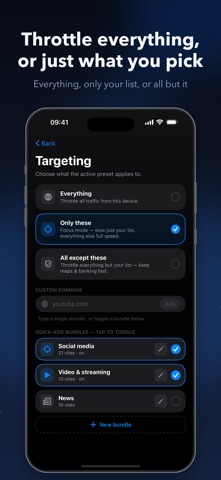
• Throttle just social media and video on mobile data, while maps, messaging and banking stay full speed
• Stretch a limited or pay-as-you-go plan further, and avoid bill shock when roaming abroad
• Set a gentle limit once and forget it — no per-app meters to babysit
FOCUS AND DIGITAL WELLBEING
Speed is a habit. Make the feeds that pull you in feel slow, and the urge to scroll fades.
• Slow down social media, video and streaming while keeping the rest of your connection usable
• Choose what to throttle: Everything, Only these (focus mode — slow just a chosen list), or All except these (keep the essentials fast)
• Toggle ready-made bundles for Social media, Video and streaming, and News, or add your own domains
• Make endless scrolling tedious enough to put the phone down
FOR DEVELOPERS AND QA
Test how your app behaves on a bad connection without leaving your desk. Curb is an on-device alternative to a desktop network link conditioner, shaping real traffic on the device itself.
• Simulate real networks with one tap: 2G EDGE, 3G, 4G LTE, DSL, Bad Wi-Fi and Satellite
• Set custom download and upload bandwidth
• Add latency, jitter and packet loss to reproduce flaky conditions
• Adjust bandwidth live while the tunnel runs — no reconnect needed
• Watch a real-time throughput chart with current rates plus session totals
HOW IT WORKS
Curb uses a local packet-tunnel built on Apple's Network Extension. Your traffic is shaped on the device and never leaves it for any server of ours. There is nothing to sign in to.
PRIVATE BY DESIGN
• 100% on-device — no Curb servers
• No account, no sign-in, no tracking, no analytics
• Nothing about your browsing is collected or shared
EDITABLE PRESETS AND LIVE CONTROL
Every preset is fully editable. Tune download and upload speed, latency, jitter and packet loss, then save your own. Switch between presets instantly, and nudge the limits while a session is live to find the exact feel you want.
DESIGNED FOR iPHONE AND iPAD
A clean, native, universal app with light and dark themes.
Note: Curb configures a local VPN profile on your device to shape traffic. This VPN stays on-device and is never used to route your data through external servers.
Use of this app is subject to Apple's Standard Licensed Application End User License Agreement (EULA), available in the App Store under "License Agreement" and at https://www.apple.com/legal/internet-services/itunes/dev/stdeula/