

DishAim: Satellite Finder
DishAim: Satellite Finder is made and published by Zippy IT Solutions Ltd. AppBrain is an independent app data site and isn't affiliated with Zippy IT Solutions Ltd. The app name, icon, screenshots and description belong to Zippy IT Solutions Ltd. and are shown as published on the App Store.
AppBrain's verdict
- Rating on App Store
- 3.00
- 4 ratings
- Last updated
- June 7, 2026
It doesn't have enough ratings yet to judge what users think.
Rankings
App Store top chartsApp Store Rankings for DishAim: Satellite Finder
Competitors
Similar apps and more from Zippy IT Solutions Ltd.Alternatives to DishAim: Satellite Finder


More from Zippy IT Solutions Ltd.


Releases
Updates seen on the App Store- Version
- 1.1.0
- Launched
- May 2026
No changelog data
User feedback
Ratings and reviews on the App StoreComments on DishAim: Satellite Finder for iOS
We don't have enough comments to show example comments. Please check back later.
Technology
Found in the app by AppBrain- Price
- Free
- App size
- 17.9 MB
- Content rating
- Everyone
Technologies used by DishAim: Satellite Finder
About the app and developer
About DishAim: Satellite Finder
DishAim: Satellite Finder is an utilities app developed by Zippy IT Solutions Ltd.
User Ratings
DishAim: Satellite Finder is rated 3.00 out of 5 stars. The rating is based on 4 ratings.
App Information
DishAim: Satellite Finder is freely available from the App Store. The app size is 17.89 MB. The latest version available is 1.1.0. The last update was on June 7, 2026.
Technical Requirements
The app has a content rating of Everyone. The app has been available on the App Store since May 2026.
Developer information for Zippy IT Solutions Ltd.
Address:
Frequently asked questions about DishAim: Satellite Finder
Is DishAim: Satellite Finder free?
Yes. DishAim: Satellite Finder is free on the App Store.
Is DishAim: Satellite Finder still available?
Yes. DishAim: Satellite Finder is on the App Store, and the last update we saw was on June 7, 2026.
How large is DishAim: Satellite Finder?
DishAim: Satellite Finder is 17.89 MB.
Is DishAim: Satellite Finder suitable for children?
App Store rates the content of DishAim: Satellite Finder as suitable for everyone.
How do people rate DishAim: Satellite Finder?
DishAim: Satellite Finder scores 3.00 out of 5 stars, from 4 ratings on the App Store.
Who made DishAim: Satellite Finder?
DishAim: Satellite Finder was developed by Zippy IT Solutions Ltd. It is listed in the utilities category on the App Store.
What are the best alternatives to DishAim: Satellite Finder?
People looking at DishAim: Satellite Finder also look at these utilities apps: Markday: Countdown & Widget, Warranly: Warranty Tracker, YazBoz Plus, Speed Dial Easy, Enerview Neu.
Store listing
By Zippy IT Solutions Ltd., from the App Store


Description by Zippy IT Solutions Ltd. Written by the developer, not by AppBrain. Click to read.
DishAim is a focused satellite TV alignment utility for iPhone. It gives you live azimuth, elevation and LNB skew for your chosen satellite, then guides the physical setup step by step. It is built for installers, RVs, motorhomes, boats, expats and anyone re-aiming a dish after wind, travel or roof work.
DishAim is a reference tool, not an RF meter. Your receiver still confirms the signal. DishAim solves the hard part before the sweep: knowing where the satellite is, what skew to set, how high to tilt the dish and which bearing to rotate through.
What you can do
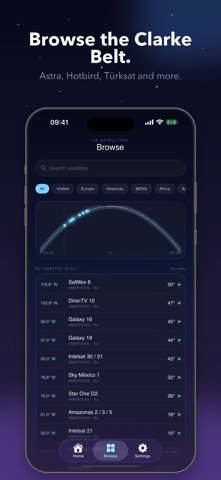
- Use a local satellite recommendation or browse the full catalog
- See the geostationary arc on a live sky dome with nearby satellites in context
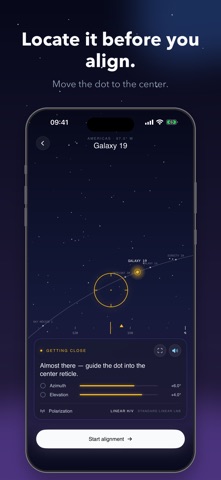
- Hold the phone up to locate the satellite before touching the dish
- Use AR mode to overlay the satellite direction on the camera view
- Hear voice cues while your hands are on the dish
- Get live azimuth, elevation, LNB skew and visibility from your location
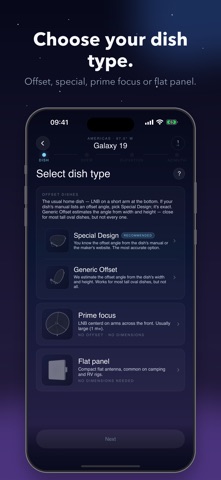
- Set up offset, special-design, prime-focus and flat-panel dishes
- Enter offset-dish dimensions or a manufacturer offset angle when needed
- Set LNB skew correctly for linear polarization; circular LNBs are handled separately
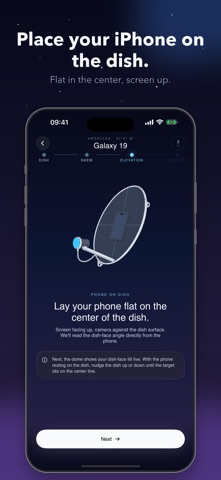
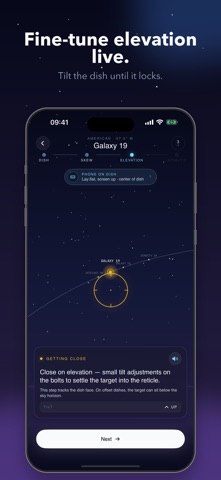
- Place the phone on the center of the dish for live elevation fine-tuning
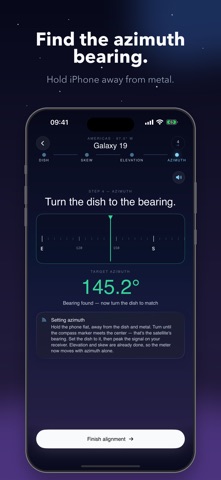
- Finish with an in-hand azimuth bearing, away from dish metal, then peak the signal on your receiver
- Check channel lists per satellite to confirm you picked the right target
- Get warnings when compass interference could make the heading unreliable
How to align a dish
1. Choose the recommended satellite, or browse and pick another.
2. Open Locate, hold the phone up and bring the satellite dot to the center reticle. This checks line of sight and gives the rough direction.
3. Start Alignment and choose your dish type: generic offset, special design, prime focus or flat panel.
4. Enter the measurements or offset angle the app asks for. Flat-panel and prime-focus dishes need no extra dimensions.
5. Set the LNB skew shown by the app. For circular-polarization satellites, DishAim tells you that no skew is needed.
6. Lay the phone flat in the center of the dish, screen up, and adjust elevation until it locks.
7. Hold the phone away from the dish and turn to the target azimuth bearing. Rotate the dish through that bearing and use the receiver's signal meter for the final peak.
Privacy
Location is used only on device to calculate look angles. It does not leave the phone. No third-party trackers and no advertising SDKs.
Requirements
iOS 26 or later. iPhone only. Compass and gyroscope required. AR mode requires a rear camera.
Use of this app is subject to Apple's Standard Licensed Application End User License Agreement (EULA), available in the App Store under "License Agreement" and at https://www.apple.com/legal/internet-services/itunes/dev/stdeula/