

TabPulse: Auto Tab Refresher
TabPulse: Auto Tab Refresher is made and published by Zippy IT Solutions Ltd. AppBrain is an independent app data site and isn't affiliated with Zippy IT Solutions Ltd. The app name, icon, screenshots and description belong to Zippy IT Solutions Ltd. and are shown as published on the App Store.
AppBrain's verdict
- Rating on App Store
- 5.00
- 1 ratings
- Last updated
- December 16, 2025
It doesn't have enough ratings yet to judge what users think.
Rankings
App Store top chartsApp Store Rankings for TabPulse: Auto Tab Refresher
Competitors
Similar apps and more from Zippy IT Solutions Ltd.More from Zippy IT Solutions Ltd.


Releases
Updates seen on the App Store- Version
- 1.0
- Launched
- December 2025
No changelog data
User feedback
Ratings and reviews on the App StoreComments on TabPulse: Auto Tab Refresher for iOS
We don't have enough comments to show example comments. Please check back later.
Technology
Found in the app by AppBrain- Price
- $1.99
- App size
- 3.35 MB
- Content rating
- Everyone
Technologies used by TabPulse: Auto Tab Refresher
About the app and developer
About TabPulse: Auto Tab Refresher
TabPulse: Auto Tab Refresher is a productivity app developed by Zippy IT Solutions Ltd.
What is the rating of TabPulse: Auto Tab Refresher?
TabPulse: Auto Tab Refresher is rated 5.00 out of 5 stars, based on one rating ratings.
Is TabPulse: Auto Tab Refresher free?
TabPulse: Auto Tab Refresher costs $1.99. The app size is 3.35 MB. The latest version available is 1.0. The last update was on December 16, 2025.
What are the requirements for TabPulse: Auto Tab Refresher?
The app has a content rating of Everyone. The app has been available on the App Store since December 2025.
Developer information for Zippy IT Solutions Ltd.
Address:
Store listing
By Zippy IT Solutions Ltd., from the App Store

Description by Zippy IT Solutions Ltd. Written by the developer, not by AppBrain. Click to read.
Set a timer per tab, choose a preset interval, or enter a custom time. Turn it on for one tab, a few tabs, or however you work—each tab runs independently.
Key features:
- Per‑tab auto refresh (each tab can have its own timer)
- Quick preset intervals plus custom minutes/seconds
- Simple Start/Stop controls with a clear status line
- Options page to set your default timer values
- Works on Safari for iPhone, iPad, and Mac
Great for:
- Analytics dashboards and reporting pages
- Status pages and incident dashboards
- Admin tools, moderation queues, and back‑office panels
- Ticketing systems, inbox/queue views, and job monitors
- Web development, QA, and testing periodic reload scenarios
Permissions & privacy (important):
TabPulse requests access to browser tabs so it can manage per‑tab timers and reload the correct tab. TabPulse does not read or modify webpage content, does not inject scripts into websites, and does not collect, track, or sell your data. Your timer preferences are stored locally on your device so the extension can remember your settings.
How to enable:
Install TabPulse.
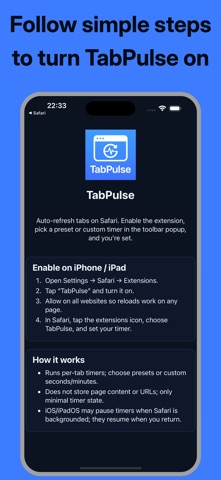
iPhone/iPad: Settings → Safari → Extensions → TabPulse → Allow.
Mac: Safari → Settings → Extensions → TabPulse → Enable.
Open Safari and tap/click the TabPulse toolbar button to start a timer for the current tab.
Use of this app is subject to Apple’s Standard Licensed Application End User License Agreement (EULA), available in the App Store under “License Agreement” and at https://www.apple.com/legal/internet-services/itunes/dev/stdeula/