

Daily Petal: Step Counter
Daily Petal: Step Counter is made and published by JudeWorks. AppBrain is an independent app data site and isn't affiliated with JudeWorks. The app name, icon, screenshots and description belong to JudeWorks and are shown as published on the App Store.
AppBrain's verdict
- Rating on App Store
- 4.60
- 5 ratings
- Last updated
- October 26, 2026
- Size
- 12.6 MB
It doesn't have enough ratings yet to judge what users think.
User feedback
Ratings and reviews on the App StoreComments on Daily Petal: Step Counter for iOS
We don't have enough comments to show example comments. Please check back later.
Store listing
By JudeWorks, from the App Store




Description by JudeWorks Written by the developer, not by AppBrain. Click to read.
As you walk, each day blooms a little further. Check your progress from your Lock Screen, your Home Screen, or a glance at the flower itself. No charts, no pressure, just a quiet picture of how you are doing.
— TWO WAYS TO BLOOM, PETAL & POSY —
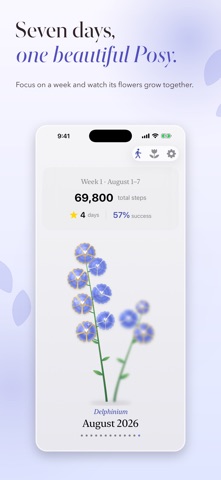
Choose how your month grows. Petal style blooms one flower per month, where every petal is a day. Posy style grows your weeks as living stems, where every day opens as its own bloom. Every month, your way.
— YOUR MONTH IN BLOOM —
In Petal style, a new flower appears each month. Every petal represents a day, growing as you move closer to your goal. It is a clear, gentle way to see your progress one day at a time.
— THE BIRTH FLOWERS SET —
The first Posy collection: twelve botanical blooms, one for each month of the year, from January's carnation to December's holly. Watch a week of walking become a stem of open flowers.
— COLORS THAT REMEMBER —
Petal and bloom colors reflect when you moved: early bird mornings, midday walks, golden hour, night owl strolls. Every flower becomes a small record of your month.
— A QUIET SENSE OF PROGRESS —
When you reach your daily step goal, your flower is marked with a soft golden glow. A small visual reward for staying consistent.
— WALK WITH IT —
Start a walk and watch your steps count up live, with your distance and an estimate of how long until today's goal blooms gold.
— DAILY PETAL ON APPLE WATCH —
Your bloom, on your wrist. See today's flower and your month at a glance, start a walk right from your watch, and add complications to keep your steps on your watch face.
— WIDGETS THAT KEEP IT CLOSE —
See your flower on your Lock Screen and Home Screen, track your step count, and check your daily goal progress at a glance.
— SIMPLE, THOUGHTFUL INTERACTIONS —
Tap a petal or bloom to look back on a day, drag across the flower to move through the month, or pinch to zoom in and see the details.
— PETAL POWER —
Unlock 18 premium flowers inspired by real blooms from around the world, including Sacred Lotus, Tropical Hibiscus, Blushing Peony, English Rose, and more. Choose which flower represents each month and make every month your own.
— PRIVACY FIRST —
Your health data stays on your device. No accounts, no servers, and no data leaves your phone.
Download Daily Petal and let every step bloom.
Safety and technology
Found in the app by AppBrain- Price
- Free
- App size
- 12.6 MB
- Content rating
- Everyone
Technologies used by Daily Petal: Step Counter
Releases
Updates seen on the App Store- Version
- 1.9.2
- Launched
- August 2025
No changelog data
Alternatives
Similar apps and more from JudeWorksAlternatives to Daily Petal: Step Counter


More from JudeWorks


Rankings
App Store top chartsApp Store Rankings for Daily Petal: Step Counter
About the app and developer
About Daily Petal: Step Counter
Daily Petal: Step Counter is a health & fitness app developed by JudeWorks.
User Ratings
Daily Petal: Step Counter is rated 4.60 out of 5 stars. The rating is based on 5 ratings.
App Information
Daily Petal: Step Counter is freely available from the App Store. The app size is 12.62 MB. The latest version available is 1.9.2. The last update was on October 26, 2026.
Technical Requirements
The app has a content rating of Everyone. The app has been available on the App Store since August 2025.
Developer information for JudeWorks
Address: