

DeMinds is made and published by Yongguo Fan. AppBrain is an independent app data site and isn't affiliated with Yongguo Fan. The app name, icon, screenshots and description belong to Yongguo Fan and are shown as published on the App Store.
AppBrain's verdict
- Rating on App Store
- 5.00
- 1 ratings
- Last updated
- October 19, 2026
It doesn't have enough ratings yet to judge what users think.
Rankings
App Store top chartsApp Store Rankings for DeMinds
Competitors
Similar apps and more from Yongguo FanAlternatives to DeMinds


Releases
Updates seen on the App Store- Version
- 1.0.53
- Launched
- May 2026
No changelog data
User feedback
Ratings and reviews on the App StoreComments on DeMinds for iOS
We don't have enough comments to show example comments. Please check back later.
Technology
Found in the app by AppBrain- Price
- Free
- App size
- 16.4 MB
- Content rating
- Everyone
Technologies used by DeMinds
About the app and developer
About DeMinds
DeMinds is a productivity app developed by Yongguo Fan.
What is the rating of DeMinds?
DeMinds is rated 5.00 out of 5 stars, based on one rating ratings.
Is DeMinds free?
DeMinds is free. The app size is 16.39 MB. The latest version available is 1.0.53. The last update was on October 19, 2026.
What are the requirements for DeMinds?
The app has a content rating of Everyone. The app has been available on the App Store since May 2026.
Developer information for Yongguo Fan
Address:
Store listing
By Yongguo Fan, from the App Store


Description by Yongguo Fan Written by the developer, not by AppBrain. Click to read.
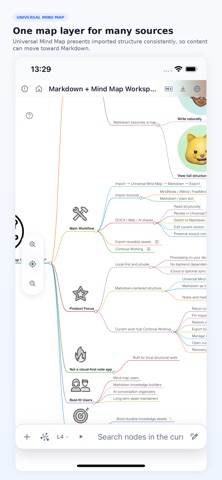
DeMinds is a local-first Markdown and mind map workspace. It brings files, web pages, mind maps, and shared links together as structured Markdown documents you can keep editing and reusing.
Open supported MindNode, XMind, and FreeMind maps, along with Markdown, TXT, DOCX, HTML, and OPML documents. Choose content from a Markdown Package or Obsidian Vault. Hierarchy, links, and images are preserved whenever possible.
With DeMinds, you can:
• See the text and the whole picture
On supported wide screens, read Markdown Preview or edit in Markdown or Rich beside the Universal Mind Map, even in Focus Mode. Jump from a node to its text while keeping your draft and Undo history. Saving refreshes the map and, where possible, keeps branches and Notes expanded or collapsed as you left them.
• Adjust the structure directly
In the Universal Mind Map, rename supported nodes, add siblings or children, and delete branches. Changes are saved in the same Markdown document.
• Edit content and Notes
Use Rich to edit supported text, images, code, tables and formulas visually, or Markdown for precise edits and unsupported content. Create, preview and edit node Notes in the same card. Complex tables from DOCX or HTML are read-only in Rich; edit their source in Markdown. In the document editor, add and reuse project images or delete saved images confirmed to be unused.
• Bring in online content
Open supported public documents, web and research articles, public ChatGPT share links, and X articles readable without signing in. Follow links from a public GitHub README to related Markdown documents.
• Pick up where you left off
Find projects by stage, time or Category in Continue Working. Compare or restore saved versions in Version History. Manually check public Feed or GitHub README Content Sources for updates. “Continue with AI…” prepares a file for an external AI tool, with an optional request for an AI Editorial Note. You share it yourself and compare returned edits before applying them.
• Choose your Workspace
Switch between Local Workspace and iCloud Workspace. Add selected missing projects without replacing existing ones; a full replacement needs separate confirmation. iCloud availability depends on your device and account.
• Take your work with you
Export a Markdown File, a Standard Markdown Bundle with assets, or a PDF. With DeMinds Plus, export a Full Mind Map as PNG, create a read-only Interactive View with text, map or both, and publish it publicly through GitHub Pages in your own account. Others can read it and download Markdown in a browser without DeMinds, or open a supported online view in the app. Disconnecting GitHub does not delete published files.
On iOS 18 or later, where supported by the system, temporarily translate the preview, map titles, and Notes without changing the original.
Core work in DeMinds needs no account. Documents, edits, and history are processed on your device or in your chosen Workspace, not on DeMinds servers. Web pages, remote documents, Content Sources, iCloud, translation, and publishing use the relevant network or system services when you enable those features.
DeMinds Plus also adds the Original Mind Map, Presentation Playback, Workspace Backup import, and a higher project limit in Continue Working.
Privacy Policy: https://deminds.xyz/privacy
Terms of Use (EULA): https://www.apple.com/legal/internet-services/itunes/dev/stdeula/