

Diagrams Notepad 3
Diagrams Notepad 3 is made and published by sunata UG (haftungsbeschraenkt). AppBrain is an independent app data site and isn't affiliated with sunata UG (haftungsbeschraenkt). The app name, icon, screenshots and description belong to sunata UG (haftungsbeschraenkt) and are shown as published on the App Store.
AppBrain's verdict
Established- Rating on App Store
- 3.54
- 52 ratings
- Last updated
- March 24, 2025
- Size
- 29.0 MB
It doesn't have enough ratings yet to judge what users think.
User feedback
Ratings and reviews on the App StoreComments on Diagrams Notepad 3 for iOS
We don't have enough comments to show example comments. Please check back later.
Store listing
By sunata UG (haftungsbeschraenkt), from the App Store


Description by sunata UG (haftungsbeschraenkt) Written by the developer, not by AppBrain. Click to read.
New Design - Pencil Support - Folders - File Export/Import - Markup Editing - UML Class Editor and more...
Create quickly and creatively wonderful diagrams and notes, flowcharts, mind maps, pinboards, organigrams, software models and AWS diagrams on your iPhone, iPad and Mac.
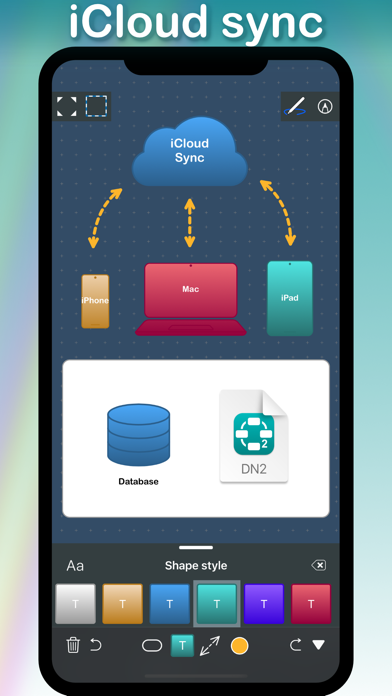
Sync your diagrams optionally and automatically between all iOS and macOS devices.
Add shapes, connectors, images, drawings and weblinks.
Draw shapes and connectors, take notes and add markup with Apple Pencil or a finger.
Share diagrams and collaborate on them with other users through iCloud.
Key features
• Automatic sync using iCloud between your iOS and macOS devices
• Vector based shapes and connectors
• Color themes and styles for the entire diagram
• Drag and drop (on iPad) or copy and paste to insert graphics, photos or URLs (rich links) from other apps directly to the diagram
• Drawing shapes and connectors with Apple Pencil or a finger
• Undo and redo all changes
• Export diagrams as vector PDF documents or PNG or JPEG images
• Diagram iCloud sharing and collaboration with your team or friends
• Designed for iOS and iCloud
The app uses iCloud to optionally and automatically sync diagrams between your iOS and macOS devices.
You can also share your diagrams and collaborate on them with other users.
• Diagrams without size limits
The diagram automatically resizes to fit your content as you add more shapes. You can add shapes from any side of the diagram.
• Each diagram has its own style
Your recently used color styles, shapes and connectors will be saved separately for each diagram.
• Replace shapes and connectors at any time
Replace any selected shapes in the diagram with another shape from the toolbar or with an image or web-link from the clipboard. The existing text and connections of connectors will not change.
• Free version with all functions
Download the free version of the application and try out all the features. You can add and edit two diagrams with a limited number of shapes in each diagram.
Upgrading to an unlimited number of diagrams and shapes is possible through an In-App Purchase.
• We are looking forward to your feedback
If you enjoy using the Diagrams Notepad app, please add a rating or write a review on the App Store.
If you have further questions or suggestions about the app, please send us an e-mail to: info@diagrams-notepad.com
Thank you for using the Diagrams Notepad app!
Safety and technology
Found in the app by AppBrain- Price
- Free
- App size
- 29.0 MB
- Content rating
- Everyone
Technologies used by Diagrams Notepad 3
Releases
Updates seen on the App Store- Version
- 3.8
- Launched
- August 2019
No changelog data
Alternatives
Similar apps and more from sunata UG (haftungsbeschraenkt)Alternatives to Diagrams Notepad 3







More from sunata UG (haftungsbeschraenkt)

Rankings
App Store top chartsApp Store Rankings for Diagrams Notepad 3
About the app and developer
About Diagrams Notepad 3
Diagrams Notepad 3 is a productivity app developed by sunata UG (haftungsbeschraenkt).
User Ratings
Diagrams Notepad 3 is rated 3.54 out of 5 stars. The rating is based on 52 ratings.
App Information
Diagrams Notepad 3 is freely available from the App Store. The app size is 28.96 MB. The latest version available is 3.8. The last update was on March 24, 2025.
Technical Requirements
The app has a content rating of Everyone. The app has been available on the App Store since August 2019.
Developer information for sunata UG (haftungsbeschraenkt)
sunata UG (haftungsbeschraenkt)
Address: