

ThinkSpace - Mind Map & Notes
ThinkSpace - Mind Map & Notes is made and published by Naoya Enokida. AppBrain is an independent app data site and isn't affiliated with Naoya Enokida. The app name, icon, screenshots and description belong to Naoya Enokida and are shown as published on the App Store.
AppBrain's verdict
EstablishedWell rated- Rating on App Store
- 4.27
- 276 ratings
- Last updated
- October 16, 2026
- Size
- 261.5 MB
Users rate it well: 4.3 stars from 276 ratings.
User feedback
Ratings and reviews on the App StoreComments on ThinkSpace - Mind Map & Notes for iOS
We don't have enough comments to show example comments. Please check back later.
Store listing
By Naoya Enokida, from the App Store



Description by Naoya Enokida Written by the developer, not by AppBrain. Click to read.
AI chats, posts you saw, books you read, things people told you. There is more to think about every day.
ThinkSpace is a thinking notebook: put your thoughts on cards, then arrange and connect them as you think. As you move cards around and put ideas into your own words, your understanding deepens.
■ How it works
Start with a single card: whatever is on your mind.
1. Collect: AI chats, web pages, photos, passing thoughts, via the Inbox or by pasting.
2. Write it down: turn them, and what is in your head, into handwritten or text cards.
3. Arrange and see the big picture: move, group, and connect cards. Step back, and unexpected connections, next questions, and next actions appear.
4. Explain: say what your cards or map mean, out loud, in your own words. Read the transcript back to check what you really understand.
■ Great for
- Clearing your head when AI chats pile up
- Making sense of books and videos, and turning them into questions and actions
- Connecting ideas from research papers and textbooks so you can explain them in your own words
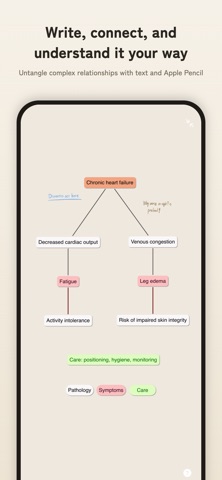
- Creating nursing concept maps and connecting conditions, symptoms, and care
- Bringing a story's world, characters, timeline, and ideas into one structure
- Journaling: writing out tangled feelings and worries
- Designing your career in the AI era, a social media strategy, or a product
- Connecting visions and goals to concrete actions and reviews
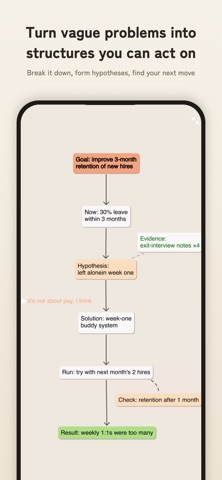
- Working through problems at work: causes, solutions, validation, results
■ Start from a purpose-built map
No need to stare at a blank canvas wondering where to begin.
- Concept map
- Problem-solving map
- Pathophysiology map
- Career map for the AI era
- Worldbuilding map
- Social media strategy map
- Habit-building map
- Product design map
- Vision map
and more — start from a foundation that fits your topic.
■ Turn AI chats into a growing map
Ask AI about a card and add the answers to your map. Break answers into ideas, connect them, and make sense of them in your own words; looking over the map sparks new questions to dig into. Your AI inputs are never used for training.
■ Key features
- Infinite canvas: place cards anywhere, half-formed thoughts included.
- Handwriting and text: Apple Pencil supported. Jot down ideas on cards and move them around with your finger.
- Mind maps, flowcharts, groups, and connections: radial thinking, steps, cause and effect.
- Send from AI chats: send a conversation from Claude or the share sheet to the ThinkSpace Inbox, then drag it in as a card.
- Explain out loud: describe a card or map in your own words; it is transcribed and saved. You notice where your understanding is thin, and can read it back later.
- Ask AI: ask about a card and add the answer as a new card.
- Extract key-point cards from long notes and web pages.
- AI brainstorming: branch a topic card into angles and questions.
- Paste into cards: copied text, photos, or URLs become cards.
- Add web pages, images, and screenshots to your canvas.
- Search and reuse cards across maps.
- Link canvases: big themes and subtopics in layers.
- Export to image, PDF, and text.
- Local-first: saved on your device, works offline.
- Sync across devices (Pro): iPhone, iPad, and Mac.
Turn scattered information and AI answers into understanding you can explain and act on.
■ Pro access
- Unlimited canvases
- Unlimited cards and groups
- Expanded AI usage limit
- Full feature access
———
Subscriptions renew automatically unless canceled at least 24 hours before the end of the current period. The renewal fee is charged to your iTunes account within 24 hours before the period ends. You can turn off auto-renewal anytime in your App Store account settings.
———
Terms of Service: https://thinkspace-public.s3.ap-northeast-1.amazonaws.com/terms-en.html
Privacy Policy: https://thinkspace-public.s3.ap-northeast-1.amazonaws.com/privacy-policy-en-v2.html
Safety and technology
Found in the app by AppBrain- Price
- Free
- App size
- 261.5 MB
- Content rating
- High
Technologies used by ThinkSpace - Mind Map & Notes
Releases
Updates seen on the App Store- Version
- 8.0.0
- Launched
- September 2018
No changelog data
Alternatives
Similar apps and more from Naoya EnokidaAlternatives to ThinkSpace - Mind Map & Notes


More from Naoya Enokida


Rankings
App Store top chartsApp Store Rankings for ThinkSpace - Mind Map & Notes
About the app and developer
About ThinkSpace - Mind Map & Notes
ThinkSpace - Mind Map & Notes is a productivity app developed by Naoya Enokida.
User Ratings
ThinkSpace - Mind Map & Notes is rated 4.27 out of 5 stars. The rating is based on 280 ratings.
App Information
ThinkSpace - Mind Map & Notes is freely available from the App Store. The app size is 261.46 MB. The latest version available is 8.0.0. The last update was on October 16, 2026.
Technical Requirements
The app has a content rating of High Maturity. The app has been available on the App Store since September 2018.
Developer information for Naoya Enokida
Address:
Frequently asked questions about ThinkSpace - Mind Map & Notes
Is ThinkSpace - Mind Map & Notes free?
Yes. ThinkSpace - Mind Map & Notes is free on the App Store.
Is ThinkSpace - Mind Map & Notes still available?
Yes. ThinkSpace - Mind Map & Notes is on the App Store, and the last update we saw was on October 16, 2026.
How large is ThinkSpace - Mind Map & Notes?
ThinkSpace - Mind Map & Notes is 261.46 MB.
Is ThinkSpace - Mind Map & Notes suitable for children?
App Store gives ThinkSpace - Mind Map & Notes a high maturity rating. It is meant for adults.
How do people rate ThinkSpace - Mind Map & Notes?
ThinkSpace - Mind Map & Notes scores 4.27 out of 5 stars, from 276 ratings on the App Store.
Who made ThinkSpace - Mind Map & Notes?
ThinkSpace - Mind Map & Notes was developed by Naoya Enokida. It is listed in the productivity category on the App Store.
What are the best alternatives to ThinkSpace - Mind Map & Notes?
People looking at ThinkSpace - Mind Map & Notes also look at these productivity apps: MindSpace - Mind Map, SimpleMind - Mind Mapping, Diagrams Notepad 3, Flowdia Diagrams, MindNode – Classic.